

WMI (Windows Management Instrumentation) is a component of the Microsoft operating system that allows you to monitor virtually every piece of the system (either locally or remotely) as well as control the windows operating system. This technology is particularly useful to professionals such as system administrators and database administrators who need to monitor and change client machines on a daily basis.
WMI consists of several pieces that allow it to manage systems. All parts of the operating system are managed through COM by a provider that talks to WMI. WMI also has a repository and a Windows Management service that manages reading and writing information between the provider and the repository. And WMI has this cool query language (WQL) that allows you to query the Windows Management service about different providers. WQL looks a heck of a lot like SQL so it is easy to learn.
.NET and WMI
If you look at the WMI API you probably will fall off your seat when you see how vast and complicated it seems. Also, it's not obvious from raw COM how to use it. Luckily, Microsoft decided to simplify the process by creating several namespaces and RAD solutions to ease the use of this Goliath (yet powerful) feature. One of the RAD facilities provided by the net is the server explorer WMI extensions. You'll need to download the server explorer extensions if they are not already installed). These extensions allow you to drag and drop WMI Classes into your .NET project and create wrappers to work with these objects directly. (Believe me, you don't want to create these wrappers yourself). Once the wrapper is created, using these classes is simple and painless.
Reading the Printer Driver through WMI
I thought I would step through a quick example of using the Server Explorer Extensions before showing you some of the cool System.Management namespace classes. Begin by opening the server explorer in Visual Studio.NET and expanding the Management Classes node. Then expand the Printers node and drag the printer into your form. This will generate the wrapper class you will need to query and control the printer.
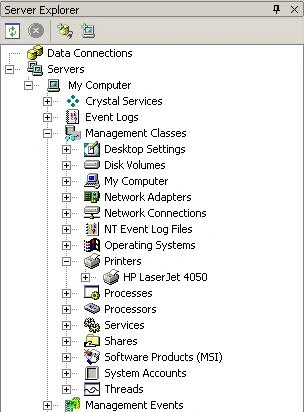
Figure 1 - Viewing WMI classes in the Server Explorer
To use this class simply construct the wrapper class object and utilize its methods and properties. Below is the C# sample code that shows the printer's name and resolution:
Listing 1 - Querying the printer through WMI
- Printer p = new TestWMI.ROOT.CIMV2.Printer("Epson 880C");
- MessageBox.Show(p.Caption);
- MessageBox.Show(p.HorizontalResolution.ToString());
- MessageBox.Show(p.VerticalResolution.ToString());
.NET WMI Classes
.NET also provides some great classes for easing the pain in working with WMI. The System.Management namespace allows you to work with the WMI API while hiding all the complex architectural details. Below is a summary of some of the useful classes in this namespace:
| Class Name | Description |
| ManagementBaseObject | The base Windows Management Object containing the basic elements of a Windows Management Object |
| ManagementObject | Represents a Windows Management Object. Allows you to access properties and methods of a particular WMI Object. This inherits properties of ManagementBaseObject |
| ManagementClass | Represents a Windows Management Class and can be used to access the properties of a particular class. This inherits from ManagementObject. |
| ManagementObjectCollection | Contains a collection of ManagementBaseObjects (which can either be ManagementObjects or ManagementClasses) |
| ManagementQuery | Base class for queries |
| ObjectQuery | query object for querying instances and classes. Inherits Management Query. |
| EventQuery | Query object for querying events in WMI. Used with event watchers. |
| ManagementScope | Describes the scope of which management operations are performed. Generally, the scope is a WMI namespace such as root\cimv2 |
| ManagementEventWatcher | Used to monitor events coming through the WMI service. This object can be constructed using a certain ManagementScope and filtered on an EventQuery. |
| ManagementObjectSearcher | Used to retrieve a collection of ManagementObjects based on a particular query. |
Monitoring the Event Log
Using the WMI classes, we can now monitor the event log. The strategy we will take to monitor the event log will be to construct a ManagementEventWatcher and subscribe to an event that queries whenever a particular event log file changes. In order to monitor the event log remotely, we will specify the WMI scope on a remote machine on our network.
Listing 2 is the class we will use to monitor the event log. This class contains a ManagementEventWatcher to do the monitoring. The ManagementEventWatcher is constructed with a ManagementScope object to allow us to connect to the WMI repository on another machine. It also is constructed with an EventQuery object that specifies the Win32_NTLogEvent class in order to look for changes in the log file. The EventQuery is passed a WQL string that filters only events occurring in the "CaptureLog" file in our Event Log. The event watcher subscribes to the eventlog event and handles the event in an eventhandler delegate.
Listing 2 - Class to watch events on the remote event log
Eddie BritoPosted Feb 24, 2013, 11:37 AM
Hi, my name is Edi Brito Im from Mexico City, and I have some troubles with a printer log conection, I really want to know how I create it, and how to show log registers from printers, thanks and it's great that you share this pages like this one...greatfull
arsenium arseniumPosted May 22, 2010, 1:27 PM
Very bad code
aay jayPosted May 8, 2009, 11:52 AM
Hi Mike, I like your article, some how I'm getting error when I try to use Please send me zip file for above code thanks, aay
Nilesh kbPosted Feb 1, 2008, 2:47 AM
can we access taskmager of remote machine through wmi
Deepa DhulipallaeditedPosted Nov 16, 2007, 6:19 AMEdited Nov 16, 2007, 6:22 AM
Hi. I have granted the privileges to the users as you specified above in order to access the WMI on the remote machine ..But still couldn't able to connect to it as its throwing an error such as "Access is denied"... Please let me know does it require any other privileges to access the WMI... Code: System.Management.ManagementScope oMs = new System.Management.ManagementScope("\\\\MyServerName\root\cimv2); oMs.Connect(); Connection method failed -- throws an error.... ("Access is denied") Please do the needful at the earliest... Thanks in Advance, Deepa.
david_cool721Posted Oct 5, 2007, 4:07 AM
I cant seem remote my remote machine. why? please advise
saime aleyPosted Sep 6, 2007, 3:56 AM
Dear Mike, I am having problem with watcher, actually I am looking for solution witch which I can get current IP address, and it refreshes with system event. As it is time and CPU consuming to poll . Could you please give me example. I am using C# Regards, Saime
revati yeolekarPosted Feb 20, 2007, 4:24 AM
i m creating my own wmi provider..to monitor chat application.i m not getting how ti define function for my own wmi provider in visual c# .net..hoew to create wmi provider n its method..plz help me