

Azure Function
Azure Functions is a serverless computing solution that enables you to write less code, manage fewer infrastructures, and reduce costs. Rather than dealing with the deployment and maintenance of servers, the cloud infrastructure provides all necessary up-to-date resources to keep applications operational. It supports multiple languages, including C#, Python, Java, JavaScript, and PowerShell.
When creating an Azure Function, it must be associated with storage accounts, which allows it to utilize storage files within the code. For security purposes, it is advisable to rotate the access key of the Azure storage accounts every six months. The function app is linked to the storage account using the access key via backend CLI commands.
To get a list of storage accounts
az webapp config storage-account list --name [MyWebApp] --resource-group [MyResourceGroup]
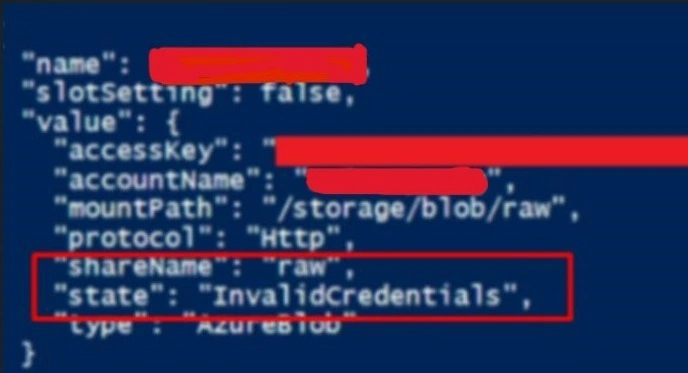
State. It will inform you whether the connection is successful and if the credentials are correct.
To update the access key from the Backend.
az webapp config storage-account update --custom-id
                                        [--access-key]
                                        [--account-name]
                                        [--ids]
                                        [--mount-path]
                                        [--name]
                                        [--resource-group]
                                        [--share-name]
                                        [--slot]
                                        [--slot-setting]
                                        [--storage-type {AzureBlob, AzureFiles}]
                                        [--subscription]
Examples
Update the access key for a connection to the Azure blob.
Azure CLI
az webapp config storage-account update -g [ResourceGroup Name] -n [FunctionApp name] --custom-id [Name shown in storage account list] --access-key [AccessKey]
Required Parameters
--custom-id -i: Name of the share configured within the web ap
Optional Parameters
- --access-key -k: Storage account access key.
- --account-name -a: Storage account name.
- --ids: One or more resource IDs (space-delimited). It should be a complete resource ID containing all information of 'Resource Id' arguments. You should provide either --ids or other 'Resource Id' arguments.
- --mount-path -m: The path which the web app uses to read-write data ex: /share1 or /share2.
- --name -n: Name of the web app. If left unspecified, a name will be randomly generated. You can configure the default using az configure --defaults web=<name>.
- --resource-group -g: Name of resource group. You can configure the default group using az configure --defaults group=<name>.
- --share-name --sn: Name of the file share as given in the storage account.
- --slot -s: The name of the slot. Default to the production slot if not specified.
- --slot-setting: With slot setting you can decide to make BYOS configuration sticky to a slot, meaning that when that slot is swapped, the storage account stays with that slot. Default value: False
- --storage-type -t: Storage type.
- Accepted values: AzureBlob, AzureFiles (It's advisable to mount Azure Function on Azure File Share)
- --subscription: Name or ID of subscription. You can configure the default subscription using az account set -s NAME_OR_ID.
Join the conversation! Your thoughts help the community grow.