
Introduction
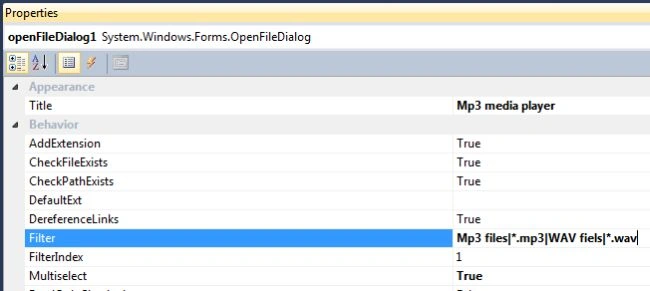
In this article, I describe how to play audio in C# .Net. There are several ways to create a player in C# but in this article, I will describe the simplest way to create an MP3 player that plays .mp3 and .wav files only, because I set the Filter property of the opendialog box.
Use the following procedure to create it.
Step 1
- Open Visual Studio 2010
- "File" -> "New" -> "Project..."
- Choose "Template" -> "Visual C#" -> "Windows Form Application "
Step 2
Now add the windows Media Player control in your Toolbox.
- Right-click in toolbox
- Select "Choose items"
- Look for the Windows Media Player within the "COM components" tab of the Choose toolbox Items window
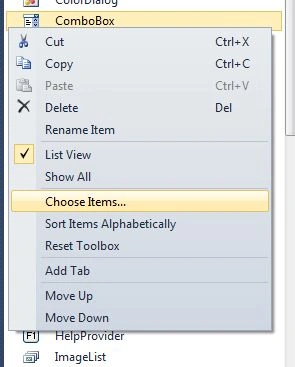
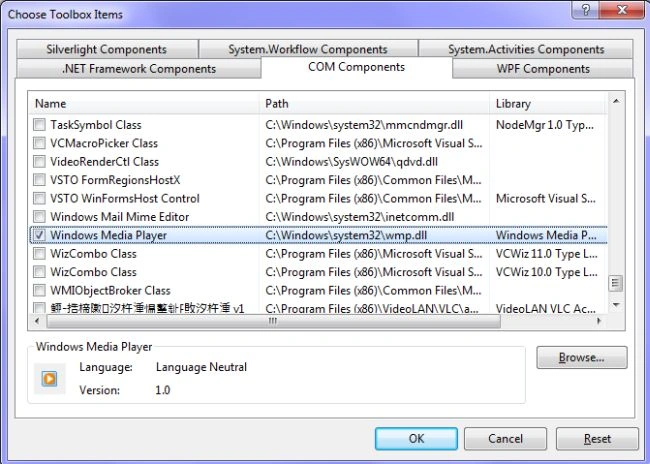
Note: Now the Windows Media Player control is added to your toolbox.
Step 3
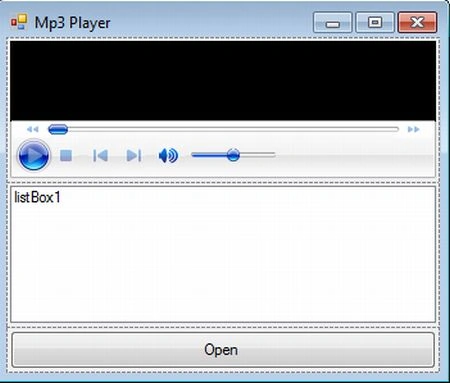
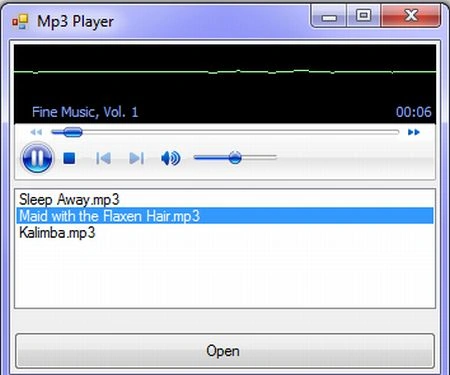
Now deign the form as you need to for the control. Here I use a TableLayout panel control on the form and set these properties to "Columncount =1, Dock =Fill and Rows=3". Now I have inserted the Windows Media Player control from the toolbox in the first row of the TableLayout panel and set the property "Dock=Fill". A list box and button control in the second and third row of the table layout panel with "Dock =Fill" property. And a OpenFileDialog to select one or more .mp3 files to play with the property.
Note: Now your windows look like this:
Step 4
Now write the following C# code in the "Form1.cs" page:
using System;
using System.Collections.Generic;
using System.ComponentModel;
using System.Data;
using System.Drawing;
using System.Linq;
using System.Text;
using System.Windows.Forms;
namespace media_player
{
    public partial class Form1 : Form
    {
        public Form1()
        {
            InitializeComponent();
        }
        string[] files, path;
        private void button1_Click(object sender, EventArgs e)
        {
            if (openFileDialog1.ShowDialog() ==System.Windows .Forms .DialogResult .OK)
            {
                files = openFileDialog1.SafeFileNames;
                path = openFileDialog1.FileNames;
                for (int i = 0; i< files.Length; i++)
                {
                    listBox1.Items.Add(files[i]);
                }
            }
        }
        private void listBox1_SelectedIndexChanged(object sender, EventArgs e)
        {
            axWindowsMediaPlayer1.URL = path[listBox1.SelectedIndex];
        }
    }
}
Step 5
Run your program.
Michael BledigPosted Nov 12, 2021, 12:16 PM
This program doesn't work properly! You can add songs to the playlist, but when you try and choose a songs from the playlist, you get a index error out of range error!
Yaroy DeveloperPosted Sep 19, 2021, 3:13 AM
great help with that projects. i learned a lot.
Deepak JerryPosted Jan 28, 2018, 10:53 AM
I have done thank you sir guys you can download my media player http://www.deepakjerry.online/software.html
Rahul SainiPosted Sep 20, 2017, 6:48 AM
Sir play nhi hua please help me sir
Deepank PantPosted Mar 23, 2017, 1:54 PM
Thanks for sharing. Inspired by you I have created my own. Do check it out https://techiedeepank.wordpress.com/2017/03/20/dplayer-a-media-player-developed-using-c-by-techie-deepank/
Deepank PantPosted Mar 23, 2017, 1:54 PM
Thanks for sharing. Inspired by you I have developed my own. Do check it out
Ashish SrivastavaPosted Apr 7, 2016, 1:05 AM
Thanks for sharing, got !dea for making my own :)
Mohammad TuahaPosted Oct 22, 2015, 9:57 AM
if we select second item in the list box it showing some exception like -- "Index was outside the bounds of the array." .do you have any solution for this ?
Hadeedian HamzaPosted Nov 24, 2014, 2:54 PM
if we select second item in the list box it showing some exception like array index out of bound .do you have any solution for this ?
pujesh pradhanPosted Nov 17, 2014, 6:17 AM
i got this error : Error 1 'WindowsFormsApplication1.Form1.Dispose(bool)': no suitable method found to override
mohsen saPosted Jun 13, 2014, 3:48 AM
thank you ...please upload your source code...
Ziyad SalehPosted Jun 2, 2014, 2:11 PM
System.IndexOutOfRangeException that's my error please help it occurs when i choose the nest mp3 in the list box
marcus nnamdiPosted Apr 23, 2014, 12:02 PM
thanks it worked, but how do you automatically play the next track in the list box?
Dominic othusitsePosted Apr 22, 2014, 3:24 AM
how do you play an album
John HarutyunyanPosted Apr 13, 2014, 5:51 AM
I can't find filter in properties... How it works...?
Grabsi AminePosted May 1, 2013, 4:24 AM
nice
Satya PrakashPosted Mar 8, 2013, 4:53 AM
Hi karthik above mention code is free from exception. I have changed selected item in listbox but it does not fire any exception. You have to review your own code.
karthik reddyPosted Mar 8, 2013, 1:59 AM
if we select second item in the list box it showing some exception like array index out of bound .do you have any solution for this ?