

Prerequisite
- Microsoft Office Outlook 2007 installed and set up with an Outlook profile.
- Visual Studio 2008, C# language.
Note: Like other MS Office products, Outlook also must be running as a background process during automation.
Without opening Outlook we cannot read or access the mail boxes (inbox, sent...), contacts etc.
References used:
Microsoft.Office.Interop.Outlook

Outlook Active Profile
To set up an active profile do as shown in the following images from the Control Panel, then Mail setup.
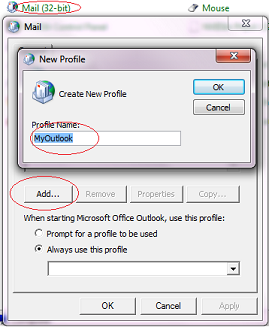
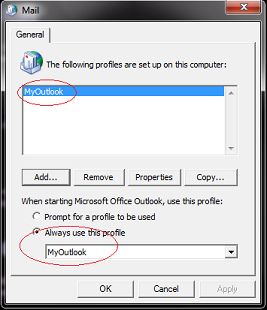
This will already be created when we configure an outlook account. If there were multiple accounts configured on
a single system, then set one account as an active default profile.
Problem Faced during Project cycle
The project was a mail automation tool which needs to process and extract mails which haves an attachment (only .pdf) from the Outlook Inbox on a daily basis. It's a kind of scheduler which schedules for every 5 hours, fetches records and uploads them to the database. On a daily basis more than 1500 mails are saved in the Inbox and also no old mail is deleted.
Initially the program does a for-loop for all the mails for reading the attachments. It takes almost half an hour to complete the process.
Also, some mails having .zip file contains .pdf files as attachments. So I need to capture those mails and extract .zip files also. So the tool reads all the mail even though there are no attachments. I tried to optimize the code by refereeing a couple of ways but in vain.
I am sure there are better ways to optimize the program.
Getting Started
Now the challenge is started.
- How to find those mails which having attachments.
- How to find those mails which come on the same day.
- How to find those mails which have a specific subject line etc...
I searched many articles for a specific logic to find the correct output. And coincidently (luckily :-)) came across this MSDN article,
which solves all the problems.
urn:content-classes:message

Ashvinkumar ThakorPosted Aug 1, 2017, 6:00 AM
How can i access my mail item in remotely hosted web application ??
apo oxPosted Jan 18, 2013, 11:53 PM
thank you for sugguestion.
apo oxPosted Jan 18, 2013, 11:53 PM
thank you for sugguestion.
Saurabh GuptaeditedPosted Feb 22, 2012, 5:22 AMEdited Feb 22, 2012, 5:25 AM
Outlook integration with sharepoint 2010 tasks using C# Users can connect the sharepoint task list to their outlook..the issue is that all the task appears there including those which are not assigned to the particular user...this is confusing..further as the other tasks do appear user are able to manupulate them... How to work around these two issues..? Has anyone resolved this...
Mahesh ChandPosted May 11, 2011, 9:47 AM
Nice to see you now expanding your horizon from forums to articles :).