

In this article we try to learn how to implement a MSMQ feature in a WCF service. The MSMQ feature allows us to create a program that can reliably send or receive messages over a wire without any loss of message. It makes use of a queue to store messages in the order in which they arrive. The queue is a First In First Out stack i.e. the message that arrived first will be the first that to be removed from the queue for processing by the server. MSMQ can be implemented in the manner that there are multiple clients sending a request to the server but because of overload, the server is busy processing previous client requests so in such cases MSMQ can be implemented to maintain a queue of requests from new clients and whenever the server becomes free it will take requests from the queue and process them one by one. By implementing MSMQ there are less chances of losing the message sent by the client.
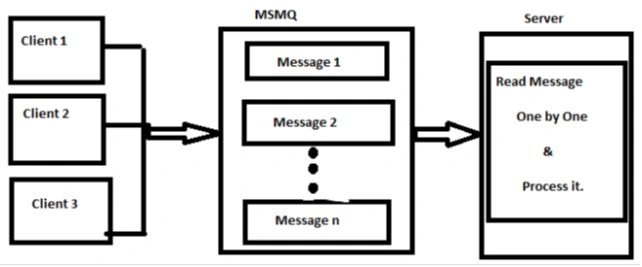
From the diagram above we can see there are multiple clients sending requests to the server, but if the server is busy then the requests are stored in the MSMQ queue and later when the server becomes free it proceeds to read and process messages one by one.
Now to get to our topic of how to implement MSMQ in a WCF service, well first of all to implement the MSMQ feature we need to install the MSMQ server, because it's an optional component in your operating system, like the way we install IIS, we can use the same way here. For installing MSMQ use the following procedure.
The following diagram depicts that.
From the diagram above we can see there are multiple clients sending requests to the server, but if the server is busy then the requests are stored in the MSMQ queue and later when the server becomes free it proceeds to read and process messages one by one.
Now to get to our topic of how to implement MSMQ in a WCF service, well first of all to implement the MSMQ feature we need to install the MSMQ server, because it's an optional component in your operating system, like the way we install IIS, we can use the same way here. For installing MSMQ use the following procedure.
- Open the "Control Panel" -> "Programs and features"
- Select "Turn Windows Features On or Off" from the left hand pane of the "Programs and Features" window
- The Windows features dialog box will appear, from there select MSMQ Server (select all dependent checkboxes to install the full MSMQ server)
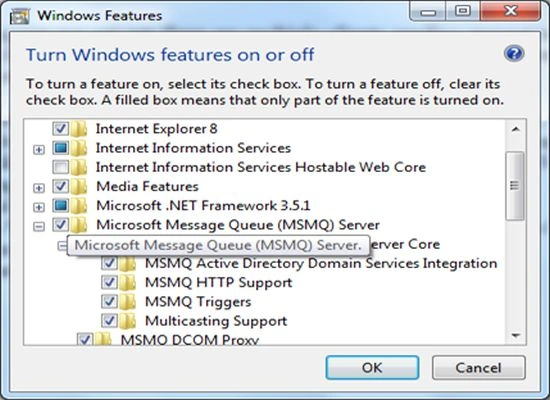
- Finally click on Ok to install it.
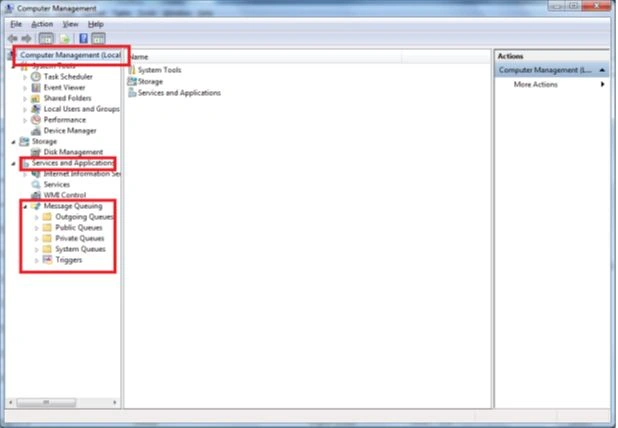
- After installing it you can verify it by clicking on "Administrative Tools" inside "Control Panel"
- Select "Computer Management" then expand "Services and Applications" and you will find Message Queuing with some sub folders inside it. Like the following:
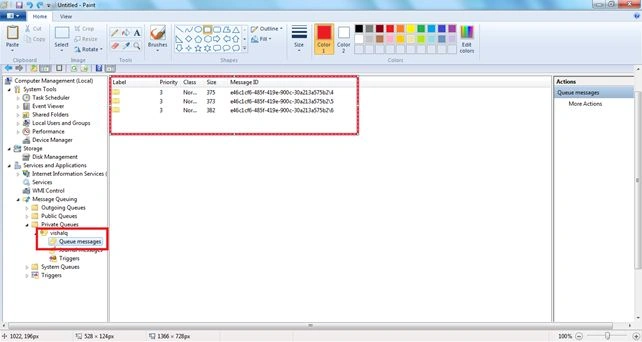
Until now we have installed MSMQ but now to work with it we must create a Queue that will store our messages if the server is not available, the queue can be created either manually or programmatically. In our case we will try to create a queue programmatically. Queues are of three types they are either public, private or System. For more information about that kindly search it.
Ok now moving towards our program in this we have created a service contract that contains one operation contract with the name "SayYourWish" that accepts the name of the clients and their wishes. To maintain reliable messaging we have implemented the MSMQ feature in our service so that no client's wish is lost while transferring or due to server load or server unavailability.
Here is my Service Contract that I defined.
IWish.cs
Ok now moving towards our program in this we have created a service contract that contains one operation contract with the name "SayYourWish" that accepts the name of the clients and their wishes. To maintain reliable messaging we have implemented the MSMQ feature in our service so that no client's wish is lost while transferring or due to server load or server unavailability.
Here is my Service Contract that I defined.
IWish.cs
- using System;
- using System.Collections.Generic;
- using System.Linq;
- using System.Text;
- using System.ServiceModel;
- namespace WishListComponent
- {
- [ServiceContract]
- public interface IWish
- {
- //IsOneWay=true denotes that there will no return message (or two way communication)
- //from the server to the client.
- [OperationContract(IsOneWay = true)]
- void SayYourWish(string wisherName, string yourWish);
- }
- }
MyWish.cs
- using System;
- using System.Collections.Generic;
- using System.Linq;
- using System.Text;
- namespace WishListComponent
- {
- public class MyWish : IWish
- {
- //This function will just display the name of the wisher and their wish on the Console //Screen
- public void SayYourWish(string wisherName, string yourWish)
- {
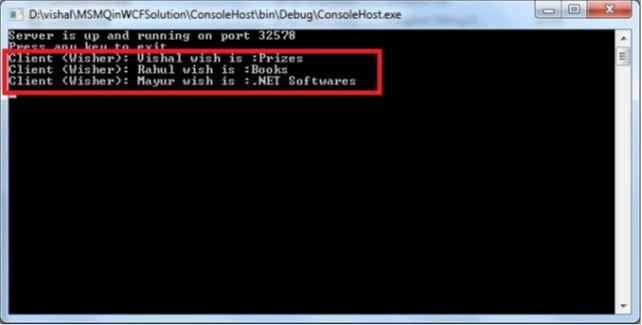
- Console.WriteLine("Client (Wisher): " + wisherName + " wish is :" + yourWish);
- }
- }
- }
ConsoleHost.cs
- using System;
- using System.Collections.Generic;
- using System.Linq;
- using System.Text;
- using System.Messaging;
- using System.ServiceModel;
- using WishListComponent;
- namespace ConsoleHost
- {
- class Program
- {
- static void Main(string[] args)
- {
- using (ServiceHost host = new ServiceHost(typeof(MyWish)))
- {
- //Path of the Queue. Here we are creating a private queue with the name VishalQ
- //where all our message would be stored, if server is unavialable.
- string myQueue = ".\\private$\\VishalQ";
- //Checking whether the queue exists or not.
- if (!MessageQueue.Exists(myQueue))
- {
- //If the queue doesnot exists it will create a queue with the name VishalQ
- //the second parameter false denotes that the queue would be a non transaction queue. If you want that your queue to be
- //transaction then make the second parameter to true.
- MessageQueue.Create(myQueue, false);
- }
- //finally opening the host to server the clients.
- host.Open();
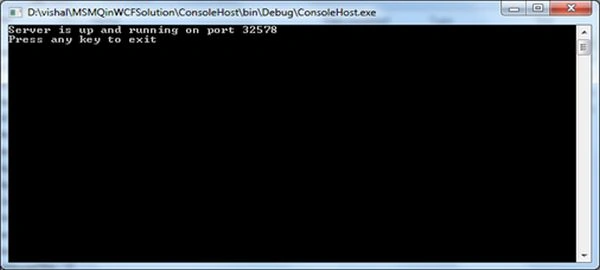
- Console.WriteLine("Server is up and running on port 32578");
- Console.WriteLine("Press any key to exit");
- Console.ReadKey();
- }
- }
- }
- }
App.Config file
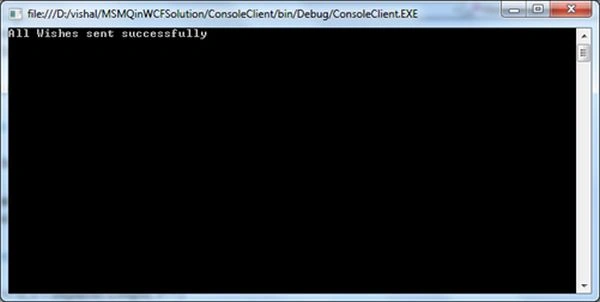
Apurv PurohitPosted Dec 29, 2016, 6:23 AM
Excellent explanation Vishal....thanks a ton... This article and step wise tutorial actually helped me to know what MSMQ is all about and how it works..!! Now I can explore the things of my own....!!! Cheers...!
Pradip LavaniaPosted Jul 2, 2015, 6:36 AM
Nice Article. Thanks Vishal :)
kya-kya TerPosted Jul 22, 2014, 7:49 AM
grazie mille!!
Vishal GilbilePosted Jun 23, 2014, 1:11 AM
Thanks all
Warren ConnorsPosted Jun 22, 2014, 5:38 PM
Excellent article Vishal!!! Great explanation and very clear, simple example. Very helpful to me!!
Shivshanker CheralPosted Oct 29, 2013, 6:29 AM
Good article with simple explanation! keep it up...
K JPosted Sep 24, 2013, 11:09 PM
Very clear!
Vikram NPosted Sep 13, 2013, 4:25 AM
I am unable to add the service reference . can I know the reason
Vikram NPosted Sep 13, 2013, 2:19 AM
Hello Vishal :) Thanks a lot for this article :) It helped me a lot :) Cheers \m/
vaibhav vijayPosted Jul 20, 2013, 4:38 AM
Hi Vishal,If my Server on which i have hosted the service give frequent timeout in that case will MSMQ provide correct data to client.
Vishal GilbileeditedPosted Feb 20, 2013, 11:43 PMEdited Feb 20, 2013, 11:43 PM
Finally Mahesh you got my name correct Vishal not vikas. Cheers.
Mahesh ChandPosted Feb 20, 2013, 1:09 PM
Thanks Vishal. This is good information to really know where exactly and how guys are using this kind of functionality.
Ibrahim ErsoyPosted Feb 20, 2013, 12:51 AM
Thank you for the article and explanation below of where it'd be useful to implement MSMQ in WCF.Cheer!
Vishal GilbilePosted Feb 19, 2013, 11:34 PM
Hello Mahesh, Thanks for reading the article. MSMQ was implemented by my previous company, where I was working on a project which allow the user to do trading of online share and mutual funds. In this project we have made use of msmq, so that we donot lose any order placed by any customer for buying or selling of shares or mutual funds. It can be implemented anywhere wherever you feel that the message should not be lost because of server unavailability or load on server. A Second scenario would be orders placed by customer for online buying of grocery items, or even you can use in chat applications where the one user may not be always online but the message sent to that user should not be lost because of his unavailability.
Mahesh ChandPosted Feb 19, 2013, 7:11 PM
Vikas, have you used this in your project? I am trying to understand in what scenario you would use MSMQ in WCF.