Introduction
In some cases we might have several fields in your data model that represent a name (first name, middle name and last name) that you want to combine into a single entry in a list. Multibinding takes multiple values and combines them into another value. There are two ways to do multibinding, either using StringFormat or by a converter. The StringFormat is simple compared to a converter, so we will start with that first.
- <TextBlock>
- <TextBlock.Text>
- <MultiBinding StringFormat=" {0}, {1}, {2}">
- <Binding ElementName="ThisWindow" Path="FirstName"/>
- <Binding ElementName="ThisWindow" Path="MiddleName"/>
- <Binding ElementName="ThisWindow" Path="LastName"/>
- </MultiBinding>
- </TextBlock.Text>
- </TextBlock>
Here the {0} ,{1}, {2} values will be replaced at runtime with FirstName, MiddleName, LastName.
Using Converter
The converter must be derived from IMultiValueConverter and is very similar to a converter derived from IValueConverter, except that instead of having a single value as an argument, it takes multiple arguments.
- public class TotalConverter : IMultiValueConverter
- {
-
- public object Convert(object[] values, Type targetType, object parameter, System.Globalization.CultureInfo culture)
- {
- decimal Amount = 0;
- decimal Discount = 0;
- string TotalAmount = string.Empty;
- Amount = (values[0] != null && values[0] != DependencyProperty.UnsetValue) ? System.Convert.ToDecimal(values[0]) : 0;
- Discount = (values[0] != null && values[1] != DependencyProperty.UnsetValue) ? System.Convert.ToDecimal(values[1]) : 0;
- TotalAmount = System.Convert.ToString(Amount - Discount);
- return TotalAmount;
- }
-
- public object[] ConvertBack(object value, Type[] targetTypes, object parameter, System.Globalization.CultureInfo culture)
- {
- throw new NotImplementedException();
- }
- }
Here in the value field we will get multiple values (amount and discount), after conversation the single value will be returned.
Now we have a MultiValue converter, we need to create an instance of it in a XAML resource.
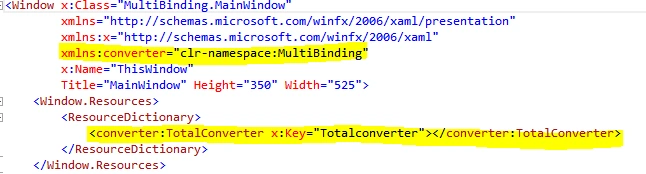
We put in the main Window tag to remind you to put in the converter namespace. Then we instantiate the converter as a resource with a name. Now we can do our multibinding.
- <TextBox Margin="2" MinWidth="120" Grid.Row="1" Grid.Column="1">
- <TextBox.Text>
- <MultiBinding Converter="{StaticResource Totalconverter }">
- <Binding Path="Amount" ElementName="ThisWindow"/>
- <Binding Path="Discount" ElementName="ThisWindow"/>
- </MultiBinding>
- </TextBox.Text>
- </TextBox>
Here we have the two properties (Amount and Discount), these properties are bound to the TextBox and implemented TotalConverter.
In
MainWindow.xaml.cs:
- public partial class MainWindow : Window, INotifyPropertyChanged
- {
- public MainWindow()
- {
- InitializeComponent();
- }
- private decimal amount ;
-
- public decimal Amount
- {
- get { return amount; }
- set { amount = value;
- OnPropertyChanged("Amount");
- }
- }
- private decimal discount;
-
- public decimal Discount
- {
- get { return discount; }
- set { discount = value;
- OnPropertyChanged("Discount");
- }
- }
-
-
- #region INotifyPropertyChanged Members implementation
-
- public event PropertyChangedEventHandler PropertyChanged;
- public void OnPropertyChanged(string txt)
- {
-
- PropertyChangedEventHandler handle = PropertyChanged;
- if (handle != null)
- {
- handle(this, new PropertyChangedEventArgs(txt));
- }
- }
- #endregion
- }
That's it. We made the application. Let me run the application.
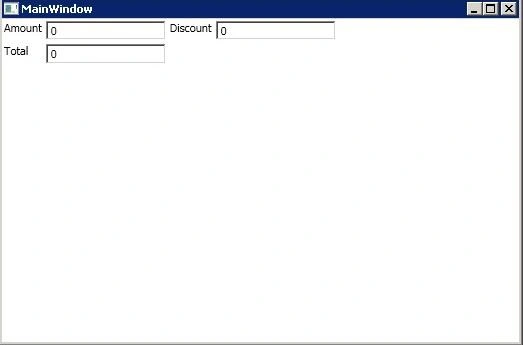 Figure:
 Initial state
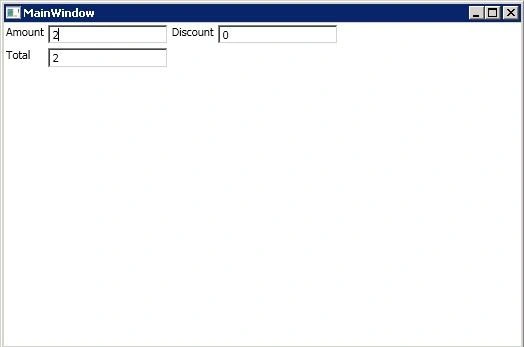 Figure:
 Amount = 2 and Discount = 0. So Amount – Discount = Total = 2
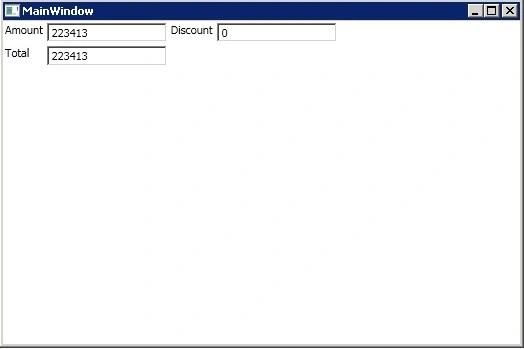 Figure:
 Amount = 223413 and Discount = 0. So Amount – Discount = Total = 223413
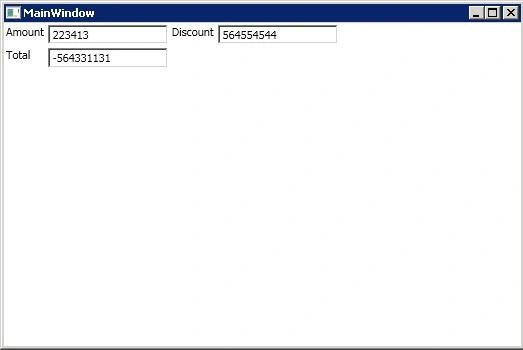 Figure:
 Amount = 223413 and Discount = 564554544. So Amount – Discount = Total = -564331131


renukag gundetiPosted Mar 12, 2020, 8:35 AM
Thanks so much clear understanding
Tom MohanPosted Mar 5, 2015, 10:33 PM
Thanks Shaili Dashora
Tom MohanPosted Mar 5, 2015, 10:33 PM
Thanks Sourabh Somani. :)
Shaili DashoraPosted Mar 5, 2015, 12:31 PM
nice one..
Sourabh SomaniPosted Mar 5, 2015, 11:45 AM
good work... Too much discount you are giving :)
Tom MohanPosted Mar 5, 2015, 11:33 AM
Thanks Vithal Wadje
Vithal WadjePosted Mar 5, 2015, 10:01 AM
nice