

AngularJs Multilingual Support
I want to share this article to apply multilingual capability for AngularJs applications. Here I would like to show you the implementation of “Multilingual for AngularJs Applications”.
Let's dive into that with a code snippet.
Required-Library
AngularJs provides us a $locale service use localization, but we cannot use that for a larger-level application where we need to show the translated content based on the user's selected language at run time and it will be useful to format the data for the specific language. Here we prefer the global concept like getting data from resource files.
I preferred to use angular-translate that provides a simpler way of doing it. Detailed API documentation has been given in the GitHub site as well. Here I will explain it with a procedure for doing it.
Create a project in ASP.NET Web Application with Index.html as the start-up page.
Download and reference the following JavaScript files in index.html page.
- angular-min.js
- angular-translate.js
- angular-translate-loader-partial.min.js (When our application has so many sub-level modules preferred one to go, this will help to load JSON files for the sub modules asynchronously).
Structuring the application folders for an Angular app can be done either by feature or by type, here I did it by feature.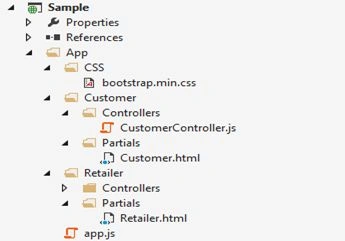
Figure 1: Application Folders
Design our required partials and controller files.
Create an app.js file that has an Angular app creation and configuration as in the following:
var app = angular.module('MultilingualApp', ['pascalprecht.translate', 'ui.router']);
- pascalprecht.translate is the dependency that needs to be injected into our Angular module when using angular-translate.
Here we use state-level routing so ui.router needs to be injected.
Then set up the config section with two states as in the following:
- app.config(['$stateProvider', function($stateProvider)
- {
- $stateProvider.state('Customer',
- {
- url: '/Customer',
- templateUrl: 'App/Customer/Partials/Customer.html',
- controller: 'CustomerController'
- });
- $stateProvider.state('Retailer',
- {
- url: '/Retailer',
- templateUrl: 'App/Retailer/Partials/Retailer.html',
- controller: 'RetailerController'
- });
- }]);
Create the necessary JSON files for keeping the translation content for each language per module as in the following:
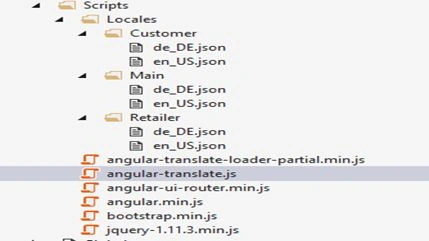
Figure 2: JSON File
Please add the following piece of code snippet to make your JSON files available in the browser:
- <system.webServer>
- <staticContent>
- <mimeMap fileExtension=".json" mimeType="application/json"/>
- </staticContent>
- </system.webServer>
- $translatePartialLoaderProvider.addPart('Main');
- $translateProvider.useLoader('$translatePartialLoader',
- {
- urlTemplate: "Scripts/Locales/{part}/{lang}.json"
- });
- $translateProvider.preferredLanguage('en_US');
The loading of JSON files for the module is determined by the addPart API provided by $translatePartialLoaderProvider. After the app is loaded I want to supply the translated strings for the main page so here I added Main for the module's JSON files to be loaded. In the controller level you need to inject $translatePartialLoader that is configured by $translatePartialLoaderProvider.
If the user does not select a language then the English language is the default.
Here I want to point out the following two things.
- Getting translated data at html level (usual one).
- <p>{{'Customer_Content'|translate}}</p> , translate can be used as filter or directive
- Getting translated data from a JSON file at the controller level (using $translate service that needs to be injected at the controller).
- $translate('Main_RetailerHeading').then(function (translatedValue)
- {
- $rootScope.PageSubTitle = translatedValue;
- });
- Before translating the content be sure that the submodule's JSON files are loaded. That will be done by $translateProvider.isPartAvailable(‘sub-module name’) that returns true if the given name is already loaded else returns false.
- But if you change the language on the fly, the translated content won't be reflected soon until you again press the same module page when you get the content from the JSON file using the $translate service (this is where the decision needs to be made whether to prefer which of the preceding two ways).
Be sure that we use the addPart API for each of the controller files for confirming which sub-module's JSON files needs to be loaded on the fly. Whenever the preceding API is used, we will get a “translateProviderStructureChanged” event that can be handled at the app.run() level that helps to look up for the changes across the app module.
In the language selection click, we use $translate.use(‘language key’) that updates the translated strings to the selected language.
That's all guys. You can get the source code from the following link:
Multilingual-AngularJs
Reference article: http://blog.thoughtram.io/angular/2015/03/21/angular-and-i18n-the-new-world.html
If you have any questions, just drop your queries into the comments section and I'll try to help you out.
I hope you enjoyed this article. I always welcome your comments that improves my knowledge and keeps motivating me personally.
Srinivasan K KPosted Jul 14, 2015, 2:20 AM
Rajeesh Menoth Jitendra Kumar thank you
Anil SinghPosted Jul 12, 2015, 11:11 AM
It might help you http://www.code-sample.com/2014/09/angularjs-documentation.html
Jitendra KumarPosted Jul 12, 2015, 4:48 AM
Good One..
Rajeesh MenothPosted Jul 11, 2015, 11:25 PM
Good One srinivasan k
Srinivasan K KPosted Jul 11, 2015, 10:29 AM
Neeraj Kumar Santhakumar Munuswamy Sibeesh Venu Thank you so much.
Sibeesh VenuPosted Jul 11, 2015, 8:23 AM
Nice share.
Santhakumar MunuswamyPosted Jul 11, 2015, 2:50 AM
Nice article! Thanks for sharing
Neeraj KumarPosted Jul 10, 2015, 12:41 PM
Nicee
Srinivasan K KPosted Jul 10, 2015, 9:54 AM
Nilesh Jadav, Debasis Saha,Debendra Dash thank you guys.
Debendra DashPosted Jul 10, 2015, 9:20 AM
great.
Debasis SahaPosted Jul 10, 2015, 9:12 AM
Nice One..
Nilesh JadavPosted Jul 10, 2015, 8:34 AM
Nice information sir
Asvini RameshPosted Jul 10, 2015, 8:12 AM
Congrats! Great Work , thanks!
Srinivasan K KPosted Jul 10, 2015, 7:51 AM
Upendra Pratap Shahi Thank you
Upendra Pratap ShahiPosted Jul 10, 2015, 7:26 AM
good one..