


Introduction
In this tutorial, we will learn how to implement Multilingual in Xamarin.Forms without using external plugins or platform wise implementation with dependency service. The latest Xamarin forms offers .net standard to implement multilingual. So without further delay, we will skip into the coding part of the article.
Steps
I have split the coding part into 4 steps as in the following.
Step 1 - Creating new Xamarin.Forms Projects.
Step 2 - Creating App Resource files for multi-language.
Step 3 - Language Management
Step 4 - Implementation of Multilingual.
Step 1 - Creating new Xamarin.Forms Projects
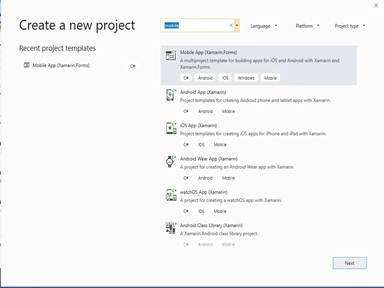
- Create a new project by selecting New Project. Select Xamarin Cross Platform App and click OK.
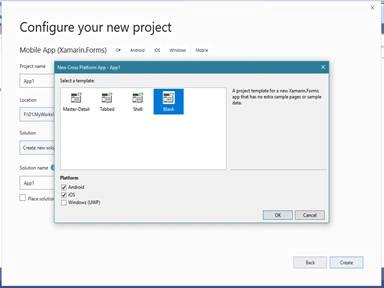
- Then Select Android, iOS and UWP Platforms as shown below with Project template as "Blank" and Click OK.
Step 2 - Creating App Resource files for multiple languages
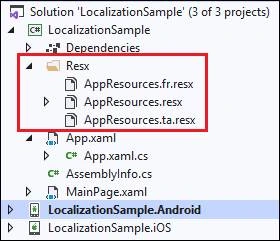
- Add one resource file as base file with the name as your preferred name. In my case, I kept the name of the file as “AppResources.resx” and it will be used as default language file.
- Then add one resource file for each language you want to support. We must follow a specific naming convention for each file as the base resources file followed by a period (.) and then the language code.
- For Example
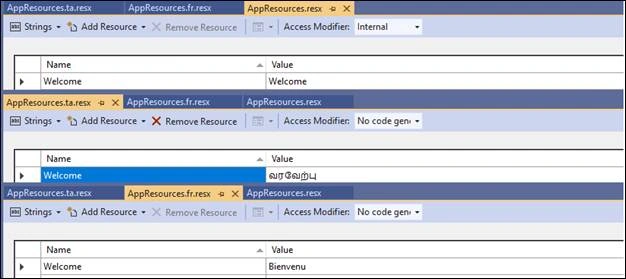
- Then add resources with the same name with language specific values in each resource files as in the below screenshot.



Join the conversation! Your thoughts help the community grow.