

Introduction
Many times, while working with Grid, we need to show the result in a GridView in different situations.
What is Kendo Grid?
The Kendo UI Grid is a powerful widget that allows you to visualize and edit data via its table representation. It provides many options, such as paging, sorting, filtering, grouping, and editing, which determine the way data is presented and manipulated.
The Grid can be bound to local or remote data by using the Kendo UI DataSource component.
Scenario I
Bind data to Kendo Grid by using the AJAX Read action method.
Scenario II
Change the data source on the change event of any HTML controls.
Scenario I
Normally, a developer can bind the data to Grid by using the AJAX Read method.
This read method is the Action Result method in MVC which will return JSON DataSourceResult & directly bind the data to Grid.
Note. Also, the developer can pass parameters to this read method. Suppose below is our read method.
Read(read => read.Action("BindGrid", "Home").Data("SortByCompanyId"))
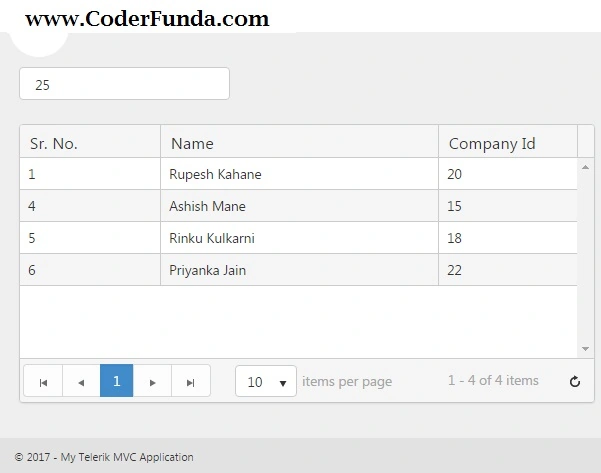
In the above line, my JavaScript function name is SortByCompanyId which will return the company ID. On that basis, we can pass parameters to our action method in the Controller.
Our JavaScript function is like the following.
<script type="text/javascript">
    function SortByCompanyId() {
        var cId = 25;
        return {
            companyId: cId
        }
    }
</script>
Step 1. Create a Model, give it a name as a Company, and declare some properties into it.
public class Company
{
    public int Id { get; set; }
    public string Name { get; set; }
    public int? CompanyId { get; set; }
}
Step 2. Now, create a Controller, and give it a name as HomeController. In this, create an action method as Index() which will return a View. On this View, write some code to bind data into the Grid View by using the above Model.
@model Grid.Models.Company
@using System.Web.Optimization
@using Kendo.Mvc.UI
@using Kendo.Mvc.Extensions
@{
    Layout = "~/Views/Shared/_Layout.cshtml";
}
<div style="width:60%;height:100%">
    @(Html.Kendo().Grid<Grid.Models.Company>()
        .Name("BindGridUsingRead")
        .Columns(columns =>
        {
            columns.Bound(p => p.Id).Width(15).Title("Sr. No.").Filterable(false);
            columns.Bound(p => p.Name).Title("Name").Width(30).Filterable(false);
            columns.Bound(p => p.CompanyId).Title("Company Id").Width(15).Filterable(false);
        })
        .Scrollable()
        .Pageable(x => x.PageSizes(new List<object> { 10, 20, 100, 200, 500, "all" }).Refresh(true))
        .Filterable(ftp => ftp.Mode(GridFilterMode.Row))
        .Resizable(resize => resize.Columns(true))
        .HtmlAttributes(new { style = "height: 100%" })
        .Selectable()
        .DataSource(dataSource => dataSource
            .Ajax()
            .Model(model => model.Id(p => p.Id))
            .ServerOperation(false)
            .Read(read => read.Action("BindGrid", "Home"))
        )
    )
</div>
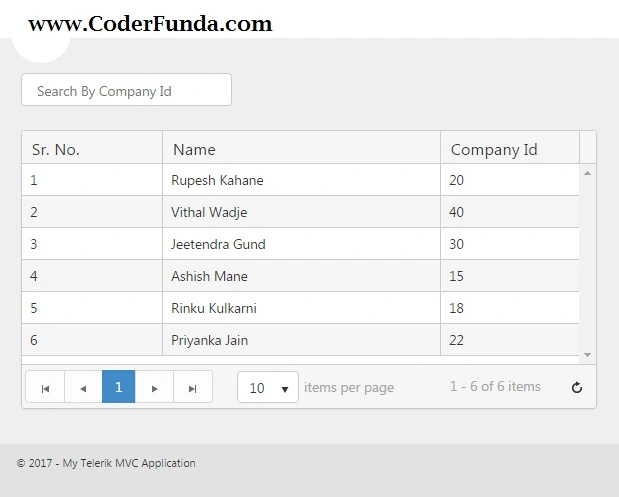
Step 3. In Controller, write method which will bind the data to Grid by using Ajax Read action method. Now, write some action methods named as BindGrid (to bind the JSON data to Grid). I am going to bind some hard-coded values by using the action method GetGridData() using the Company model which will return an IEnumerable List.
public ActionResult Index()
{
    return View();
}

public ActionResult BindGrid([DataSourceRequest] DataSourceRequest request)
{
    try
    {
        decimal companyId = 0;
        List<Models.Company> lst = new List<Models.Company>();
        lst = GetGridData(Convert.ToInt32(companyId)).ToList();
        DataSourceResult result = lst.ToDataSourceResult(request, p => new Models.Company
        {
            Id = p.Id,
            Name = p.Name,
            CompanyId = p.CompanyId,
        });
        return Json(result, JsonRequestBehavior.AllowGet);
    }
    catch (Exception ex)
    {
        var errorMsg = ex.Message.ToString();
        return Json(errorMsg, JsonRequestBehavior.AllowGet);
    }
}

public IEnumerable<Models.Company> GetGridData(decimal companyId)
{
    List<Models.Company> objCmp = new List<Models.Company>();
    List<Models.Company> listCompany = new List<Models.Company>();
    objCmp.Add(new Models.Company() { Id = 1, Name = "Rupesh Kahane", CompanyId = 20 });
    objCmp.Add(new Models.Company() { Id = 2, Name = "Vithal Wadje", CompanyId = 40 });
    objCmp.Add(new Models.Company() { Id = 3, Name = "Jeetendra Gund", CompanyId = 30 });
    objCmp.Add(new Models.Company() { Id = 4, Name = "Ashish Mane", CompanyId = 15 });
    objCmp.Add(new Models.Company() { Id = 5, Name = "Rinku Kulkarni", CompanyId = 18 });
    objCmp.Add(new Models.Company() { Id = 6, Name = "Priyanka Jain", CompanyId = 22 });
    if (companyId > 0)
    {
        listCompany = objCmp.ToList().Where(a => a.CompanyId <= companyId).ToList();
        return listCompany.AsEnumerable();
    }
    return objCmp.ToList().AsEnumerable();
}
Alan HortonPosted May 12, 2022, 9:16 AM
First example I've found that meets my Usecase that actually works! Thanks.
SaiPosted Jun 30, 2017, 4:26 AM
Thanks in advanced
SaiPosted Jun 30, 2017, 4:25 AM
Every body given table example with crud..but my requriement is ng grid . for insert update delete ..use ado.net code and use modalpopup if click on create and edit..when we click on delete , shows confirm message to delete a record or not..
SaiPosted Jun 30, 2017, 4:24 AM
Please help me..its urgent for me...
SaiPosted Jun 30, 2017, 4:23 AM
Provide delete logic also
SaiPosted Jun 30, 2017, 4:23 AM
Crud operations perform in ng grid using mvc with angularjs..use ado.net code...please use modal popup when we click on create and edit
SaiPosted Jun 30, 2017, 4:21 AM
Please use ado.net code [ not ado.net entity data model]..
SaiPosted Jun 30, 2017, 4:20 AM
Hi rupesh , i need ur help.. can you upload the crud operations in mvc using angularjs.