

So this article explains how to insert, select, update and delete with a webgrid. This explains CRUD operations step-by-step.
Step 1: Database
Create an EmployeeData table in a SQL database as in the following.
- Create Table EmployeeData
- (
- EmpID int identity (1,1) Primary Key,
- EmpName varchar(30),
- Contact nchar(15),
- EmailId nvarchar(50)
- )
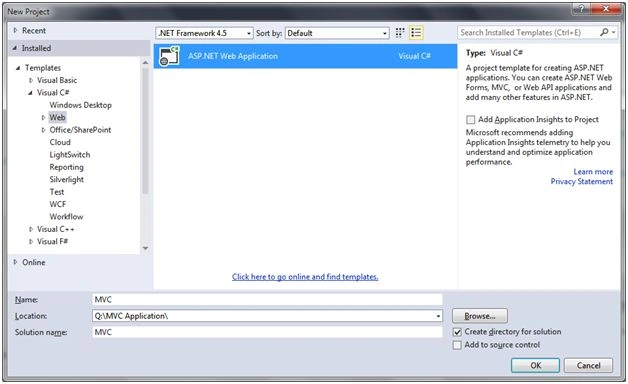
Figure 1: Application Name
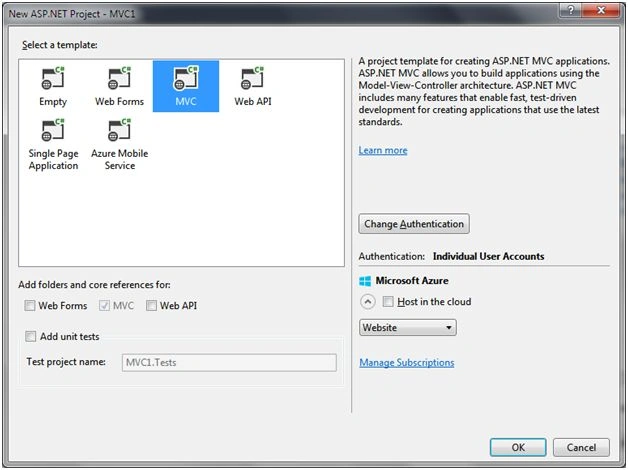
Figure 2: MVC template
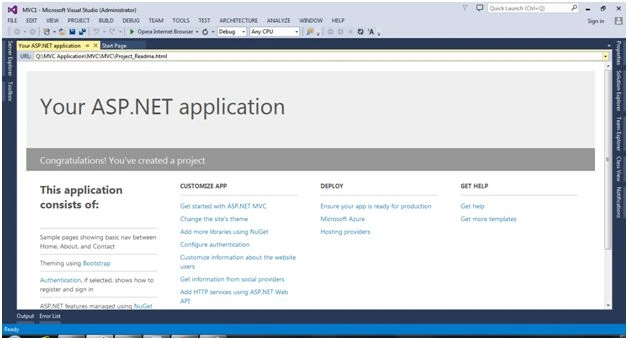
Figure 3: Default URL
Step 3: LINQ to SQL class
Create a LINQ to SQL class to read data from the table as in the following:
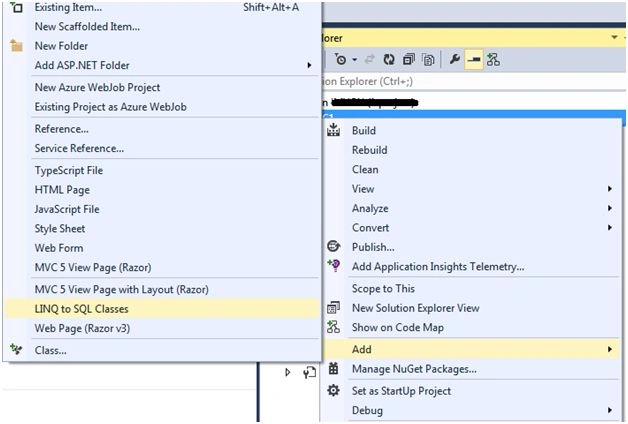
Figure 4: Add LINQ to SQL Class
After using the Server Explorer and adding an EmployeeData table in the surface area as in the following:

Figure 5: Server Explorer surface area
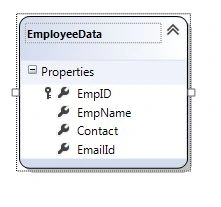
Figure 6: Add Table
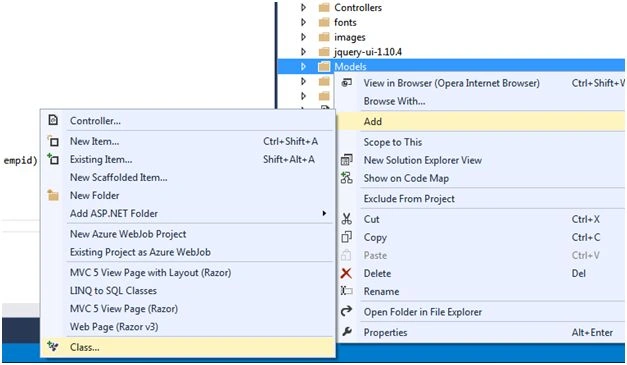
Now add a controller to the CRUD operations for EmployeeData.
So open the Solution Explorer and right-click on the controller folder and add a controller as in the following:
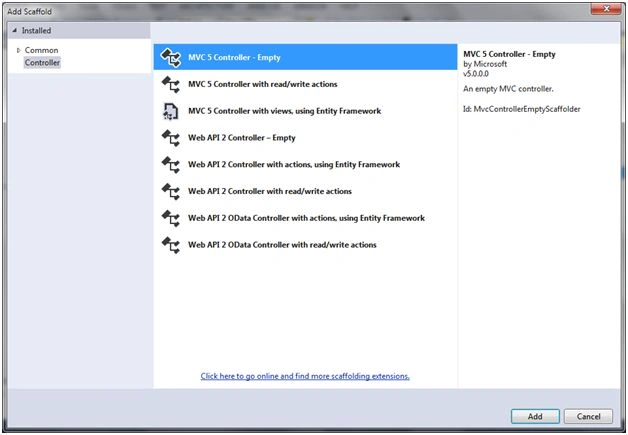
Figure 7: Select Controller

Figure 8: Add Controller Name
Step 4: Controller
Create a default controller that looks as in the following:
- namespace MVC.Controllers
- {
- public class EmployeeInfoController : Controller
- {
- public ActionResult Index()
- {
- return View();
- }
- }
- }
- using System;
- using System.Collections.Generic;
- using System.Linq;
- using System.Web;
- using System.Web.Mvc;
- using MVC.Models;
- namespace MVC.Models
- {
- public class EmployeeInfoController : Controller
- {
- EmpDBDataContext db = new EmpDBDataContext();
- public ActionResult Index() //Record Select
- {
- List<EmployeeData> EmployeeDatas = db.EmployeeDatas.OrderByDescending(x => x.EmpID).ToList<EmployeeData>();
- return View(EmployeeDatas);
- }
- [HttpGet]
- public PartialViewResult Create() //Insert PartialView
- {
- return PartialView(new MVC.Models.EmployeeInfo());
- }
- [HttpPost]
- public JsonResult Create(MVC.EmployeeData Emp) // Record Insert
- {
- EmpDBDataContext db = new EmpDBDataContext();
- db.EmployeeDatas.InsertOnSubmit(Emp);
- db.SubmitChanges();
- return Json(Emp, JsonRequestBehavior.AllowGet);
- }
- [HttpGet]
- public PartialViewResult Edit(Int32 empid) // Update PartialView
- {
- EmpDBDataContext db = new EmpDBDataContext();
- EmployeeData emp = db.EmployeeDatas.Where(x => x.EmpID == empid).FirstOrDefault();
- EmployeeInfo empinfo = new EmployeeInfo();
- empinfo.EmailId = emp.EmpID.ToString();
- empinfo.EmpName = emp.EmpName;
- empinfo.Contact = emp.Contact;
- empinfo.EmailId = emp.EmailId;
- return PartialView(empinfo);
- }
- [HttpPost]
- public JsonResult Edit(MVC.EmployeeData employee) // Record Update
- {
- EmpDBDataContext db = new EmpDBDataContext();
- EmployeeData empdt = db.EmployeeDatas.Where(x => x.EmpID == employee.EmpID).FirstOrDefault();
- empdt.EmpName = employee.EmpName;
- empdt.Contact = employee.Contact;
- empdt.EmailId = employee.EmailId;
- db.SubmitChanges();
- return Json(empdt, JsonRequestBehavior.AllowGet);
- }
- public JsonResult Delete(Int32 empid)
- {
- EmployeeData emp = db.EmployeeDatas.Where(x => x.EmpID == empid).FirstOrDefault();
- db.EmployeeDatas.DeleteOnSubmit(emp);
- db.SubmitChanges();
- return Json(true, JsonRequestBehavior.AllowGet);
- }
- }
- }
Step 5: View
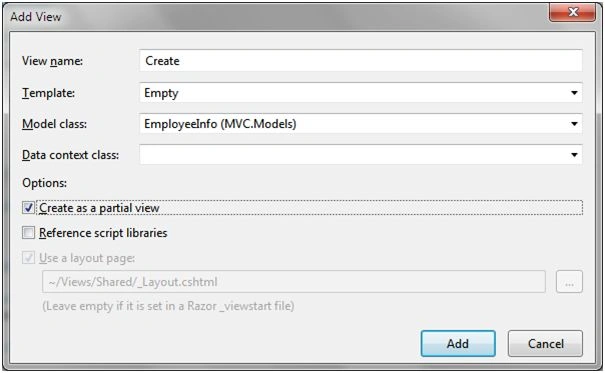
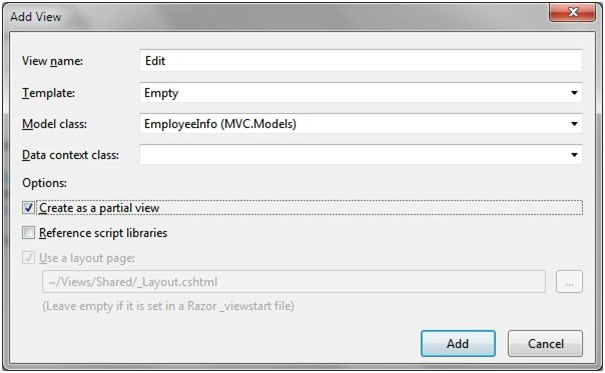
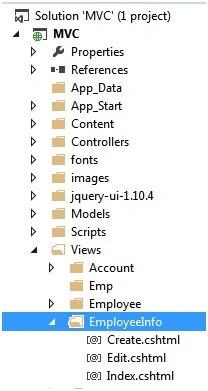
Now create a view and a partialview on a right-click corresponding to the controller as in the following: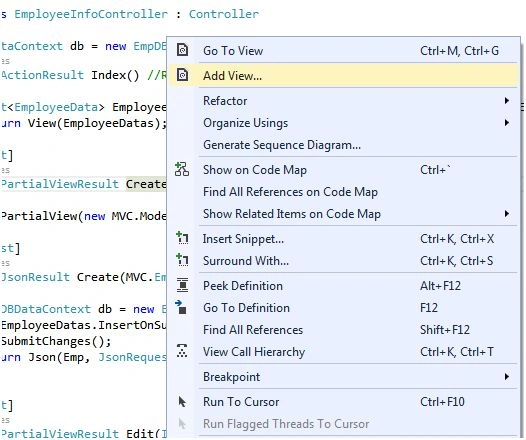
Figure 9: Add view to controller
1. Index View (select data)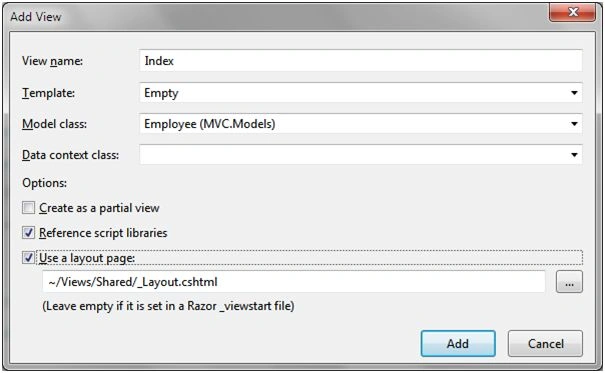
Figure 10: Add Index view
In this figure see the view name is auto create, it's not changed. After selecting a Template and Model class as shown in the following figure.
Index code
- @model List<MVC.EmployeeData>
- @{
- ViewBag.Title = "Index";
- Layout = "~/Views/Shared/_Layout.cshtml";
- <style type="text/css">
- .grid {
- width: 100%;
- }
- </style>
- }
- <div style="padding:7px 0;">
- <input type="button" value="Add New Employee" onclick="CreateEmployee()" />
- </div>
- <div id='OpenDilog'></div>
- <h3>Employee Information List</h3>
- <div style="width:100%;">
- @{
- WebGrid grid = new WebGrid(Model);
- @grid.GetHtml(
- tableStyle: "grid",
- fillEmptyRows: false,
- mode: WebGridPagerModes.All,
- firstText: "<< First",
- previousText: "< Prev",
- nextText: "Next >",
- lastText: "Last >>",
- columns: new[] {
- grid.Column("EmpID",header: "ID"),
- grid.Column("EmpName",header: "Name"),
- grid.Column("Contact"),
- grid.Column("EmailId"),
- grid.Column("EmpID", header: "Action", canSort:false,
- format: @<text>
- @Html.Raw("<img src='/images/edit.png' title='Edit' onclick='EditEmployee(" + item.EmpID + ")' />")
- @Html.Raw("<img src='/images/delete.png' title='Edit' onclick='DeleteEmployee(" + item.EmpID + ")' />")
- </text>
- )
- })
- }
- </div>
- <link href="@Url.Content("~/Content/Site.css")" rel="stylesheet" type="text/css" />
- <link href="@Url.Content("~/jquery-ui-1.10.4/themes/base/jquery-ui.css")" rel="stylesheet" type="text/css" />
- <script src="@Url.Content("~/jquery-ui-1.10.4/ui/minified/jquery-ui.min.js")" type="text/javascript"></script>
- <script type="text/javascript">
- function CreateEmployee() {
- var div = $("#OpenDilog");
- div.load("/EmployeeInfo/Create", function () {
- div.dialog({
- modal: true,
- width: 500,
- height: 400,
- title: "Add New Employee",
- resizable: false
- });
- });
- }
- function EditEmployee(E_ID) {
- var ph = $("#OpenDilog");
- ph.load("/EmployeeInfo/Edit?EmpID=" + E_ID, function () {
- ph.dialog({
- modal: true,
- width: 500,
- height: 400,
- title: "Edit Employee",
- resizable: false
- });
- });
- }
- function DeleteEmployee(E_ID) {
- if (confirm("Are You Sure Delete Selected Employee Record No.? " + E_ID)) {
- var data = { 'EmpID': E_ID }
- $.post('/EmployeeInfo/Delete', data,
- function (data) {
- if (data == true)
- location = location.href;
- else
- alert("Not delete something Wrong");
- });
- }
- }


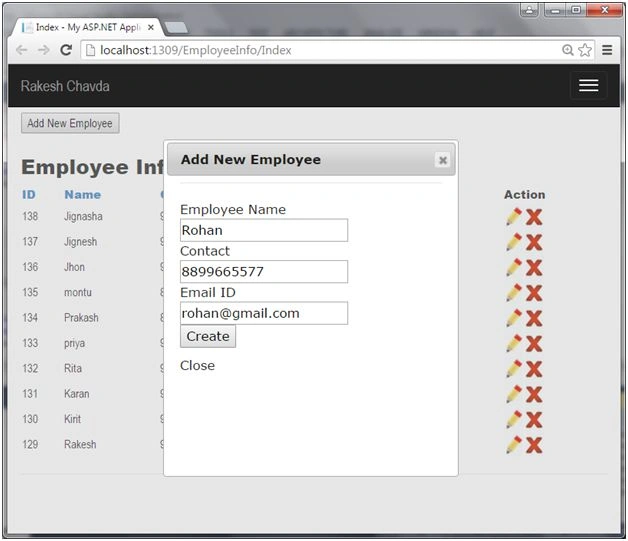
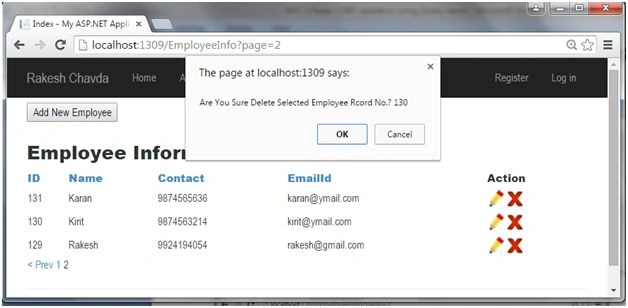
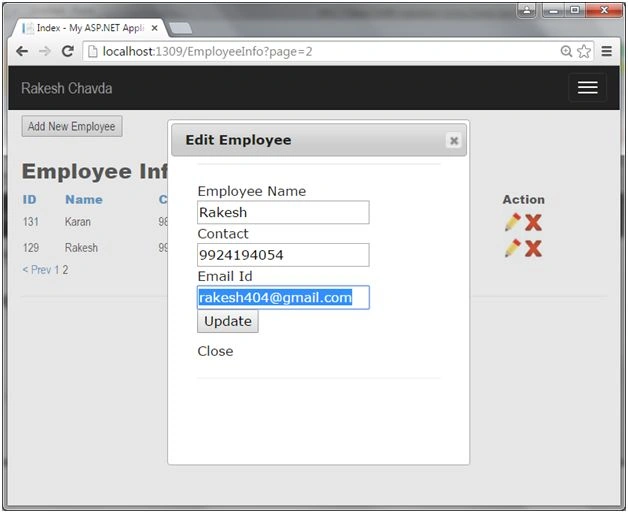
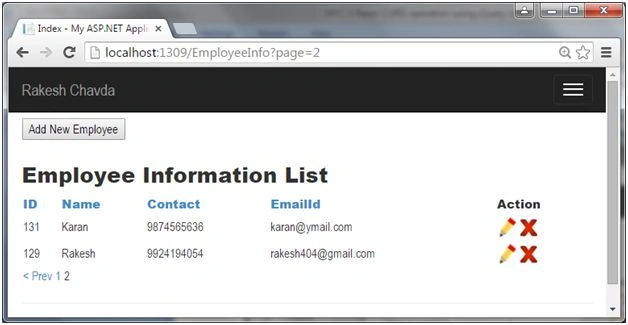
Alessandro CunhaPosted Dec 20, 2021, 8:00 PM
[email protected]
Sourish RoyPosted Jan 3, 2020, 12:48 AM
Where is the Site.css???????????????
Craig SnyderPosted Feb 17, 2019, 9:41 AM
I am receiving an JavaScript error that ph.dialog is not a function with the latest version. The create works just fine.
MOHAMED SAFEERPosted Jan 25, 2018, 2:15 AM
Hi, Please Email me ur Project [email protected]
Murali DarshaPosted Jun 14, 2017, 1:42 PM
Can you please provide link to download this project or mail me, my mail id is [email protected]
sathish reddyPosted Feb 19, 2017, 2:36 AM
Can you please provide link to download this project
ajay kumarPosted Sep 25, 2016, 2:50 AM
My Mail Id [email protected]
ajay kumarPosted Sep 25, 2016, 2:49 AM
I need Source code for this project please provide that.
ajay kumarPosted Sep 7, 2016, 1:15 AM
How can i download this project
Manav PandyaPosted Aug 10, 2016, 7:39 AM
Sir i dont know any JSON syntax , so can you suggest me any resources for that because i cant uderstand "return json()" sentence , Reply me sir thanks
Akbar ImteyazPosted Jun 29, 2016, 6:56 AM
I have one question how we can close the popup on update after a success message.
Akbar ImteyazPosted Jun 29, 2016, 6:55 AM
Dear Rakesh this is really good one..
Mohit SolankiPosted Feb 1, 2016, 12:31 AM
This is Really Good Article. Thank You Sir Rakesh.
Shrikant SharmaPosted Jan 3, 2016, 8:14 AM
Nice Article.Thanks Sir
RakeshPosted Jul 27, 2015, 1:25 AM
Thanks Sibeesh Venu
Sibeesh VenuPosted Jul 27, 2015, 12:43 AM
Nice Share. Thanks
RakeshPosted Jul 26, 2015, 11:33 PM
Thanks Neeraj Kumar
Neeraj KumarPosted Jul 26, 2015, 4:38 PM
Good Work
RakeshPosted Jul 26, 2015, 2:47 AM
thank you sir Santhakumar Munuswamy
Gopi ChandPosted Jul 26, 2015, 2:30 AM
Excellent work
Santhakumar MunuswamyPosted Jul 26, 2015, 2:08 AM
Thanks for nice article