

Hello Geeks!
I am back with
Quick View
Agenda
- A Brief Introduction
- The Model's Role
- Working with
Model - Mind Twisters | Model
- Scaffolding | Model
- Hierarchy | Model
- Exploring Model
- Interview Questions | Model
- Pin Points
- Summary
A Brief Introduction
The 
The Model's Role
The Model represents the real world object and provides data to the view. A
Because of a
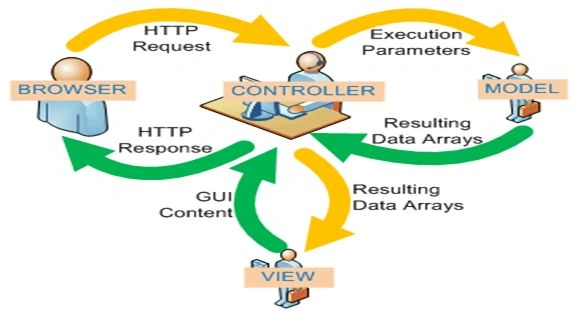
Working with a
ASP.NET MVC provides a number of tools and features to build application features using only the definition of the model object. Let's explore this with a simple example.
Suppose you want to create a picture gallery. ASP.NET MVC provides you friendly tools and functionalities to create a Controller and View (as discussed in previous articles) for some sort of functioning in your gallery. These features, or I better say scenarios, can be create, delete, edit and so on
All this construction work is called Scaffolding in MVC.
Scaffolding | Model
Scaffolding in ASP.NET MVC can generate the base code you need for Create, Delete, Update and Delete (CRUD) operations in MVC for
The Scaffolding is smart, it knows all the following things:
- How to name your Controller?
- How to name your View?
- What code needs to be in a component?
- Where to place all these segments in the project?
- How each component is going to behave?
(You don't need to be
Some Common Mind Twisters
MT1: What if there was no Model?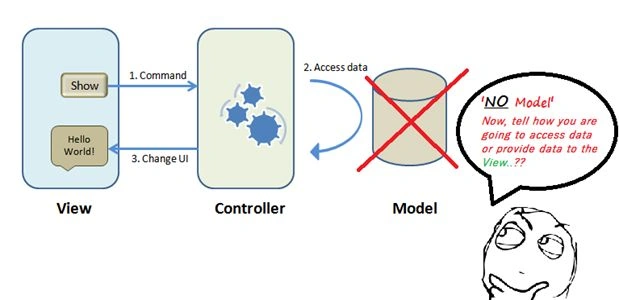
MT2: Is Model something new?
The answer to this twister is short, "no".
There is nothing new in it. Just remember the concept of a 3-Tier Architecture for development. There used to be three layers. One of them is "Database Layer". So the Model in MVC is the same as the Database Layer in the 3-Tier architecture. The one and only difference between them is the "separation of concerns".
MT3: Why Model?
The answer to both of these twisters is the same.
- The three words "Separation of concerns"
- A bridge between "Model" and "View"
MT4: How does a Model work with both a Controller and a View?

(If you guys have any other mind twisters in your mind then let me know I'll update that twister here.)
Hierarchy | Model
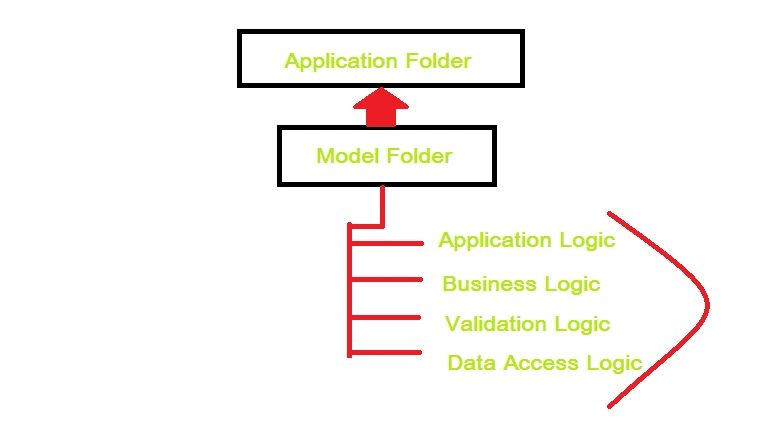
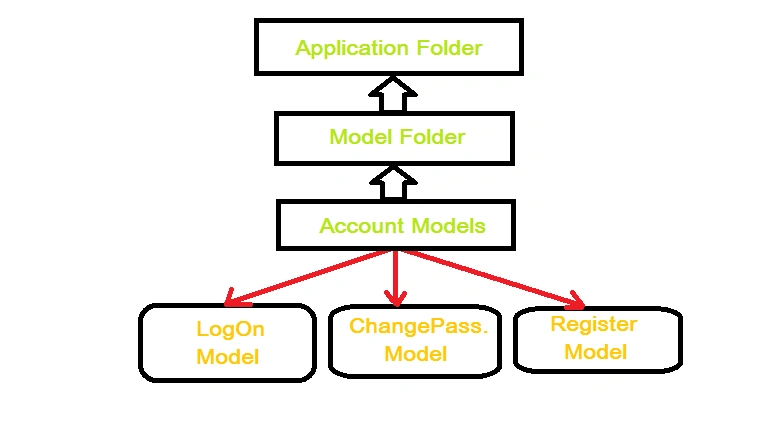
This is a typical Model Hierarchy in MVC. I tried to keep this simple and less descriptive since the diagram says it all.
Just go through this and understand the typical Model structure and functionalities in MVC.
Exploring Model
Let's explore the "Model".
Click on the Solution Explorer, here you will get a list containing a set of options that includes Images, Model, View, Controller, Filter and App_Data.
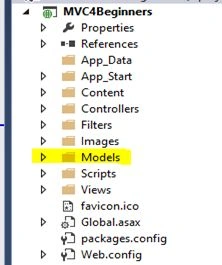
Just click on "Model" and further you will see a list containing the following fields:
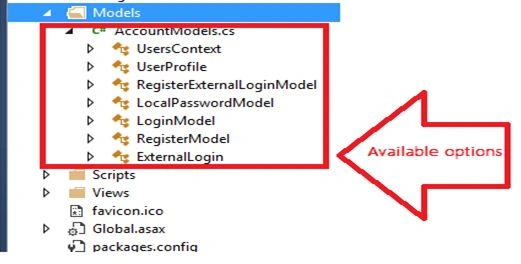
UserContext
"UserContext " is the first element in the list. Have a look at the "UserContet" segment:
namespace MVC4Beginners.Models- {
-
public class UsersContext: DbContext - {
-
public UsersContext( ): base( "DefaultConnection ") - {
- }
- … .
- … .
- … .
- }
UserProfile
"UserProfile " is the second in the list. It generally represents default properties or attributes of the user, like UserId andUserName . These are default attributes that are created by "Scaffolding" for you, but there is no need to worry if you want to add your attributes.
You are always welcome to do that.
Have a look at the "UserProfile " segment:
namespace MVC4Beginners.Models- {
-
public class UsersContext: DbContext - {
-
public UsersContext( ): base( "DefaultConnection ") - {
- }
-
public DbSet<UserProfile >UserProfiles { get; set;} - }
- [Table
( "UserProfile")] -
public class UserProfile - {
- [Key]
- [
DatabaseGeneratedAttribute ( DatabaseGeneratedOption. Identity)] -
public int UserId{ get; set;} -
public string UserName{ get; set;} - }
- ….
- ….
- ….
- }
RegisterExternalLoginModel
"RegisterExternalLoginModel " is third in the row. I don't think itsounds new to you guys if you have enough hands-on experience with HTML. It is somehow similar to that, creating a form for External login for the user.
You can call it Registration Block or Login Block or anything you wish to. This segment also has the restricted rule "Required", in other words one cannot simply avoid it (As trick use the "*" symbol in you HTML form, while drawing the required fields).
Have a look at "RegisterExternalLoginModel" segment:
namespace MVC4Beginners.Models- {
-
public class UsersContext: DbContext - {
- … .
- … .
- … .
- }
-
public class RegisterExternalLoginModel - {
- [Required]
- [Display
( Name = "User name")] -
public string UserName{ get; set;} -
public string ExternalLoginData{ get; set;} - }
- ….
- ….
- ….
- }
LocalPasswordModel
"LocalPasswordModel " is fourth in the list. I hope this segment will be familiar to you guys again. Just draw a diagram ofHTML form , where you guys used to create "Password" fields and further applying some set of restrictions over that using "JavaScript" or "ASP.NET controls". Like:
- Length Validation
- Required Field Validation
- Password Matching Validation
- Error Message
Have a look at the following "LocalPasswordModel" segment:
namespace MVC4Beginners.Models- {
-
public class UsersContext: DbContext - {
- … .
- … .
- … .
- }
-
public class LocalPasswordModel - {
- [Required]
- [
DataType ( DataType. Password)] - [Display
( Name = "Current password")] -
public string OldPassword{ get; set;} - [Required]
- [
StringLength ( 100,ErrorMessage = "The {0} must be at least {2} characters long.",MinimumLength = 6)] - [
DataType ( DataType. Password)] - [Display
( Name = "New password")] -
public string NewPassword{ get; set;} - [
DataType ( DataType. Password)] - [Display
( Name = "Confirm new password")] - [Compare
( "NewPassword ",ErrorMessage = "The new password and confirmation password do not match.")] -
public stringConfirmPassword { get; set;} - }
- ….
- ….
- ….
- }
LoginModel
"LoginModel " is fifth in the row. This segment is somehow similar to "Login/Signup". In this segment there are generally two fields to provied, "UserName or "UserId" and "Password". This section is auto-generated for you by scaffolding.
For securitypurposes you can always use a "CAPTCHA" or "Some Security Question".
Have a look at the "LoginModel" segment as in the following:
namespace MVC4Beginners.Models- {
-
public class UsersContext: DbContext - {
- … .
- … .
- … .
- }
-
public class LoginModel - {
- [Required]
- [Display
( Name = "User name")] -
public string UserName{ get; set;} - [Required]
- [
DataType ( DataType. Password)] - [Display
( Name = "Password")] -
public string Password{ get; set;} - [Display
( Name = "Remember me?")] -
public bool RememberMe { get; set;} - }
- ….
- ….
- ….
- }
RegisterModel
"RegisterModel " is sixth in the row. I don't think it also sounds new to you guys, if you have enough hands-on experience with HTML. It is somehow similar to that, creating a Registration Page for External login for the user.
You can call it a Registration Block or SignUp Block or anything you wish to. You can always add some other attributes, depending onyou choice or depending on the requirements of your application.
Have a look at the "RegisterModel " segment:
namespace MVC4Beginners.Models- {
-
public class UsersContext: DbContext - {
- … .
- … .
- … .
- }
-
public classRegisterModel - {
- [Required]
- [Display
( Name = "User name")] -
public string UserName{ get; set;} - [Required]
- [
StringLength ( 100,ErrorMessage = "The {0} must be at least {2} characters long.",MinimumLength = 6)] - [
DataType ( DataType. Password)] - [Display
( Name = "Password")] -
public string Password{ get; set;} - [
DataType ( DataType. Password)] - [Display
( Name = "Confirm password")] - [Compare
( "Password",ErrorMessage = "The password and confirmation password do not match.")] -
public stringConfirmPassword { get; set;} - }
- ….
- ….
- ….
- }
ExternalLogin
"ExternalLogin " is the last segment inModel . Itgenerally consists of an external user login identity and other details. These attributes and properties are accessed by some defined parameters.
Have a look at the "ExternalLogin " segment.
namespace MVC4Beginners.Models- {
-
public class UsersContext: DbContext - {
- … .
- … .
- … .
- }
-
public classExternalLogin - {
-
public string Provider{ get; set;} -
public string ProviderDisplayName{ get; set;} -
public string ProviderUserId{ get; set;} - }
- }
Interview Questions Based on "Model"
So, if you guys
- How does a Model accommodate a Controller and a View in MVC?
- What does a Model
represent in the MVC framework? - Is a Model in MVC similar to a database layer in 3-Tier Architecture?
- What do you understand by Scaffolding in MVC?
- What are the various types of Scaffold templates available in ASP.NET MVC?
- Where do you see
separation of concerns in MVC? - What is a ViewModel
in MVC? - Name some application templates in MVC?
- What is
NuGet in MVC? - Can we customize Scaffolding in MVC?
(These are a very few questions. If anyone has more questions then let me know and I'll update all those here. One more thing I
Points
Here's a summary of this article:
- Deal with Data Access
- It is just the same concept as a
Database Layer in 3-Tier Architecture - Works as an interface between Controller and View
- Necessary (as per the separation of concerns)
- Scaffolding, "A construction work in MVC"
- Various types of scaffold templates
Summary
I used some complex terms in this article like Scaffolding, templates and so on. I'll explain all these terms in a separate article of this series because all these are as important as learning OOP concepts before going through any object oriented language.
- Take your time
- Do as much
practise you can (implementation) - Try to "learn" things.. Don't just "study" (I mean it)
- Try to discuss things with friends, colleagues or in
forums (such as C# Corner) - If you experience any problem, then your queries are welcome.
I hope you guys enjoyed this.
#HappyCoding
DhanasekarPosted Apr 10, 2015, 3:28 AM
:)
Abhishek JaiswalPosted Apr 10, 2015, 3:26 AM
Yup u'r right.. Thanks for the update. :)
DhanasekarPosted Apr 10, 2015, 3:23 AM
Hi... in MT3 (A bridge between "Model" and "View") , it should be A bridge between "Controller " and "View" i guess?
Rahul Kumar SaxenaPosted Mar 15, 2015, 6:41 AM
Well Good Show
Abhishek JaiswalPosted Mar 14, 2015, 4:49 PM
Yeah, sure I'll include some applications of MVC in the end of this series. So that one can better understand the way MVC works. #Cheers :)
Anurag SarkarPosted Mar 14, 2015, 4:46 PM
Please do write some sample application in mvc.