

Article Overview
- Background
- Return a file from the action method of the controller
- Create a blob for an Excel file and make it auto-downloadable using jQuery
- Display a loader while processing to generate an Excel file and download it using jQuery
- Pre-requisites
- How to Return a File (Excel) from a Controller’s Action method and create an Excel Blob into the jQuery along with the Loader effect
- AJAX call to action method from button click
- Return a file from the action method
- Create a blob for an Excel file and make it auto-downloadable using jQuery
- Display a loader while processing to generate an Excel file and download it using jQuery
- Complete example
- Ajax call to action method from button click
- Return a file from the action method
- Create a blob for an Excel file and make it auto-downloadable using jQuery
- Display a loader while processing to generate an Excel file and download it using jQuery
- Output
- Summary
Background
There was a requirement where I had to “Export data into the Excel file with ASP .NET MVC”. I have gone through various links and found one common solution using “Response. End()”. My basic requirement was to display a loader while generating and downloading Excel files. Hence, I have to customize the searched solution in a different way.
This article mainly focuses on three key things.
- Return a file from the action method of the controller
- Create a blob for an Excel file and make it auto-downloadable using jQuery
- Display a loader while processing to generate an Excel file and download it using jQuery.
Here, I have kept all the key details in one place with the whole example.
Prerequisites
You should have basic knowledge of ASP .NET MVC and jQuery.
How to Return a File (Excel) from a Controller’s Action method and create an Excel Blob into jQuery along with the Loader effect.
There are mainly four key steps to implement this.
- Ajax call to action method from button click
- Return a file from the action method
- Create a blob for an Excel file and make it auto-downloadable using jQuery
- Display a loader while processing to generate an Excel file and download it using jQuery
Now, let us see in detail.
Ajax calls to action method from the button click
I have kept a button “Export to Excel” and its click calls an action method.
$.ajax({
    url: '@Url.Action("ExportToExcel", "Export")',
});
Return a file from an action method
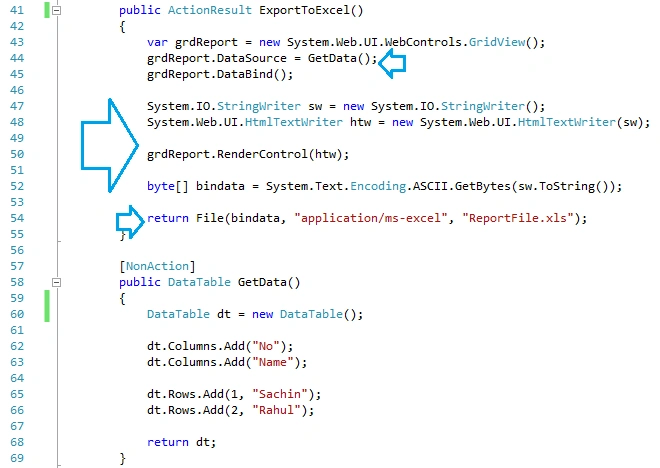
I have created a GridView object and assigned data to it. And then, stored it into a byte array. Finally, I return a File as an ActionResult.
var grdReport = new System.Web.UI.WebControls.GridView();
byte[] bindata = System.Text.Encoding.ASCII.GetBytes(sw.ToString());
return File(bindata, "application/ms-excel", "ReportFile.xls");
Create a blob for an Excel file and make it auto-downloadable using jQuery.
On the success of the AJAX call, create a Blob of Excel type. Create an anchor link set the file to it and make it auto-downloadable.
var blob = new Blob([response], { type: 'application/ms-excel' });
document.body.appendChild(a);
Display a loader while processing to generate an Excel file and download it using jQuery
In the Ajax call, start and stop loader in “success” and “complete” respectively.
beforeSend: function () {
    // Your code before the request is sent
},
complete: function () {
    // Your code after the request is completed
}
Here, I have given high-level steps for our requirements. Now, let us see the complete example below which will give you more clarity about these steps.
Complete example
For the complete example, I have prepared and uploaded a file that contains all the code.
- Ajax call to action method from button click
- Return a file from the action method
- Create a blob for an Excel file and make it auto-downloadable using jQuery
- Display a loader while processing to generate an Excel file and download it using jQuery
- Output
Ajax calls to action method from the button click
First, set one “Export to Excel” button. Second, call an Ajax method on the button click.

Return a file from the action method
First, create a GridView and set data to it. Second, create StringWriter and HTMLTextWriter to render GridView. Third, use a byte array to store the result into it. Fourth, return a file as ActionResult.
Create a blob for an Excel file and make it auto-downloadable using jQuery.
First, create a blob object of Excel on Ajax's success. Second, create an object URL and make it downloadable.
This is already covered in the "success" of the above first image.

Display a loader while processing to generate Excel file and download it using jQuery
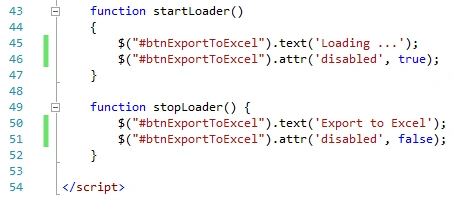
First, start a loader in before sending the Ajax call. Second, stop the loader in complete.
Output
First, the button will be enabled before clicking it.
Second, after the button clicks and during processing, it will be disabled and the text will be "Loading.

Third, after process completion, the button will come back to the original state, and the Excel file will be downloaded.

Summary
Now, I believe you will be able to return a File (Excel) from a Controller’s Action method and create an Excel Blob into the jQuery along with the Loader effect.
Havilah SPosted Aug 31, 2023, 6:41 PM
Excel file is downloaded it has all special characters but not the data from source datatable.
Ufuk AltayPosted Oct 19, 2022, 12:24 PM
Hello,First of all, thank you for sharing this article. When I download the file, I have a Turkish character problem and some characters are corrupted. I tried several ways but couldn't solve the problem. Can you help me?
Devika MPosted Jun 19, 2020, 5:55 AM
Tried implementing, but a file was getting downloaded. It wasnt in proper format too. Attaching code for ref Else if (fileType === "xlsx") { $.ajax({ type: 'GET', cache: false, async: false, contentType: "application/json; charset=utf-8", data: { fileType: fileType }, url: '@Url.Action("PreviewClick", "Home")', success: function (data) { var blob = new Blob([data], { type: 'application/ms-excel' }); var tabUrl = URL.createObjectURL(blob); var a = document.createElement("a"); a.href = tabUrl; a.target = "_blank"; document.body.appendChild(a); a.click(); } }); }
Devika MPosted Jun 17, 2020, 8:18 AM
Can we display the preview the excel instead of download. I got the excel downloaded but wanted it to be previewed only.
H GPosted Apr 15, 2020, 2:07 PM
Thank you for sharing this article, I am trying to use the ajax with asp.net core. The issue is that the returned file is corrupted and excel cannot render the data. Is there a way to accommodate this code to read dataTable populated through stored procedure and return the file the Ajax to download the excel?
Rakesh TPosted Dec 5, 2019, 4:29 AM
I think Downloading of excel file is not working in Internet Explorer. When click on download button, browser is asking "Do you want to allow this website to open an app on your computer?"
Rakesh TPosted Dec 4, 2019, 8:19 AM
When I open the downloaded excel file, It is showing a warning that 'file format and extension of file don't match. the file could be corrupted and unsafe'........ How can we avoid this warning
Rakesh TPosted Dec 4, 2019, 7:54 AM
It is working now. I am not sure why It did not work first time. Thank you Pankaj. It was very helpful.
Rakesh TPosted Dec 4, 2019, 12:43 AM
The code is working in local but when I hosted in IIS, Excel file download is not working
Dhruvik SathvaraPosted Oct 10, 2019, 1:02 AM
Good article...
Chittaranjan SwainPosted Sep 30, 2019, 1:43 AM
Nice Article...
Arvind PatelPosted Sep 26, 2019, 7:06 AM
Nice article...!!
Jaykishan VaghelaPosted Sep 16, 2019, 12:19 AM
Nice Article
Amit MohantyPosted Sep 10, 2019, 11:18 PM
Nice article