

Introduction
In this tutorial, we will learn how to perform the MVVM approach in Xamarin.Forms using FreshMVVM. MVVM is the best approach for Xamarin.Forms and WPF Applications. There are a lot of MVVM plugins or libraries like FreshMVVM, MVVMCross, Prism, etc. available to simplify MVVM implementations.
FreshMVVM
FreshMVVM is designed to perform MVVM easily and simply with the Xamarin.Forms application. It was created Michael Ridland. It has certain rules to perform MVVM Databinding. You can find the plugin from GitHub and NuGet.
Rules for FreshMVVM
The rules for MVVM are simple.
- The Views (Pages) name should end with Page.
- The namespace of both, Page and Pagemodel, should be same.
- You don’t need to set BindingContext. The plugin will detect the View and ViewModel with its name.
Let us start coding with FreshMVVM.
Coding Part
Steps
I have split this part into 3 steps -
Step 1
Creating new Xamarin.Forms Projects.
Step 2
Setting up the plugin for Xamarin.Forms Application.
Step 3
Implementing Fresh MVVM.
Step 1
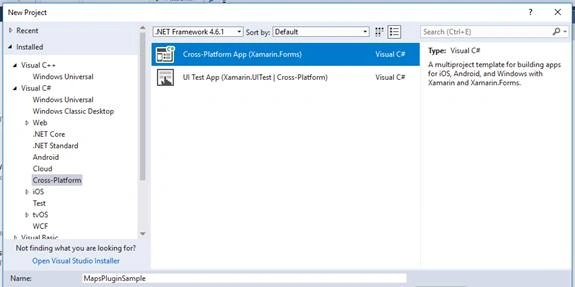
Create a new project by selecting New >> Project >> Xamarin Cross-Platform App and click OK.
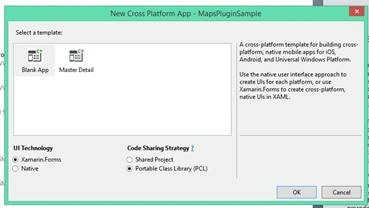
Then, select Android and iOS platforms as shown below with Code Sharing Strategy as PCL or .NET Standard, and click OK.
Step 2
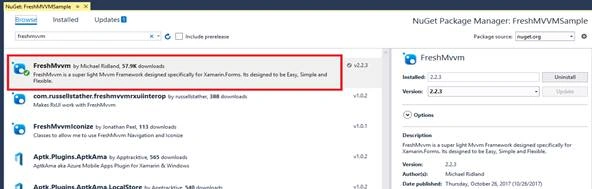
We will start coding for FreshMVVM. Create a new Xamarin.Forms Project. Open NuGet Package Manager against the solution and search for FreshMVVM Plug-in or paste the following NuGet Installation.
Install-Package FreshMvvm -Version 2.2.3
Click "Install" to install this plug-in against your PCL Project or .NET Standard Project.
Step 3
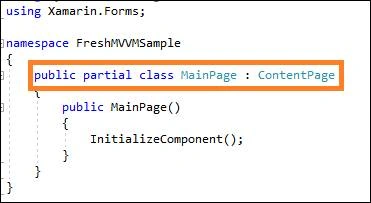
Create your XAML page (View) with name ending up with “Page”.
Create PageModel by creating a class name ending with “PageModel” and inherited with “FreshBasePageModel”, as shown in the below screenshot.
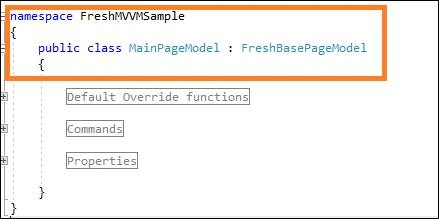
The namespace of the Page and PageModel should be same as shown in the above screenshots.
- The Binding Properties and Command Properties are implemented same as the normal MVVM approach.
- To indicate the binding properties, we just changed the RaisePropertyChanged instead of OnPropertyChanged event in Normal MVVM.
- The following code is used to raise the property changed.
RaisePropertyChanged("MainPageLabel");
Set MainPage
To initialize the FreshMVVM Navigation, you should set the MainPage with FreshMVVM Navigation Container with the following code.
- Open xaml.cs or App.cs and set MainPage.
- // To set MainPage for the Application
- var page = FreshPageModelResolver.ResolvePageModel < MainPageModel > ();
- var basicNavContainer = new FreshNavigationContainer(page);
- MainPage = basicNavContainer;
Navigation between Pages
FreshMVVM itself has navigation methods to make navigation between the pages.
- Use PushPageModel for pushing the page in the navigation stack or goto next page instead of PushAsync in normal MVVM.
It is equivalent to the following.- await CoreMethods.PushPageModel<SecondPageModel>();
- Navigation.PushAsync(new SecondPage());
Join the conversation! Your thoughts help the community grow.