

Model View View-Model is a very powerful design pattern as you know. But if you are a beginner and do not have an idea of MVC MVP then it’s my personal experience that it’s very confusing and painful to understand the logic of MVVM. I am trying to explain the basic fundamentals of MVVM In this series. In this article I‘ll focus fully on the logic and implementation of ICommand.
The following are some core main important components of MVVM:
- Binding
- Command
- Event
- Converter
I have already provided a MVVM introduction and Data Binding in XAML, if you are beginner then I recommended you go through these articles:
What is Command
Before explaining ICommand in MVVM, you need to know a little bit about the Command Design Pattern because I think ICommand in MVVM comes from the Command Design Pattern. This command pattern is one of the more powerful design patterns in object oriented design patterns. This pattern allows you to decouple the request of an action from the object that actually performs an action, in other words a command pattern represents an action as an object. A Command object does not contain the functionality that is to be executed. This removes the direct link between the command definitions and the functionality and it’s promoting a loose coupling. When you want to implement operations based on the user request then the command pattern is the best pattern to handle your object.
The following are the members of the Command Design Pattern:
- Client
- Invoker
- Command
- Concrete Command
- Receiver
Flow of Command Design Pattern
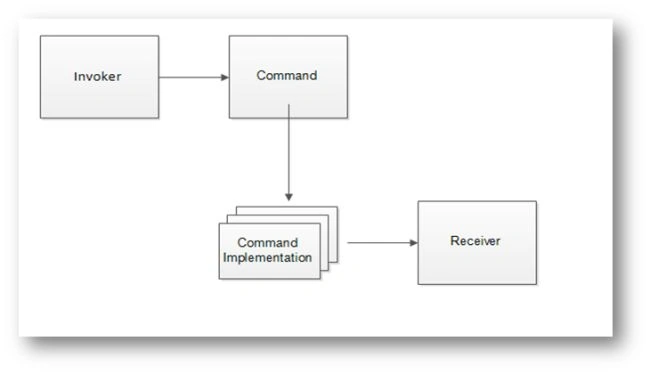
The Invoker is a UI element. The Receiver is nothing but a handling method, it can be some code implementation or some business logic that will be executed whenever a command is to be executed. Between some layers is this nothing just interface layers. Because an invoker (XAML Element event binding) depends only on the interface based. This is the core logic of a command between many things that are reelvant as the client or some concrete method, I am not covering all points because my target is ICommand MVVM. If you want to learn the Command Design Pattern then you can learn here with a nice explanation.
- Wikipedia: Command pattern
- oodesign: Command Pattern
What is ICommand
An ICommand is a core component of MVVM. ICommand is frequently used in MVVM, it provides separation logic between a View and View Model (User Interface and Business Logic). XAML offers a way to bind your GUI event better by ICommand. ICommand requires the user to define two methods, bool CanExecute and void Execute. The CanExecute method really just says to the user, can I execute this Action? This is useful for controlling the context in which you can perform GUI actions.
ICommand is very simple but it’s more interesting and complicated when you are using it in an application. ICommand integrates your User Interface to business logic or it’s making a direct communication between a View to a View Model. It also provides a mechanism for the view to update the model/view-model. All mechanisms and scenarios are similar and simple, but an implementation seems different and it can be confusing. So I will explain step-by-step how to use and implement ICommand in your application.
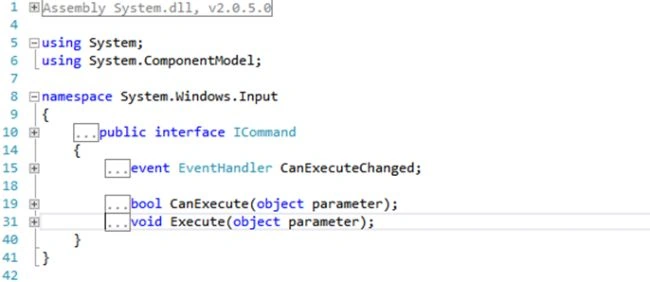
The ICommand interface provides very useful methods and events, like the Execute() and CanExecute() methods and the CanExecuteChanged Event. The preceding Snap ICommand interface specifies and ICommand members.
- Execute (object): This method is called when a Command is triggered. It has only one object parameter, the Execute (object). Which can be used to additional information and it has a void return type.
- CanExecute (object): It also has only one object parameter but it’s returning a bool value, if it’s returning true then it means the command can execute. If you have used XAML controls that support the Command property then the control will be automatically disabled. I‘ll explain in a sample application what hapens when it returns false.
- CanExecuteChanged: This is event mast be raised by the command implementation when the CanExecute method needs to be reevaluated or else after the user has filled in a field. The CanExecuteChanged event exists so we can check if the Save button should be enabled.
Before implementing a core implementation and use ICommand we should understand how the Internal interface works. For that, I am explaining below the command line and am creating one small Hello World sample with the use of my own ICommand Interface.
using System;
using System.Diagnostics;
using System.Text;
namespace CommandPattern
{
public interface ICommand
{
void Execute(object parameter);
bool CanExecute(object parameter);
event EventHandler CanExecuteChanged;
}
public class HelloCommandPattern : ICommand
{
public void Execute(object parameter)
{
Debug.WriteLine(parameter);
}
public bool CanExecute(object parameter)
{
return parameter != null;
}
public event EventHandler CanExecuteChanged;
static void Main(string[] arg)
{
var parm = new HelloCommandPattern();
if (!parm.CanExecute(null))
parm.Execute("Hello World");
}
}
}
public ICommand Command;
public void ToVM()
{
Command = new HelloCommandPattern();
if (!Command.CanExecute(this))
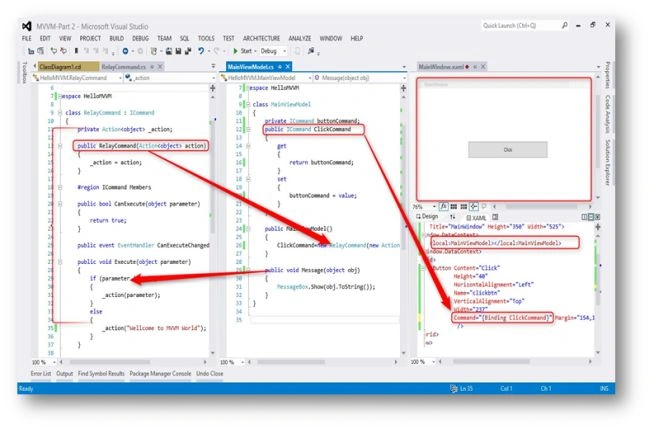
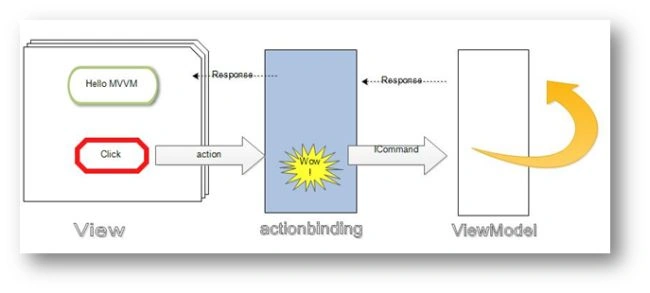
Toan LamPosted Jul 13, 2021, 4:23 AM
Very good.
Sabyasachi MishraPosted Dec 17, 2015, 11:28 PM
Nice one
Gowtham RajamanickamPosted Apr 25, 2015, 5:53 AM
good one
Vishnujeet KumarPosted Dec 16, 2013, 2:01 AM
thanks Vithal sir .
Vithal WadjePosted Dec 15, 2013, 1:48 PM
good one,keep it up sir