

Introduction
In this article, I'm starting from scratch to create a new ASP.NET MVC application with ReactJS.Net and I'm also adding a React component in it. I`m using Visual Studio to creating the ASP.NET MVC application and will install NuGet package ReactJS.NET with ES6. I am creating a simple "Hello World" application.
Let’s start to create the ASP.NET MVC application,
- Open Visual Studio from the Start menu or taskbar icon
- After that click on - File => New => Project
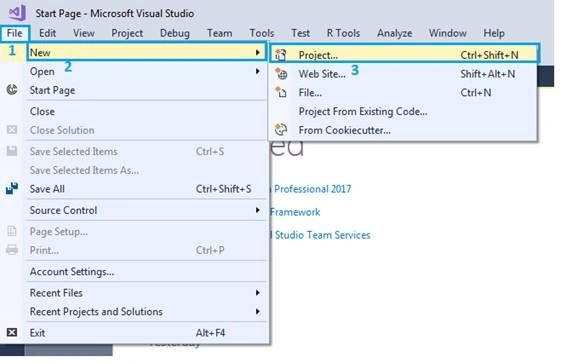 When clicking on the Project open a "New Project” popup, and from there we can select a project and enter the application and select folder location.
- Open a "New Project" popup and select Template => Visual C# => Web => ASP.NET Web Application (.NET Framework)
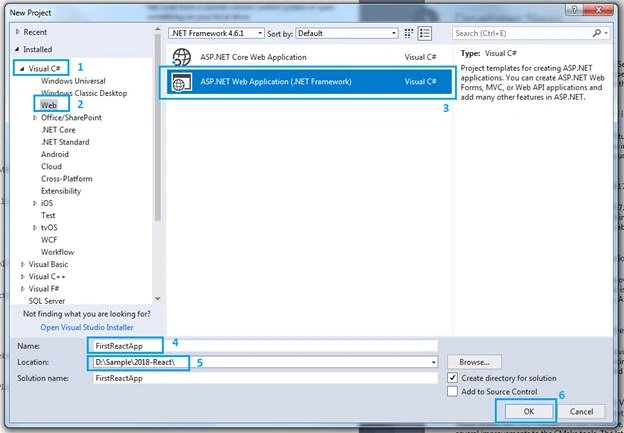 Here you select project template with ASP.NET Web Application (.NET Framework) and your application name; e.g., FirstReactApp. After that click on the OK button and open a new popup called: "New ASP.NET Application"
- Open popup (dialog) - New ASP.NET Application – FirstReactApp
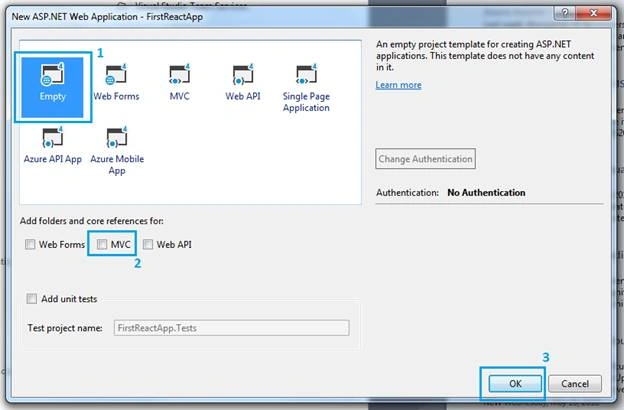 In this dialog popup, we select "Empty" project template as in the below list of project templates. And in the below, project templates list select "Add folders and core references for:” e.g. Web Form, MVC & Web API, etc. We`ll select MVC for now. And click on the OK button.
- Now, we see ASP.NET MVC application folder structure in solution as per the below screenshot.
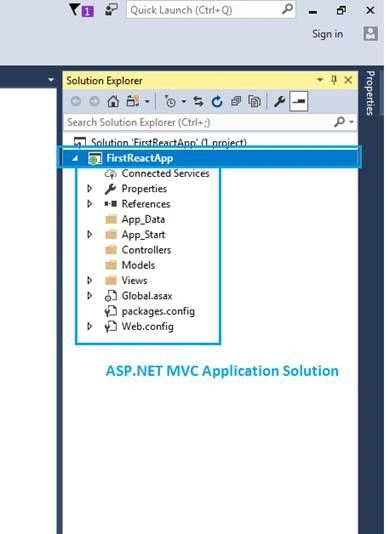 => Now, we are going to install the required NuGet Package from Manage NuGet Packages.
- Install ReactJS.NET (React.Web.Mvc4) NuGet Package from Manage NuGet Packages
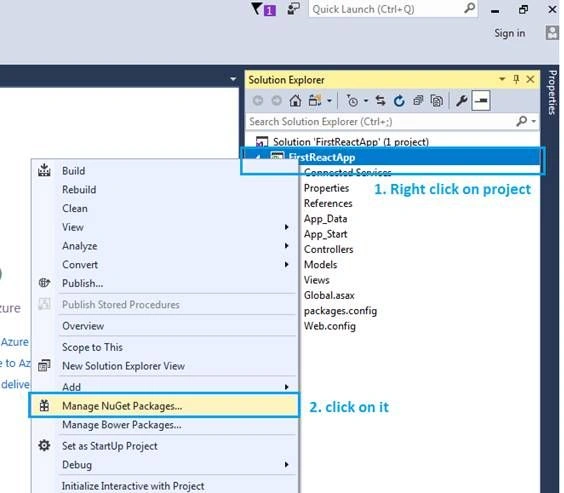 Now, we need to install ReactJS.NET (React.Web.Mvc4), by right-clicking on the project "FirstReactApp" and selecting NuGet package manager "Manage NuGet Packages" and opening a dialog popup to install the required package,Select "Browse" => Enter Package "React.Web.Mvc4" => Select "React.Web.Mvc4" from search result => click on "Install" button.
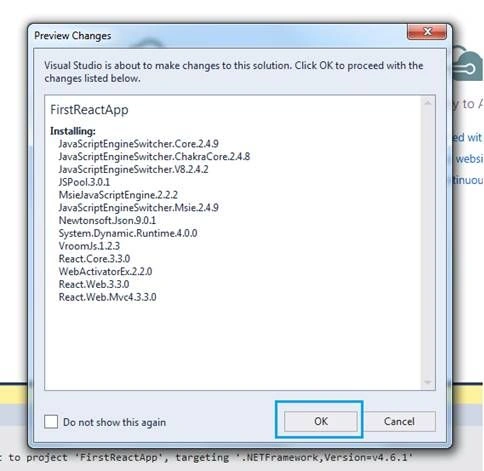
- => Open a dialog box and click on OK
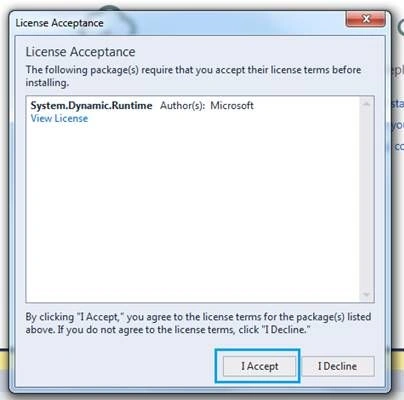
- => again open another dialog popup for licenses acceptance and click on "I Accept" button
 After that, you can see 3 packages installed: 1. React.Web.Mvc4; 2. React. Web; 3. React.Core. Close the "Manage NuGet Packages" dialog popup.
 - And also install "Web.Optimization.React" from "Manage NuGet Packages" using the same steps as above.
- Now, add a controller by right-clicking on the controller folder from the solution.
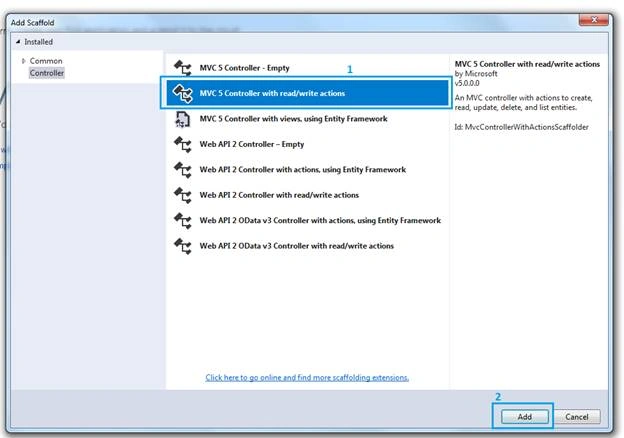
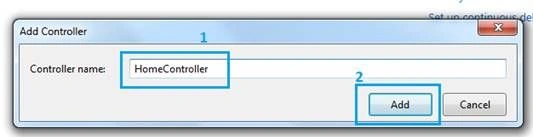 Select the option of the controller and add the name of controller; eg. HomeController, and click on add button. After that click on the home controller and right click on Index action and click on Add View option.Controller => HomeController.CS
- using System.Web.Mvc;
- namespace FirstReactApp.Controllers {
- public class HomeController: Controller {
- // GET: Home
- public ActionResult Index() {
- return View();
- }
- }
- }
Sougato DasPosted Dec 3, 2024, 7:09 AM
But where is the .sln file
Barath DopPosted Apr 28, 2021, 8:42 AM
Hello Developer, Nice Blog.. Need clarification from your side. When I create a TypeScript JSX file its creating file with an extension of "filename.tsx". Why did I get this extension and How can I get ".jsx" file. Thank you
Yuvasri ShanmugamPosted Mar 9, 2021, 1:38 PM
Hello all..Things we need to install here is.. JavascriptEngineSwitcher.V8, JavaScriptEngineSwitcher.V8.Native.linux-x64, JavaScriptEngineSwitcher.V8.Native.win-x86 from nuget package manager . Then, In App_Start folder there is a file named ReactConfig.cs .. in that file.. import the namespace(using javascriptEngineSwitcher.V8) and inside public static void Configure() .. add these two lines..( JavaScriptEngineSwitcher.Core.JsEngineSwitcher.Current.DefaultEngineName = V8JsEngine.EngineName; JavaScriptEngineSwitcher.Core.JsEngineSwitcher.Current.EngineFactories.AddV8(); ) and thats all
bibhu ranjanPosted Jul 27, 2020, 3:24 PM
Please suggest how to install packages like axios, router etc
Harris ReidPosted Jun 24, 2020, 6:28 AM
Nice article! thank you for sharing
Danilo SilvaPosted Jun 6, 2020, 12:37 PM
When I run my project, it shows this error: No JS engines were registered. Visit https://reactjs.net/docs for more information. it shows this line in red: Ligne 40: @Scripts.Render("~/bundles/main") could someone help me please?
Prashanth SubramaniPosted Dec 27, 2019, 7:26 AM
Is it possible to make this project in MVC 2 with VS 2010 ?
FrenkyB (FrenkyB)Posted Nov 18, 2019, 2:24 AM
It would be great if you also post working example with .NET 4.7.2 version.
Kevin WinterPosted Aug 28, 2019, 12:37 PM
You work in your sample source code with a normal Web Application with MVC. But you show screenshots, that you used the Empty Web Application MVC template! The article is very bad and stole my time!
kriishna kanthPosted Jun 25, 2019, 7:26 AM
Visit this site for updated example on the same context : https://reactjs.net/
Mohammedshiyas PaPosted Apr 26, 2019, 5:32 AM
I am not able view the images given in the jsx file. Can you please help me with this.
Mukesh KamathPosted Jan 31, 2019, 12:57 AM
One unsolicited advise to the author is "Please make this project in ASP.Net Core 2.1 also"... a tidbit of info to other readers is I needed to add using JavaScriptEngineSwitcher.Core; using JavaScriptEngineSwitcher.V8; in the ReactConfig.cs file in the App_Start folder. Of course I had to add these packages using NuGet Package Manager. Errors encountered during development were 1)no js engines were registered2) @Scripts does not exist 3) packages element is not declared 4) JSX element div has no corresponding closing tag
emil bgPosted Jan 13, 2019, 10:01 AM
Dude, if you are writing something, please write it correct. do it 100%. your article is not matching with your sample. you installed bunch of other packages in your sample to run and you have more code in your sample. i wish there was a thump down button here, i could give you that you waste our time.
First LastPosted Aug 27, 2018, 6:40 PM
I had to add this to the Global.asax.cs file: using System.Web.Optimization; BundleConfig.RegisterBundles(BundleTable.Bundles);
First LastPosted Aug 27, 2018, 6:40 PM
In the _Layout.cshtml, it states to add in: @Scripts.Render("~/bundles/main"). Do this in the body section at the bottom. Also following it, you need: @RenderSection("scripts", required: false)
First LastPosted Aug 27, 2018, 3:15 PM
I get a "The name 'Scripts' does not exist in the current context" error from adding @Scripts.Render("~/bundles/main") to the _Layout.cshtml page. It has the red squiggly line. I had to add to the Views folder’s web.config <namespaces> section. <add namespace="System.Web.Optimization"/>
First LastPosted Aug 27, 2018, 3:14 PM
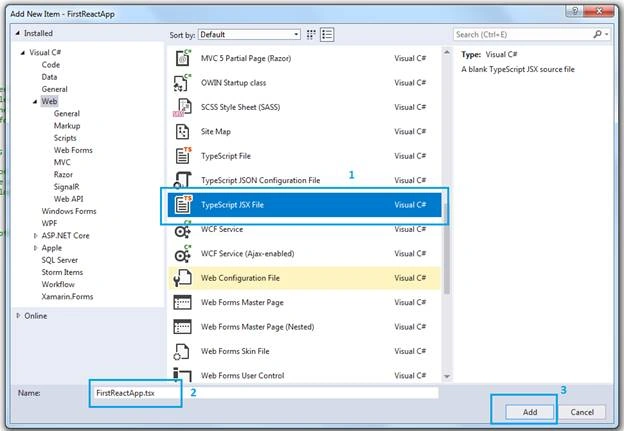
I got "Cannot find name 'react' in the FirstReactApp.tsx. It has the red squiggly lines. Also when I created the FirstReactApp I choose Web/Scripts/TypeScript JSX file as indicated above and it created a .tsx file. (This even shows in the screen shot above). I since created it again but using Web/Markup/JSX file and it created the file with the .jsx extension and I no longer get this error.
Mar IbrahimPosted Aug 14, 2018, 3:52 AM
I tried this out ang I've got this error "react is not defined", any suggestions please
Kaushik Roy ChowdhuryPosted Aug 7, 2018, 5:07 PM
Hi Kirti, I too had the same problem with bundling that didn't find the main (so in essence didn't load the .jsx file). However I managed to get around by bypassing bundling and rendering the script directly on index.cshtml by coding: @Scripts.Render("~/Scripts/FirstReactApp.jsx")Hope it helps others!
Kirti KanadePosted Jul 29, 2018, 10:38 AM
I got this warning as Loading failed for the <script> with source “http://localhost:56221/bundles/main”. so not getting display Hello World. Can anyone please help me out?
Umesh ParshadPosted May 22, 2018, 12:38 AM
Great article sir...... thank you for sharing
Abhinav KatiyarPosted May 21, 2018, 10:19 AM
You created the baby steps for the React learners. You did the great effort to create such a nice content. Keep it up.
Tridip BhattacharjeePosted May 21, 2018, 3:58 AM
Routing is possible in react like angular?
Tridip BhattacharjeePosted May 21, 2018, 3:57 AM
Good article. please post more part wise to show data and form where data will be fetching from db etc. looking for a full blown application like Todo or quiz etc where multiple forms will be there. thanks
Deepak VermaPosted May 21, 2018, 2:16 AM
Great article sir......... :)
Bhairab DuttPosted May 21, 2018, 1:26 AM
Nice article sir to learn about React Application with MVC ... :)
Mahesh VermaPosted May 21, 2018, 12:33 AM
Nice article sir :-)
arvind kumarPosted May 21, 2018, 12:04 AM
Good , easy to follow the steps