GridViews are very powerful in .NET. The last GridView article shows a GridView example and how to work with GridViews with ASP.NET controls.
Now, this article shows how to work with multiple GridViews in ASP.NET.
This article was created in India state and their city with a nested GridView example.
This nested grid example uses two GridViews. One GridView for the state data and the second one for the cities.
For the first create two tables, State and City, in your SQL database.
Step 1: Database Side
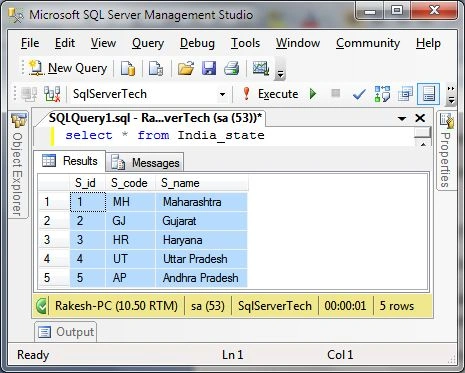
Create an India State table.
- Create table India_State
- (
- S_id int identity(1,1) primary key,
- S_code varchar(3),
- S_name varchar(30)
- )
And add some data to this table as in the following.
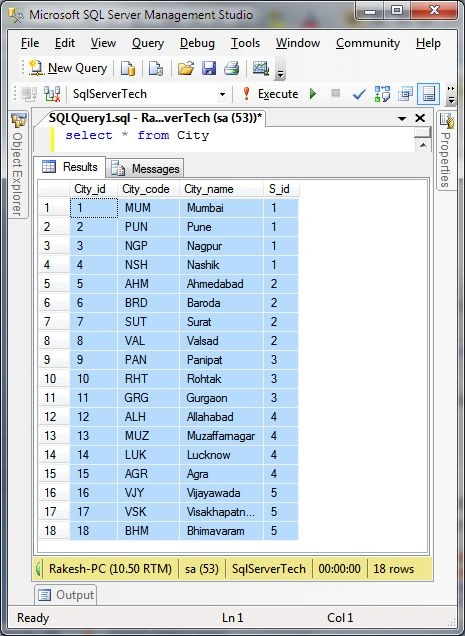
 Create City Table
- create table City
- (
- City_id int identity(1,1) primary key,
- City_code varchar(3),
- City_name varchar(30),
- S_id int foreign key references India_state(S_id)
- )
Also add some records to the city table as in the following.
 Step 2: Page Desgin side
Now move to Visual Studio and add a new .aspx design page to your project and also provide a suitable name for the nested GridView demo as in the following:
- <%@ Page Title="" Language="C#" MasterPageFile="~/MasterPage.Master" AutoEventWireup="true" CodeBehind="NestedGridview.aspx.cs"
- Inherits="Test_WebApplication.BlogWork.NestedGridview" %>
- <asp:Content ID="Content1" ContentPlaceHolderID="head" runat="server">
- </asp:Content>
-
- <asp:Content ID="Content2" ContentPlaceHolderID="ContentPlaceHolder1" runat="server">
-
-
- </asp:Content>
Now first add a style sheet for the GridView as in the following:
- <div>
- <style type="text/css">
- body
- {
- font-family: Times New Roman;
- font-size: 10pt;
- }
- .Grid th
- {
- background-color: #DF7401;
- color: White;
- font-size: 10pt;
- line-height:200%;
- }
- .Grid td
- {
- background-color: #F3E2A9;
- color: black;
- font-size: 10pt;
- line-height:200%;
- text-align:center;
- }
- .ChildGrid th
- {
- background-color: Maroon;
- color: White;
- font-size: 10pt;
- }
- .ChildGrid td
- {
- background-color: Orange;
- color: black;
- font-size: 10pt;
- text-align:center;
- }
- </style>
- </div>
In this example use a JavaScript function to display a child GridView record and also hide the records in this nested GridView example as in the following:
- <div>
- <script type="text/javascript" src="http://ajax.googleapis.com/ajax/libs/jquery/1.8.3/jquery.min.js"></script>
- <script type="text/javascript">
- function StateCity(input) {
- var displayIcon = "img" + input;
- if ($("#" + displayIcon).attr("src") == "../image/Detail.jpg") {
- $("#" + displayIcon).closest("tr")
- .after("<tr><td></td><td colspan = '100%'>" + $("#" + input)
- .html() + "</td></tr>");
- $("#" + displayIcon).attr("src", "../image/hide.jpg");
- } else {
- $("#" + displayIcon).closest("tr").next().remove();
- $("#" + displayIcon).attr("src", "../image/Detail.jpg");
- }
- }
- </script>
- </div>
After adding two GridViews to your project Contents page. In this one GridView display the State data and another GridView display the City record. Therefore the State GridView works as the parent grid and the city GridView works as the child grid.
Here in this example first
GridState works as the
parent grid and inside the second grid
GridCity is the
child GridView. In this both the parent grid and child grid define
DataKeyNames as in the following:
- <div>
- <asp:GridView ID="GridState" runat="server" AutoGenerateColumns="false" DataKeyNames="S_id"
- CssClass="Grid" onrowdatabound="GridState_RowDataBound" >
- <Columns>
- <asp:TemplateField ItemStyle-Width="20px">
- <ItemTemplate>
- <a href="JavaScript:StateCity('div<%# Eval("S_id") %>');">
- <img alt="City" id="imgdiv<%# Eval("S_id") %>" src="../image/Detail.jpg" />
- </a>
- <div id="div<%# Eval("S_id") %>" style="display: none;">
- <asp:GridView ID="GridCity" runat="server" AutoGenerateColumns="false" DataKeyNames="S_id"
- CssClass="ChildGrid" >
- <Columns>
- <asp:BoundField ItemStyle-Width="150px" DataField="City_code" HeaderText="City Code" />
- <asp:BoundField ItemStyle-Width="200px" DataField="City_name" HeaderText="City Name" />
- </Columns>
- </asp:GridView>
- </div>
- </ItemTemplate>
- </asp:TemplateField>
-
- <asp:BoundField ItemStyle-Width="100px" DataField="S_Code" HeaderText="State Code" />
- <asp:BoundField ItemStyle-Width="150px" DataField="S_Name" HeaderText="State Name" />
- </Columns>
- </asp:GridView>
- </div>
Step 3: Page Code SideNow go to the page code.
First set the connection string in the web.config file to connect to the database to get the GridView record.
- <connectionStrings>
- <add name="connstr" connectionString="Data Source=RAKESH-PC;Initial Catalog=SqlServerTech;User ID=sa;Password=****" providerName="System.Data.SqlClient"/>
- <add name="Pratical_testConnectionString" connectionString="Data Source=RAKESH-PC;Initial Catalog=Pratical_test;User ID=sa" providerName="System.Data.SqlClient"/>
- </connectionStrings>
Now for the first State data fill in the parent GridView with the page load and Chid grid data is obtained in the parent GridView RowDataBound event as in the following code:
Page Code
- using System;
- using System.Collections.Generic;
- using System.Linq;
- using System.Web;
- using System.Web.UI;
- using System.Web.UI.WebControls;
- using System.Configuration;
- using System.Data;
- using System.Data.SqlClient;
-
- namespace Test_WebApplication.BlogWork
- {
- public partial class NestedGridview : System.Web.UI.Page
- {
- string conString = ConfigurationManager.ConnectionStrings["connstr"].ConnectionString;
- protected void Page_Load(object sender, EventArgs e)
- {
- string sQuery = "SELECT S_id,S_code,S_name from India_state";
- GridState.DataSource = getData(sQuery);
- GridState.DataBind();
-
- }
- protected void GridState_RowDataBound(object sender, GridViewRowEventArgs e)
- {
- if (e.Row.RowType == DataControlRowType.DataRow)
- {
- string S_id = GridState.DataKeys[e.Row.RowIndex].Value.ToString();
- string sQuery = "SELECT City_code,City_name,S_id FROM City WHERE S_id='" + S_id + "'";
- GridView SC = (GridView)e.Row.FindControl("GridCity");
- SC.DataSource = getData(sQuery);
- SC.DataBind();
- }
- }
- private DataTable getData(string sQuery)
- {
- SqlDataAdapter sdt = new SqlDataAdapter();
- DataTable dTable = new DataTable();
- SqlConnection con = new SqlConnection(conString);
- con.Open();
- SqlCommand cmd = new SqlCommand(sQuery, con);
- sdt.SelectCommand = cmd;
- sdt.Fill(dTable);
- con.Close();
- return dTable;
- }
- }
- }
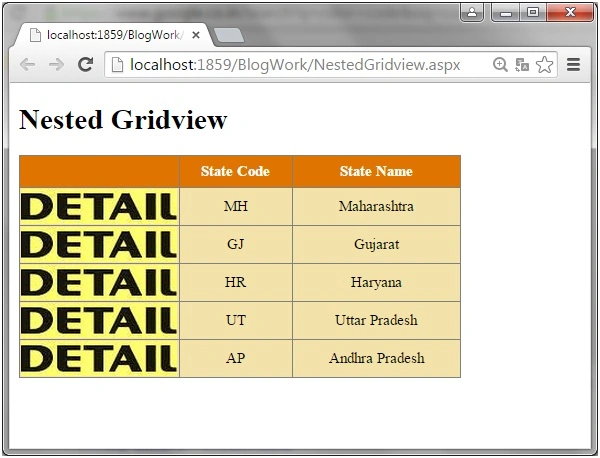
Step 4: Browser SideFill in the State record in the GridView with Page Load.
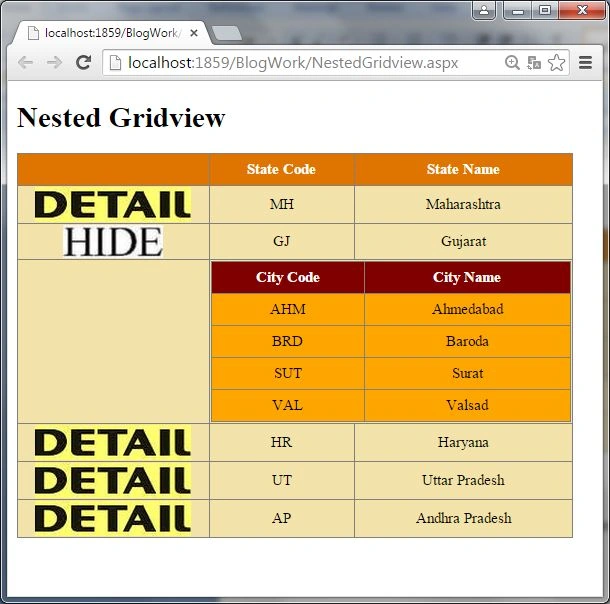
Fill in the City record in the child grid as per selecting the parent grid's State Detail.
I hope you understand how to work with a nested GridView.


Prameela BPosted Apr 16, 2024, 2:55 PM
Thanks nice article. how to display the nested Gridview without the use of Expand button directly on first look.
AbedElHamid AlWahidyPosted Dec 3, 2015, 5:19 AM
many thanks for you
leon michealPosted Aug 10, 2015, 3:10 PM
HI Rakesh, how how you get values of raws being selected using a checkbox template filed from the child gridview via a button a page
RakeshPosted Aug 5, 2015, 1:55 PM
Thanks Manas Mohapatra
Manas MohapatraPosted Aug 5, 2015, 7:09 AM
Implemented in nice way...
NitinPosted Jun 15, 2015, 10:30 AM
good one
Pankaj Kumar ChoudharyPosted Jun 14, 2015, 8:27 PM
Nice Article @Rakesh Sir.........
Santhakumar MunuswamyPosted Jun 14, 2015, 11:55 AM
Thanks for nice article