

In this article, I would like to show the new analytic functions First_Value and Last_Value in SQL Server. First_Value and Last_Value are part of the analytic functions. The First_Value Function returns the first value in an ordered set of values, and Similarly Last_Value function returns the last value from an ordered set of values. So let's have a look at a practical example of how to use the First_Value and Last_Value functions in SQL Server 2012. The example is developed in SQL Server 2012 using SQL Server Management Studio.
We'll start by walking through a simple First_Value function.
Creating a table in SQL Server
Now we create a table named employee.
Create table Employee
(
EmpID int,
EmpName varchar(30),
EmpSalary int
)
The following is the sample data for the employee Table.

First_Value Function
The First_Value function is a new analytic function in SQL Server. It returns the first value in an ordered set of values. Here, you will see some examples related to the First_Value function.
Syntax
The following is the SQL Analytic First_Value function syntax:
First_Value ( [scalar_expression )
OVER ([partition_by_clause] order_by_clause)
Scalar_expression - can be a column, subquery, or other expression that results in a single value.
OVER - Specify the order of the rows.
ORDER BY - Provide sort order for the records.
Partition By - Partition by clause is a optional part of First_Value function and if you don't use it all the records of the result-set will be considered as a part of single record group or a single partition.
Example
Let us see the following query:
Select *, First_value(EmpSalary) OVER (order BY EmpSalary ) as First_ValueResut From Employee
Output
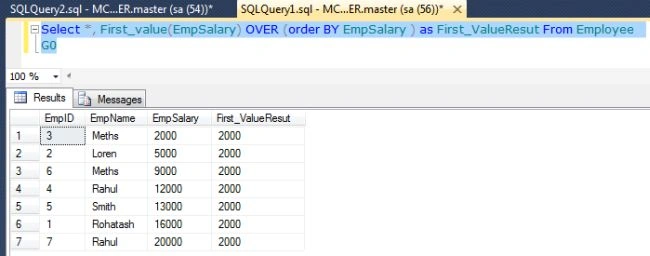
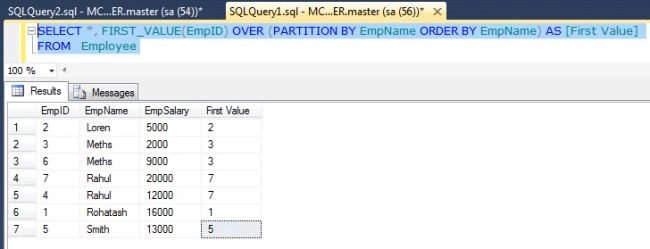
First_Value Function with Partition By Clause
The Partition by clause is an optional part of First_Value function. By using the PARTITION BY clause with FIRST_VALUE function we can divide the result set by name.

Join the conversation! Your thoughts help the community grow.