
- Create a class library.
- Manage Nuget package and install:
- NUnit
- NUnit Test Adapter for vs2012, vs2013 and vs2015

- The reference should be added to class library,
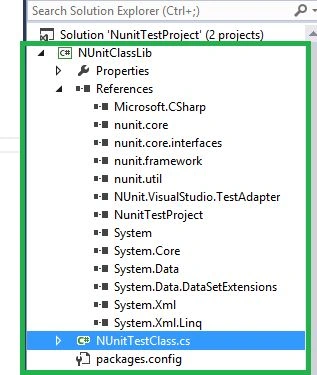
- Create a console project in the same solution and add the reference of the project to the class library.
- In the unit test project add the below code to test the console project.
- [TestFixture]
- public class UnitTest1 {
- DecimalToBinary obj = null;
- Fibonacci fObj = null;
- FizzBizz fbObj = null;
- public UnitTest1()
- {
- obj = new DecimalToBinary();
- fObj = new Fibonacci();
- fbObj = new FizzBizz();
- }
- [Test]
- public void FizzBizzPass()
- {
- var ExpectedResult = "Fizz";
- var originalResult = string.Empty;
- originalResult = fbObj.checkFizzBuzz(6);
- Assert.AreEqual(ExpectedResult, originalResult);
- }
- [Test]
- public void FizzBizzFail()
- {
- var ExpectedResult = "FizzBizz";
- var originalResult = string.Empty;
- originalResult = fbObj.checkFizzBuzz(6);
- Assert.AreEqual(ExpectedResult, originalResult);
- }
- [Test]
- public void DecimalToBinaryPass()
- {
- var ExpectedResult = "1000";
- var originalResult = string.Empty;
- originalResult = obj.getDecimalNumber(8);
- Assert.AreEqual(ExpectedResult, originalResult);
- }
- [Test]
- public void DecimalToBinaryFail()
- {
- var ExpectedResult = "1001";
- var originalResult = string.Empty;
- originalResult = obj.getDecimalNumber(8);
- Assert.That(ExpectedResult, Is.EqualTo(originalResult));
- }
- [Test]
- public void FibonacciPass()
- {
- List < int > ExpectedResult = new List < int > ();
- var result = fObj.GetFibonacci(1);
- ExpectedResult.Add(0);
- ExpectedResult.Add(1);
- ExpectedResult.Add(1);
- CollectionAssert.AreEqual(ExpectedResult, result);
- }
- [Test]
- public void FibonacciFail()
- {
- List < int > ExpectedResult = new List < int > ();
- var result = fObj.GetFibonacci(1);
- ExpectedResult.Add(0);
- ExpectedResult.Add(1);
- ExpectedResult.Add(1);
- ExpectedResult.Add(2);
- CollectionAssert.AreEqual(ExpectedResult, result);
- }
- }
- To test the methods,
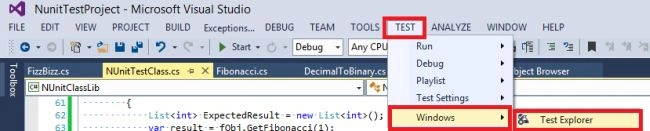
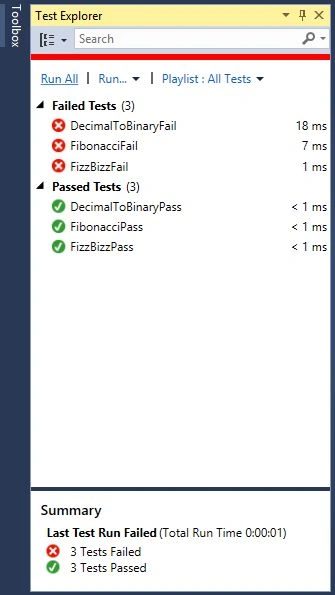
- Other ways to test
- Install NUit Download.
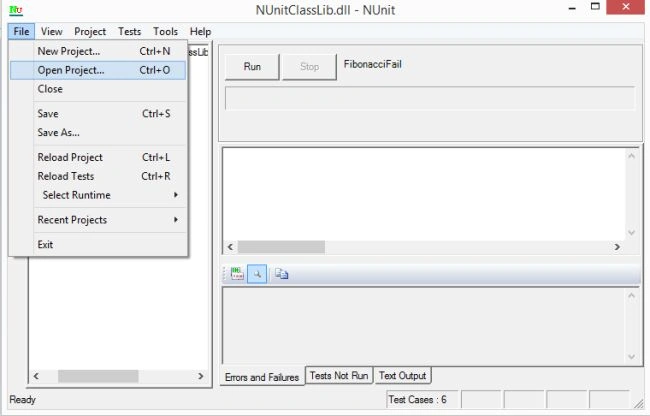
Run Nunit and open the test project dll.
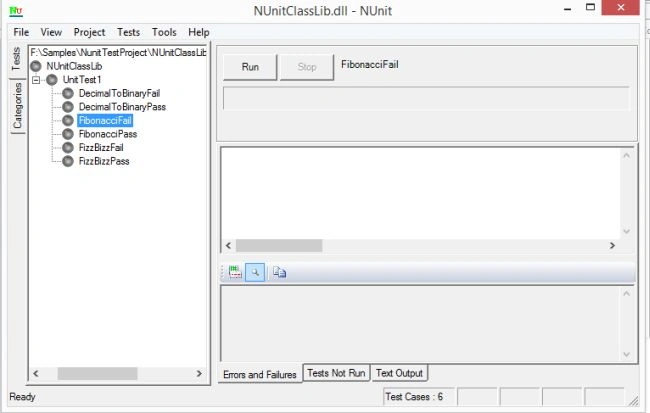
Click on run to know the output.
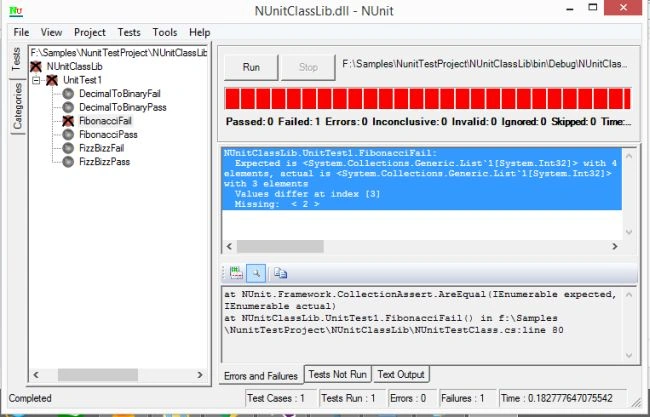

Creating NUnit Test Project
Join the conversation! Your thoughts help the community grow.
Sign in to leave a comment
It is the same account you read, post and publish with — and you will come straight back to this page.
Mahesh SinghPosted May 17, 2016, 12:23 AM
good one
Anish AnsariPosted Nov 16, 2015, 12:38 AM
NIce
Santhakumar MunuswamyPosted Nov 13, 2015, 10:13 AM
Good one
Sibeesh VenuPosted Nov 12, 2015, 4:05 AM
Nice Share
Manas MohapatraPosted Nov 12, 2015, 12:31 AM
Good Introduction..