

Introduction
In this article, we are going to cover the Onion architecture in ASP.Net 5.0. As we all know, it's a newly launched framework officially released in the month of November. Here I am sharing the link to install the SDK for .Net 5
What we are going to cover in this .NET 5 Onion Architecture?
- What is Onion Architecture
- Layers of Onion Architecture
- Implementation of Onion Architecture
- Pros and Cons
What is Onion Architecture?
A large portion of the customary design raises basic issues of tight coupling and partition of concerns. Onion Architecture was acquainted by Jeffrey Palermo with giving a superior method to construct applications in the context of better testability, practicality, and constancy. Onion Architecture tends to the difficulties confronted with 3-tier and n-tier architectures, and gives an answer for normal issues. Onion design layers associate with one another by utilizing the Interfaces.
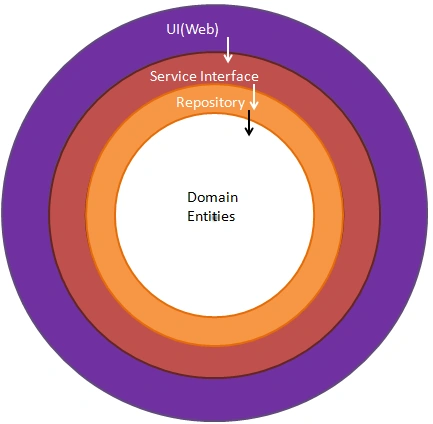
Layers of Onion Architecture
Basically, it uses the concept of Layers but they are different from 3-tier and N-tier Layers. Let's deep dive into each of these layers.
Domain Layer
It exists at the center part of the Onion architecture where it consists of all application domain entities which are nothing but database models created by code first approach. In this project, I have used Fluent API in creating the table schema using Entity Framework
Repository Layer
The repository layer acts as a middle layer between the services and Model objects and in this layer, we will maintain all the Database migrations and application Data context object and in this layer, we typically add interfaces that will consist of data access pattern of read and write operations involving a database.
Services Layer
This layer is used to communicate between the Repository layer and Main Project where it consists of exposable API's. The Service layer also could hold business logic for an entity. In this layer, the service interfaces are kept separate from their implementation for loose coupling and also the separation of concerns.
UI Layer
The UI is nothing but a front end application that will communicate with this API.
Implementation of Onion Architecture
Create a New project
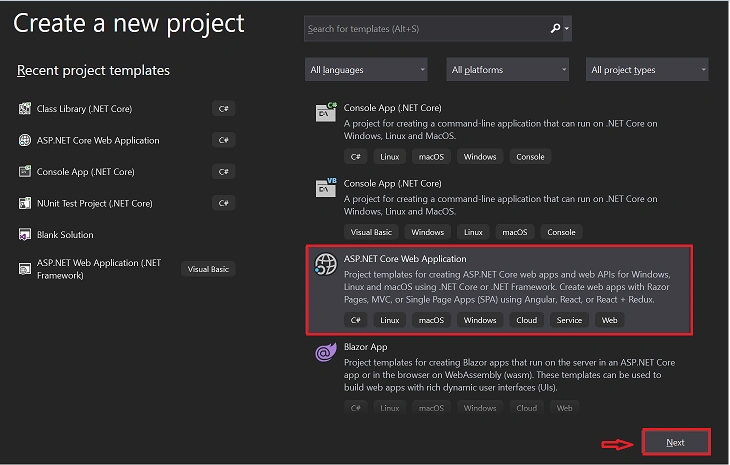
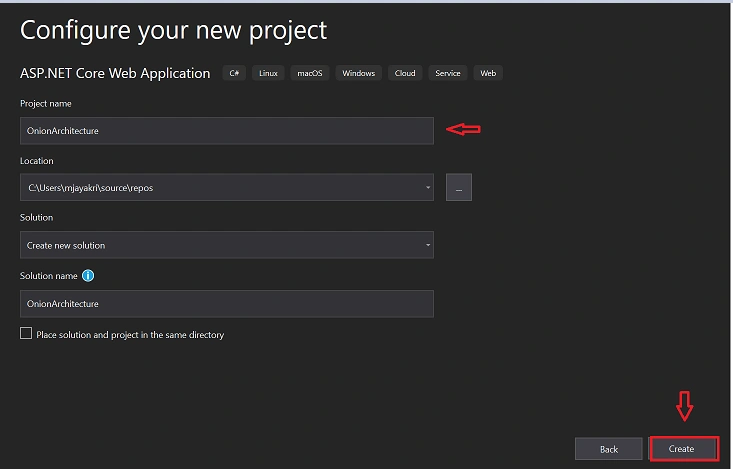
After clicking on the Next button add the project name and solution name and click on create button
Choose the ASP.Net Core 5.0 template in the drop-down and also make sure to check the Enable Open API Support for default Swagger implementation in your project
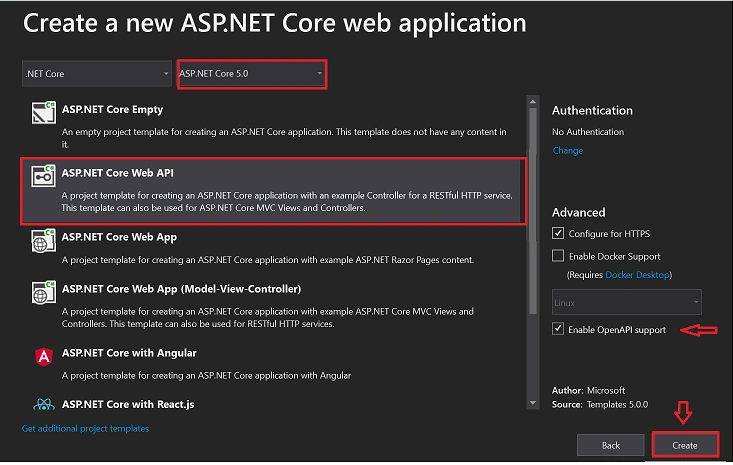
Default project will be created and now we need 3 empty Class library(.Net Core) projects inside this application as
- DomainLayer
- RepositoryLayer
- ServicesLayer
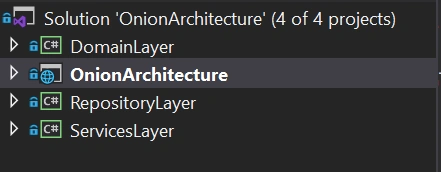
We will start first with Domain Layer
Domain Layer
Packages used in this Layer
- Microsoft.EntityFrameworkCore(5.0.3)
- Microsoft.EntityFrameworkCore.Relational(5.0.3)
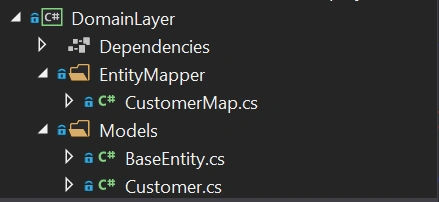
Create a folder named Models and inside that create Customer Class and BaseEntity class where customer class invokes this base entity
BaseEntity.cs
- using System;
- using System.Collections.Generic;
- using System.Text;
- namespace DomainLayer.Models
- {
- public class BaseEntity
- {
- public int Id { get; set; }
- public DateTime CreatedDate { get; set; }
- public DateTime ModifiedDate { get; set; }
- public bool IsActive { get; set; }
- }
- }
- using System;
- using System.Collections.Generic;
- using System.Text;
- namespace DomainLayer.Models
- {
- public class Customer : BaseEntity
- {
- public string CustomerName { get; set; }
- public string PurchasesProduct { get; set; }
- public string PaymentType { get; set; }
- }
- }
CustomerMap.cs
- using DomainLayer.Models;
- using Microsoft.EntityFrameworkCore;
- using Microsoft.EntityFrameworkCore.Metadata.Builders;
- namespace DomainLayer.EntityMapper
- {
- public class CustomerMap : IEntityTypeConfiguration<Customer>
- {
- public void Configure(EntityTypeBuilder<Customer> builder)
- {
- builder.HasKey(x => x.Id)
- .HasName("pk_customerid");
- builder.Property(x => x.Id).ValueGeneratedOnAdd()
- .HasColumnName("id")
- .HasColumnType("INT");
- builder.Property(x => x.PurchasesProduct)
- .HasColumnName("purchased_product")
- .HasColumnType("NVARCHAR(100)")
- .IsRequired();
- builder.Property(x => x.PaymentType)
- .HasColumnName("payment_type")
- .HasColumnType("NVARCHAR(50)")
- .IsRequired();
- builder.Property(x => x.CreatedDate)
- .HasColumnName("created_date")
- .HasColumnType("datetime");
- builder.Property(x => x.ModifiedDate)
- .HasColumnName("modified_date")
- .HasColumnType("datetime");
- builder.Property(x => x.IsActive)
- .HasColumnName("is_active")
- .HasColumnType("bit");
- }
- }
- }
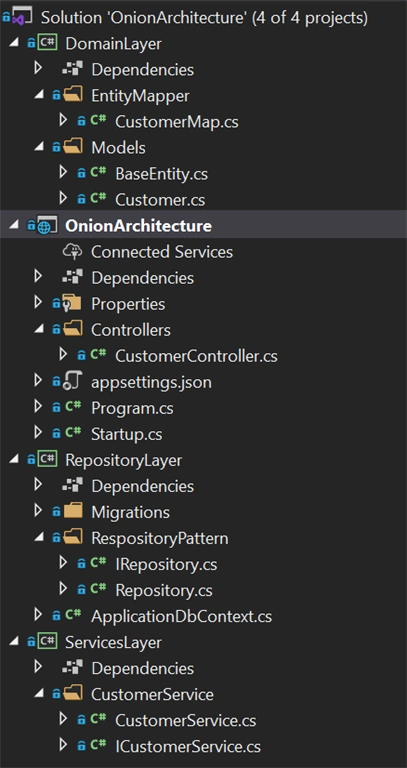
Domain Layer Structure
Repository Layer
Packages used in this Layer
- Microsoft.EntityFrameworkCore(5.0.3)
- Microsoft.EntityFrameworkCore.Design(5.0.3)
- Microsoft.EntityFrameworkCore.SqlServer(5.0.3)
- Microsoft.EntityFrameworkCore.Tools(5.0.3)
So far we designed our table in the Domain layer now will create the same table using migration commands in SQL DB. let's create the connection string in our main project.
appsettings.json
- {
- "Logging": {
- "LogLevel": {
- "Default": "Information",
- "Microsoft": "Warning",
- "Microsoft.Hosting.Lifetime": "Information"
- }
- },
- "AllowedHosts": "*",
- "ConnectionStrings": {
- "myconn": "server=YOUR Server Name; database=onionarcDb;Trusted_Connection=True;"
- }
- }
Startup.cs
- public void ConfigureServices(IServiceCollection services)
- {
- services.AddControllers();
- services.AddSwaggerGen(c =>
- {
- c.SwaggerDoc("v1", new OpenApiInfo { Title = "OnionArchitecture", Version = "v1" });
- });
- #region Connection String
- services.AddDbContext<ApplicationDbContext>(item => item.UseSqlServer(Configuration.GetConnectionString("myconn")));
- #endregion
- }
ApplicationDbContext.cs
- using DomainLayer.EntityMapper;
- using DomainLayer.Models;
- using Microsoft.EntityFrameworkCore;
- using System;
- namespace RepositoryLayer
- {
- public partial class ApplicationDbContext : DbContext
- {
- public ApplicationDbContext(DbContextOptions options) : base(options)
- {
- }
- protected override void OnModelCreating(ModelBuilder modelBuilder)
- {
- modelBuilder.ApplyConfiguration(new CustomerMap());
- base.OnModelCreating(modelBuilder);
- }
- }
- }
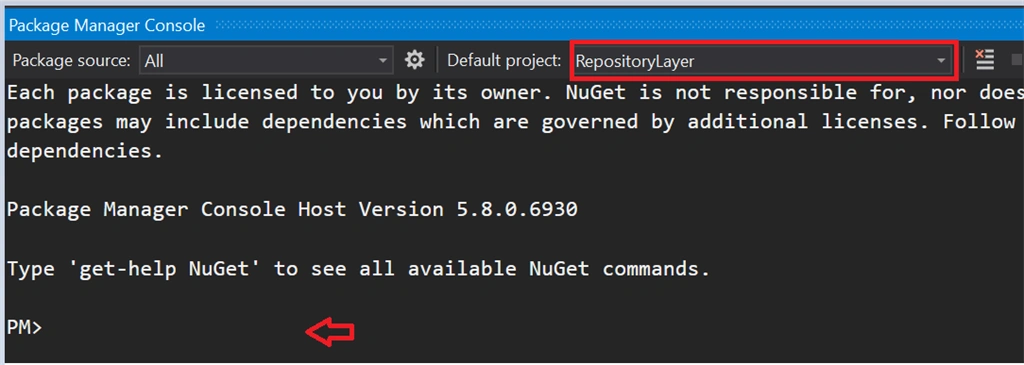
Commands to execute
- Add-Migration 'CreateCustomerTable'
- Update-database
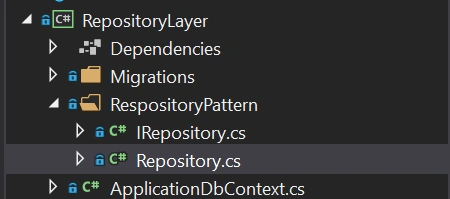
ASP.Net Core is designed in such a way to support dependency injection. Now we create a generic repository interface for the entity operations so that we can see the loosely coupled application. Below is the code snippet
IRepository.cs
- using DomainLayer.Models;
- using System;
- using System.Collections.Generic;
- using System.Text;
- namespace RepositoryLayer.RespositoryPattern
- {
- public interface IRepository<T> where T : BaseEntity
- {
- IEnumerable<T> GetAll();
- T Get(int Id);
- void Insert(T entity);
- void Update(T entity);
- void Delete(T entity);
- void Remove(T entity);
- void SaveChanges();
- }
- }
Repository.cs
Dan OrlovskyPosted Jan 25, 2023, 3:50 PM
Your domain layer should not have any dependencies. You're breaking that by adding EF Core to the domain layer. Model configuration should be relegated to the Repository layer.
Abeer GhPosted Jan 24, 2022, 12:37 PM
I'm having a problem with this .. when i call any of the api methods i got this error saying : Error: Internal Server Error .. System.OverflowException: Arithmetic operation resulted in an overflow.
Red ShirtPosted Jan 18, 2022, 12:37 PM
I have a quick question. The onion Architecture states that the UI layer should not have a direct referent to the domain layer, However, the Insert Customer function in the customer controller uses the Domainlayer.Model as a reference. Could you please explain this?
Mang MangPosted Jul 27, 2021, 12:10 PM
I don't see the difference of this onion architecture with classic 3-tier architecture(UI-BLL-DAL). And other articles say the Data access layer is in the same layer of UI.
Saroj Kumar SahuPosted Apr 6, 2021, 11:36 AM
Great explanation and thanks for sharing.
Dinesh GabhanePosted Mar 30, 2021, 5:40 AM
Really nice article. thanks for it. keep it up
Sundaram SubramanianPosted Mar 19, 2021, 11:39 PM
Good one. Thanks for writing the concepts very clear.
Cao FangshengPosted Mar 13, 2021, 2:02 AM
Nice article.very good
Hamid KhanPosted Mar 12, 2021, 7:07 PM
Very well explain