

The first step in Object Oriented Programming is to learn how to create a DLL because most of the reusable components are written in the form of a DLL (Dynamic Link Library).
.NET provides you the option to create libraries (components) that are not “.exe” executables. Instead, the Class Library project final build output will be a “.dll” that can be referenced by other applications to expose its entire functionality.
Build a DLL
Step 1
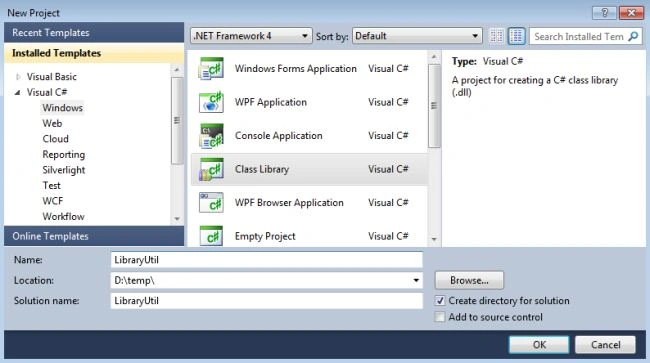
First, create a project of type “Class Library” as shown here.
Step 2
Step 2
Then we are implementing a Math class library that is responsible for calculating the sum of two numbers.
- using System;
- namespace LibraryUtil
- {
- public class MathLib
- {
- public MathLib() { }
- public int Sum(int x, int y)
- {
- int z = x + y;
- return z;
- }
- }
- }
Step 3
Build this code and you will see that a DLL file has been created rather than an exe in the root directory of the application (path = D:\temp\LibraryUtil\LibraryUtil\bin\Debug\ LibraryUtil.dll)
Consume the DLL
Step 1
Consume the DLL
Step 1
Now create another console based application where we will utilize the class library functionality.
Step 2
Step 2
Then you need to add the reference of the Math Class Library DLL file reference to access the declared class in the library DLL. (Right-click on the Reference then select Add reference then select the path of the DLL file.)
Step 3
Step 3
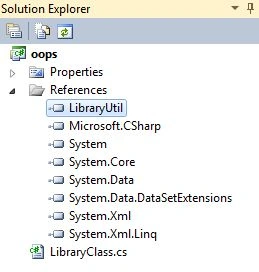
When you add the class library reference then you will see in the Solution Explorer that a new LibraryUtil is added as in the following,
Step 4
Step 4
Now add the namespace of the class library file in the console application and create the instance of the class declared in the library as follows,
- using System;
- using LibraryUtil; // add library namespace
- namespace oops
- {
- public class LibraryClass
- {
- static void Main()
- {
- //library class instance
- MathLib obj = new MathLib();
- //invoke Sum method
- Console.WriteLine(obj.Sum(12, 13));
- }
- }
- }
Step 5
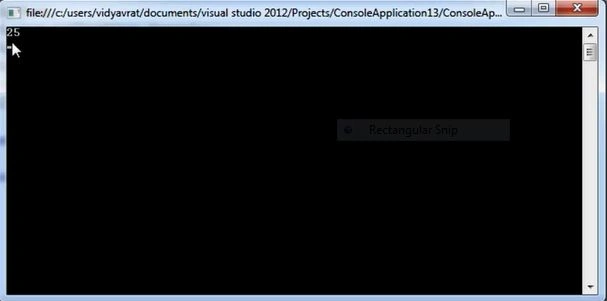
Finally, run the application and you must see the result as shown in the image below.
YouTube Video
Alain NataliniPosted Oct 11, 2018, 10:25 PM
Great article. Very useful. Thank you so much, Sir.
Rushi MehtaPosted Oct 11, 2018, 3:07 AM
Very straight and nice conept explained
Suraj KumarPosted Oct 8, 2018, 1:29 PM
Very straight forward and good explanation by @Vidya Vrat Sir.
Syed QadriPosted Oct 3, 2018, 3:56 AM
When building class library LibraryUtil, i got error Error 1 'LibraryUtil.MathLib.Sum(int, int)': not all code paths return a value C:\csharp\LibraryUtil\LibraryUtil\Class1.cs 9 20 LibraryUtil
Kaushal PareekPosted Aug 1, 2018, 10:42 PM
Short ans simple explanation. Thank you
Amit Kumar SinghPosted Jul 2, 2017, 4:32 AM
Thanks sir for sharing !!!
Sr KarthigaPosted May 6, 2016, 9:19 PM
good one sir
Gowtham RajamanickamPosted May 20, 2015, 1:17 AM
thanks for sharing
Gowtham RajamanickamPosted May 20, 2015, 1:17 AM
good one
Vithal WadjePosted Oct 6, 2014, 1:21 PM
good one,thanks for sharing