
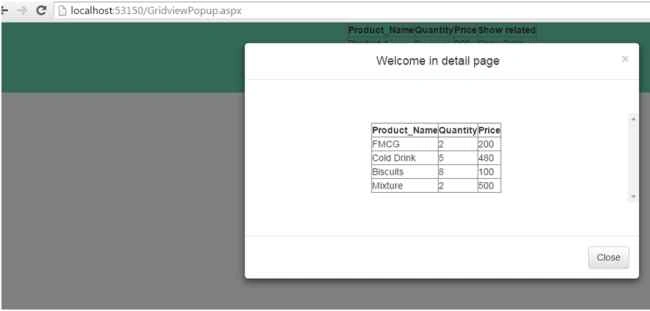
This shows a pop-up on a link button clicked inside a first grid and then open a second grid in a modal window of Bootstrap. With Bootstrap it is easy to design responsive sites. In this I’ve used the jQuery library and Bootstrap.
Background
I encountered an opportunity from the problem to show one grid view on a link button click in modal pop-up programmatically, so I wrote this article to help other developers.
Initial chamber
Step 1
Open your Visual Studio and create an empty website, provide a suitable name such as GridViewPopup.
Step 2
In Solution Explorer you get your empty website, then add web forms.
For Web Form
GridViewPopup (your empty website). Right-click and select Add New Item -> Web Form. Name it GridviewPopup.aspx.
Design chamber
Step 3
Open the GridviewPopup.aspx file and write some code for the design of the application.
First add the jQuery plugin in your head section. Here I used jquery-1.10.2.js plugin for demonstration purposes.
How to add in your page
In the head section of your web page:
- <script src="http://code.jquery.com/jquery-1.10.2.js"></script>
- Add bootstrap CSS plugin
- <link rel="stylesheet" href="https://maxcdn.bootstrapcdn.com/bootstrap/3.3.5/css/bootstrap.min.css"/>
- <!-- Optional theme -->
- <link rel="stylesheet" href="https://maxcdn.bootstrapcdn.com/bootstrap/3.3.5/css/bootstrap-theme.min.css"/>
- <!-- Optional theme -->
- <link rel="stylesheet" href="https://maxcdn.bootstrapcdn.com/bootstrap/3.3.5/css/bootstrap-theme.min.css"/>
- After this I’ve added Bootstrap plugin for working with bootstrap-
- <!-- Latest compiled and minified JavaScript -->
- <script src="https://maxcdn.bootstrapcdn.com/bootstrap/3.3.5/js/bootstrap.min.js"></script>
- Add control on your page and your page looks like below-
- div style="background-color:mediumaquamarine;">
- <asp:GridView ID="GridView1" AutoGenerateColumns="false" OnRowDataBound="GridView1_RowDataBound" runat="server">
- <Columns>
- <asp:BoundField DataField="Product_Name" HeaderText="Product_Name" />
- <asp:BoundField DataField="Quantity" HeaderText="Quantity" />
- <asp:BoundField DataField="Price" HeaderText="Price" />
- <asp:TemplateField HeaderText="Show related">
- <ItemTemplate>
- <asp:LinkButton ID="lnkdetail" href="#myModal" data-toggle="modal" runat="server">Show Data</asp:LinkButton>
- </ItemTemplate>
- </asp:TemplateField>
- </Columns>
- </asp:GridView>
- </div>

Now add a GridView to be shown in a modal popup:
- <!-- this is bootstrp modal popup -->
- <div id="myModal" class="modal fade">
- <div class="modal-dialog">
- <div class="modal-content">
- <div class="modal-header">
- <button type="button" class="close" data-dismiss="modal" aria-hidden="true">×</button>
- <h4 class="modal-title">Welcome in detail page</h4>
- </div>
- <div class="modal-body" style="overflow-y: scroll; max-height: 85%; margin-top: 50px; margin-bottom: 50px;">
- <asp:Label ID="lblmessage" runat="server" ClientIDMode="Static"></asp:Label>
- <asp:GridView ID="GridView2" runat="server"></asp:GridView>
- </div>
- <div class="modal-footer">
- <button type="button" class="btn btn-default" data-dismiss="modal">Close</button>
- </div>
- </div>
- </div>
- </div>
- <asp:LinkButton ID="lnkdetail" href="#myModal" data-toggle="modal" runat="server">Show Data</asp:LinkButton>
- <%@ Page Language="C#" AutoEventWireup="true" CodeFile="GridviewPopup.aspx.cs" Inherits="GridviewPopup" %>
- <!DOCTYPE html>
- <html xmlns="http://www.w3.org/1999/xhtml">
- <head runat="server">
- <title></title>
- <script src="http://code.jquery.com/jquery-1.10.2.js"></script>
- <link rel="stylesheet" href="https://maxcdn.bootstrapcdn.com/bootstrap/3.3.5/css/bootstrap.min.css"/>
- <!-- Optional theme -->
- <link rel="stylesheet" href="https://maxcdn.bootstrapcdn.com/bootstrap/3.3.5/css/bootstrap-theme.min.css"/>
- <!-- Latest compiled and minified JavaScript -->
- <script src="https://maxcdn.bootstrapcdn.com/bootstrap/3.3.5/js/bootstrap.min.js"></script>
- </head>
- <body>
- <form id="form1" runat="server">
- <center>
- <div style="background-color:mediumaquamarine;">
- <asp:GridView ID="GridView1" AutoGenerateColumns="false" OnRowDataBound="GridView1_RowDataBound" runat="server">
- <Columns>
- <asp:BoundField DataField="Product_Name" HeaderText="Product_Name" />
- <asp:BoundField DataField="Quantity" HeaderText="Quantity" />
- <asp:BoundField DataField="Price" HeaderText="Price" />
- <asp:TemplateField HeaderText="Show related">
- <ItemTemplate>
- <asp:LinkButton ID="lnkdetail" href="#myModal" data-toggle="modal" runat="server">Show Data</asp:LinkButton>
- </ItemTemplate>
- </asp:TemplateField>
- </Columns>
- </asp:GridView>
- </div>
- <!-- this is bootstrp modal popup -->
- <div id="myModal" class="modal fade">
- <div class="modal-dialog">
- <div class="modal-content">
- <div class="modal-header">
- <button type="button" class="close" data-dismiss="modal" aria-hidden="true">×</button>
- <h4 class="modal-title">Welcome in detail page</h4>
- </div>
- <div class="modal-body" style="overflow-y: scroll; max-height: 85%; margin-top: 50px; margin-bottom: 50px;">
- <asp:Label ID="lblmessage" runat="server" ClientIDMode="Static"></asp:Label>
- <asp:GridView ID="GridView2" runat="server"></asp:GridView>
- </div>
- <div class="modal-footer">
- <button type="button" class="btn btn-default" data-dismiss="modal">Close</button>
- </div>
- </div>
- </div>
- </div>
- </center>
- <!-- end -->
- </form>
- </body>
- </html>
Adding namespaces to the page:
- using System;
- using System.Collections.Generic;
- using System.Data;
- using System.Linq;
- using System.Web;
- using System.Web.UI;
- using System.Web.UI.WebControls;
- using System;
- using System.Collections.Generic;
- using System.Data;
- using System.Linq;
- using System.Web;
- using System.Web.UI;
- using System.Web.UI.WebControls;
- public partial class GridviewPopup : System.Web.UI.Page
- {
- protected void Page_Load(object sender, EventArgs e)
- {
- if (!IsPostBack)
- {
- BindGridView1();
- }
- }
- protected void BindGridView1() {
- DataSet ds = new DataSet();
- DataTable dt;
- DataRow dr;
- DataColumn pName;
- DataColumn pQty;
- DataColumn pPrice;
- int i = 0;
- dt = new DataTable();
- pName = new DataColumn("Product_Name", Type.GetType("System.String"));
- pQty = new DataColumn("Quantity", Type.GetType("System.Int32"));
- pPrice = new DataColumn("Price", Type.GetType("System.Int32"));
- dt.Columns.Add(pName);
- dt.Columns.Add(pQty);
- dt.Columns.Add(pPrice);
- dr = dt.NewRow();
- dr["Product_Name"] = "Product 1";
- dr["Quantity"] = 2;
- dr["Price"] = 200;
- dt.Rows.Add(dr);
- dr = dt.NewRow();
- dr["Product_Name"] = "Product 2";
- dr["Quantity"] = 5;
- dr["Price"] = 480;
- dt.Rows.Add(dr);
- dr = dt.NewRow();
- dr["Product_Name"] = "Product 3";
- dr["Quantity"] = 8;
- dr["Price"] = 100;
- dt.Rows.Add(dr);
- dr = dt.NewRow();
- dr["Product_Name"] = "Product 4";
- dr["Quantity"] = 2;
- dr["Price"] = 500;
- dt.Rows.Add(dr);
- ds.Tables.Add(dt);
- GridView1.DataSource = ds.Tables[0];
- GridView1.DataBind();
- }
- //for pop-up gridview
- protected void BindGrid2() {
- DataSet ds = new DataSet();
- DataTable dt;
- DataRow dr;
- DataColumn pName;
- DataColumn pQty;
- DataColumn pPrice;
- int i = 0;
- dt = new DataTable();
- pName = new DataColumn("Product_Name", Type.GetType("System.String"));
- pQty = new DataColumn("Quantity", Type.GetType("System.Int32"));
- pPrice = new DataColumn("Price", Type.GetType("System.Int32"));
- dt.Columns.Add(pName);
- dt.Columns.Add(pQty);
- dt.Columns.Add(pPrice);
- dr = dt.NewRow();
- dr["Product_Name"] = "FMCG";
- dr["Quantity"] = 2;
- dr["Price"] = 200;
- dt.Rows.Add(dr);
- dr = dt.NewRow();
- dr["Product_Name"] = "Cold Drink";
- dr["Quantity"] = 5;
- dr["Price"] = 480;
- dt.Rows.Add(dr);
- dr = dt.NewRow();
- dr["Product_Name"] = "Biscuits";
- dr["Quantity"] = 8;
- dr["Price"] = 100;
- dt.Rows.Add(dr);
- dr = dt.NewRow();
- dr["Product_Name"] = "Mixture";
- dr["Quantity"] = 2;
- dr["Price"] = 500;
- dt.Rows.Add(dr);
- ds.Tables.Add(dt);
- GridView2.DataSource = ds.Tables[0];
- GridView2.DataBind();
- }
- protected void GridView1_RowDataBound(object sender, GridViewRowEventArgs e)
- {
- if (e.Row.RowType == DataControlRowType.DataRow)
- {
- string username = Convert.ToString(DataBinder.Eval(e.Row.DataItem, "Product_Name"));
- LinkButton lnkbtnresult = (LinkButton)e.Row.FindControl("lnkdetail");
- BindGrid2();
- }
- }
- }

Figure 1: On initial loading

Figure 2: On link button click
I hope you liked this. Have a good day. Thank you for reading.

Abhilash ChalisseryPosted Mar 16, 2021, 4:12 AM
This is not practical in my case though. I need to show the data details of particular row. This is just making the pop up visible with already loaded data. Is there some code which can be dynamic on the details for the particular row click.
S PPosted May 18, 2017, 3:32 PM
I want to fill data in the textbox on click of row of Gridview in bootstrap modal popup.
Vipul MalhotraPosted Sep 11, 2015, 4:48 AM
nice
Humayun Kabir MamunPosted Sep 11, 2015, 2:38 AM
Nice...
Yashwanth MuthineniPosted Aug 31, 2015, 8:39 AM
Nice Share sir
Amol JadhaoPosted Aug 26, 2015, 4:37 AM
Good one Upendra
Rajeesh MenothPosted Aug 26, 2015, 12:56 AM
Good One Buddy
Karthikeyan KPosted Aug 26, 2015, 12:07 AM
Good one sir..Thanks for share
Vaikesh K PPosted Aug 26, 2015, 12:04 AM
Great work
Pankaj Kumar ChoudharyPosted Aug 25, 2015, 9:21 PM
Nice Explain Sir.........