

Azure Files is a cloud-based file storage solution that allows users to mount file shares on Windows, Linux, and macOS machines. It provides seamless access to files over the Server Message Block (SMB) and Network File System (NFS) protocols. Azure Files is ideal for scenarios requiring shared storage across multiple virtual machines or on-premises systems. In this article, we will explore a real-time use case of Azure Files and demonstrate how to set up and use it via the Azure Portal.
Key Features of Azure Files
- Fully Managed File Shares: No need to maintain file servers.
- Multiple Access Methods: Supports SMB, NFS, and REST APIs.
- Security & Compliance: Integration with Azure Active Directory and RBAC.
- Scalability & Performance: Supports up to 100 TiB per file share.
- Snapshot Support: Enables file versioning and backup.
Real-Time Scenario: Shared Storage for an Enterprise Application
Use Case
A company runs a web application hosted on multiple Azure Virtual Machines (VMs). These VMs need access to shared configuration files, logs, and user-uploaded content. To ensure consistency and high availability, the company decides to use Azure Files to store and share these files among all VMs.
Solution
- Create an Azure Files share in a storage account.
- Mount the file share on each VM.
- Configure access permissions and networking.
- Use Azure File Sync to synchronize files between on-premises storage and Azure.
Setting Up Azure Files in Azure Portal
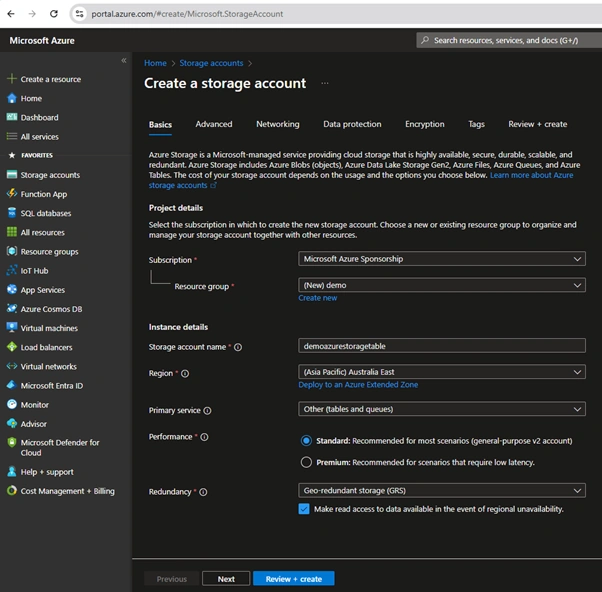
Step 1. Create a Storage Account.
- Sign in to the Azure Portal.
- Navigate to Storage Accounts and click + Create.
- Provide details.
- Subscription: Select your Azure subscription.
- Resource Group: Choose or create a resource group.
- Storage Account Name: Enter a unique name.
- Region: Choose a region close to your users.
- Performance: Select Standard or Premium based on needs.
- Redundancy: Choose an appropriate redundancy option.
- Click Review + Create, then Create.
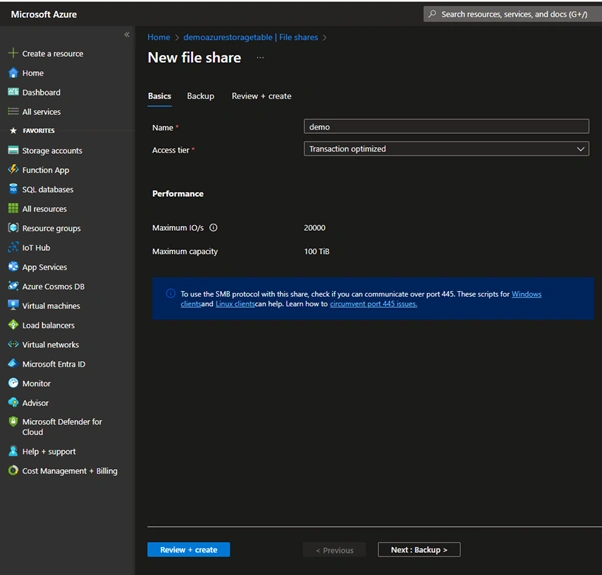
Step 2. Create an Azure File Share.
- Navigate to your Storage Account.
- Under Data Storage, select File Shares.
- Click + File Share.
- Provide a Name and set the Quota (optional).
- Click Create.
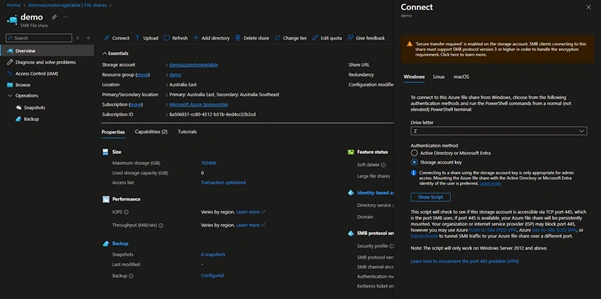
Step 3. Mount Azure File Share on a Virtual Machine.
For Windows
- Open the Azure Portal and go to your File Share.
- Click Connect and choose Windows.
- Copy the PowerShell script provided.
- Run the script in PowerShell on the VM to mount the file share.
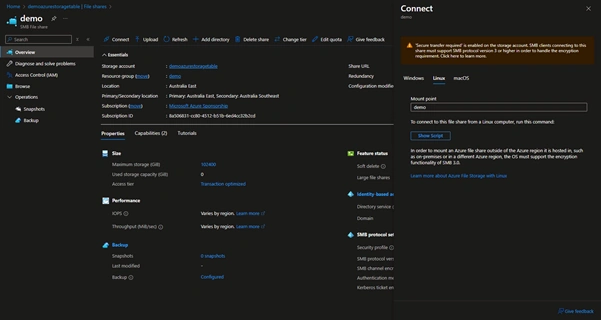
For Linux
- Select Linux in the Connect section.
- Install required utilities: sudo apt install cifs-utils (for Ubuntu/Debian).
- Use the provided mount command to mount the share.
Step 4. Configure Access Control.
- Navigate to your Storage Account.
- Under Access Control (IAM), assign roles to users or groups.
- Use a Shared Access Signature (SAS) for temporary access.
Step 5. Enable Azure File Sync (Optional).
- Install the Azure File Sync agent on a Windows Server.
- Register the server with Azure.
- Create a Sync Group in the Azure Portal.
- Add the Azure File Share and the on-premises server to the sync group.
Best Practices for Azure Files
- Use Azure AD authentication for enhanced security.
- Leverage soft delete and snapshots for data recovery.
- Monitor usage and performance with Azure Monitor.
- Optimize costs by selecting the right storage tier.
- Automate mounting using startup scripts in VMs.
Conclusion
Azure Files is an excellent solution for applications requiring scalable, secure, and highly available shared storage. By following this guide, you can easily set up and integrate Azure Files into your environment, enabling seamless file sharing across cloud and on-premises systems.
Join the conversation! Your thoughts help the community grow.