

Introduction
In this article, we will discuss a new way of declaring and initializing the out parameters in C# 7.0. This article can be used by beginners, intermediate, and professionals.
We are going to cover:
- What is the Out parameter?
- Scope of Out parameter.
- How to ignore the Out parameter?
- Out parameter with Var datatype.
- Out parameter with TryParse.
- Important points of Out parameter.
What is Out parameter?
It is normally used when the method wants to return more than one value. It is a keyword in C# that is used to pass as an argument to a method as a reference type to get value from the method.
Before C# 7.0, if we want to pass the out parameter to the method, we need to declare the variable first and then can pass it into the method. See below code before C# 7.0.
using System;

namespace OutVarible
{
    class Program
    {
        static void Main(string[] args)
        {
            int sum, sub;
            double mul, div;
            Math(5, 10, out sum, out sub, out mul, out div);
            Console.WriteLine("Sum : {0}, Sub :{1} , Mul :{2}, Div : {3}", sum, sub, mul, div);
            Console.ReadLine();
        }

        public static void Math(int a, int b , out int sum, out int sub, out double mul, out double div)
        {
            sum = a + b;
            sub = b - a;
            mul = a * b;
            div = b / a;
        }
    }
}
The output of the above code,

The new way of declaring and using out parameter in C# 7.0 is below,
using System;

namespace OutVarible
{
    class Program
    {
        static void Main(string[] args)
        {
            Math(5, 10, out int sum, out int sub, out double mul, out double div);
            Console.WriteLine("Sum : {0}, Sub :{1} , Mul :{2}, Div : {3}", sum, sub, mul, div);
            Console.ReadLine();
        }

        public static void Math(int a, int b , out int sum, out int sub, out double mul, out double div)
        {
            sum = a + b;
            sub = b - a;
            mul = a * b;
            div = b / a;
        }
    }
}
Output
Based on the above code, I can say that we can pass the out parameter to the method without declaring it.
Scope of the Out parameter
See below code to understand the scope of the out parameter,
using System;

namespace OutVarible
{
    class Program
    {
        static void Main(string[] args)
        {
            string str = "Kirtesh";
            if(int.TryParse(str,out int i))
            {
                Console.WriteLine(i);
            }
            Console.WriteLine(i);
            Console.ReadLine();
        }
    }
}
In the above code, int variable "i" is declared in the if block. But we can see that variable "i" can be used outside of the if block.
How to ignore the Out parameter?
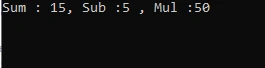
Sometimes we need to ignore out parameters. Let's try to understand this concept using the above Math method. Suppose we want only Sum, Sub, and Mul but don’t want Div, in this case, we will pass out with underscore(out _) in place of Div out parameter.
Let's see the below code,

Kirtesh ShahPosted Jun 2, 2021, 3:06 PM
Thanks Pranam
Pranam BhatPosted Jun 2, 2021, 1:25 PM
Great article ...