Have you gotten a requirement to override a system ribbon or command button? If yes then this article will help you to implement your requirement.
Requirement: Let's say we have a requirement to prompt the user before saving the record and we need to save or cancel the save operation.
Solution: We can create a custom button to replicate the out-of-the-box button, we will be calling the same method that is called from the out-of-the-box button. Once our button is ready we will hide the out-of-the-box button. To implement our requirement use the following procedure.
Download and install the RibbonWorkBench solution.
Create a Demo solution and add an account entity to the solution.
Note: You can follow our previous article to get the RibbonWorkBench solution, to create the demo solution and add existing entities. We will override the Save button on the account entity.
Open the Demo solution and add a new web resource by navigating to
Components ->Web Resources -> New.
Fill in the following properties and click on the Text Editor button:
- Name: OnSave.js
- Display Name: OnSave.js
- Type: Script (Jscript)
At this point create a blank function as in the following and Save and Publish the web resource.
- function OverrideSave()
- {
-
-
Now we will create a custom button and will copy the properties or save button. Using the following procedure:
- Open RibbonWorkBench and select our Demo solution
- Drag a Button from the Toolbox and leave it next to the Save button under the Form section
- Right-click on the system Save button and select Customize Command
- Copy all properties system Save button to our custom button except the Sequence and CommandCore properties (we need to copy and paste these properties one by one)
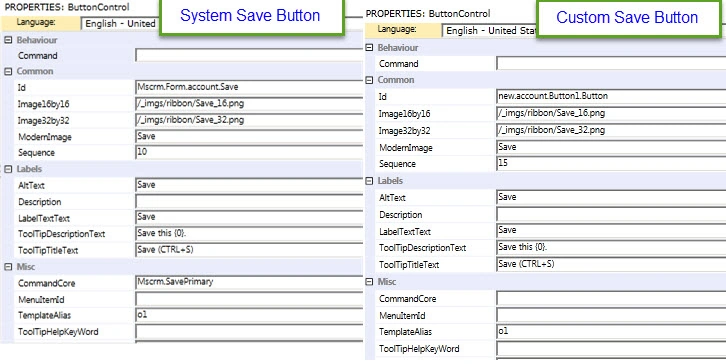
Now we need to check the command associated with the system save button and need to see which function and parameter is used for that. Use the following procedure.
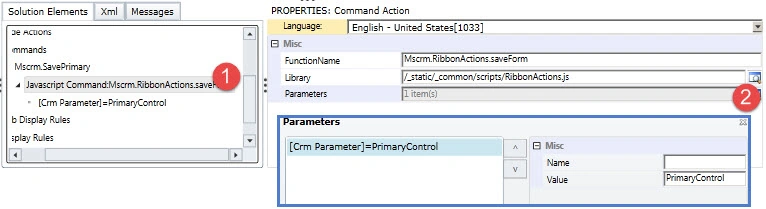
Select Mscrm.SavePrimary under Commands and click on Actions lookup to check for function name and parameter, we got this command name from the Save button commandcore property.
- Right-click on Command and select Add New, we need to add a command for your custom Save button.
- Click on Actions lookup then click on Add and select JavaScript Function Action
- Write our function name and select our web resource
- Click on Parameters lookup then click on Add and select Crm Parameter
- Select Primary Control under the Value drop down
It should look as in the following:

- Select our custom Save button and select our command name under the command drop down
- Right-click on the system Save button and select the Hide Button option
- Click on the Publish button to publish your changes
- Open our JavaScript web resource and change the function definition as in the following
- function OverrideSave()
- {
- var response=confirm("Do want to save ??");
- if(response==true){
-
- Mscrm.RibbonActions.saveForm();
- } }
Save and
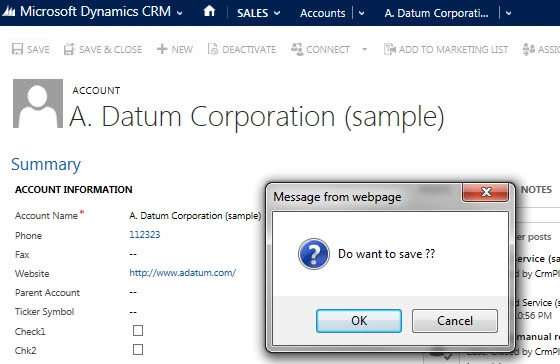
Publish web resource and open any account record. Change some field value and click on the Save button, you should get a prompt as in the following:


Vithal WadjePosted Apr 9, 2015, 2:20 PM
nice keep it up
Santhakumar MunuswamyPosted Apr 9, 2015, 2:20 PM
Good