Introduction
As we know, the Angular library contains many different modules inside it. It has three declarable classes, namely - components, directives, and pipes. In this article, we will discuss Angular Pipes – How to create and use them in our application.
While working on any client-side application, data formatting plays an important role. Many times we get stuck while formatting our output to some specific format without changing the actual value of our variable.
To overcome these types of situations, Angular has come up with the pipe. Using pipes we can manipulate our output – without changing the actual value. Pipe operator “|” is used to apply pipes in HTML templates.
There are two types of pipes,
- Built-in pipes
- Custom pipes
Built-in Pipes
Angular provides some pipes which are ready to use, such as date pipe, currency pipe, uppercase pipe, lowercase pipe etc.
Example,
Uppercase Pipe
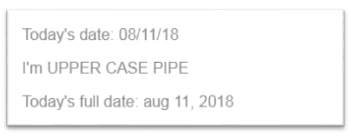
Yes, uppercase pipes work like this!! – It converts the value to uppercase within a template.
- <p>Today's date: {{ dateToday | date:"MM/dd/yy"}} </p>
- <p>I'm {{ pipename | uppercase}}</p>
- <p>Today's full date: {{ dateToday | date | lowercase }} </p>
Let’s try this in our component,
- import { Component } from '@angular/core';
- @Component({
- selector: 'app-pipe-example',
- template: `
- <p>Today's date: {{ dateToday | date:"MM/dd/yy" }} </p>
- <p>I'm {{ pipename | uppercase}}</p>
- <p>Today's full date: {{ dateToday | date | lowercase }} </p>
- `
- })
- export classPipeExampleComponent {
- dateToday = newDate();
- pipename = "upper case pipe"
- }
Output
Custom Pipes
We can also create own pipes in Angular as per our requirement. Pipes are a declarable class in Angular.
The @Pipe decorator is used to create pipes and to use it, we first have to declare them inside the declaration array of Module (it can either be root module or another module – it depends on the project), after that, it will be available to use inside the template.
To create pipe – we have to implement PipeTransform class in our custom pipe class – which has a transform method.
Example
So, let’s try to create a custom pipe.
Requirement
Create a repeat pipe which will take a value and a number, say n, and repeat the value n a number of times.
- import{Pipe, PipeTransform} from '@angular/core';
- @Pipe({name: 'repeat'})
- exportclass RepeatPipe implements PipeTransform {
- transform(value: any, times: number) {
- returnrepeat(times);
- }
- }
Line #1
Import statement – importing Pipe and PipeTransform interface which is available in ‘@angular/core’ library.
Line #3
Declaring that the exported class will be a pipe using @Pipe decorator and giving a name to a pipe which can be used while applying it into the template.
Line #5
Exporting a class which implements a PipeTransform interface and inside the class, there is one method called transform and it contains all the logic for repeat pipe.
Let’s try to add repeat pipe in component,
- import { Component } from '@angular/core';
-
- @Component({
- selector: 'app-custom-pipe',
- template: `
- <p>Check repeat pipe: {{ 'ok' | repeat:3 }} </p>
- `
- })
- export class CustomPipeComponent {
- }
Line #6
Adding value on the template using interpolation. Also, I added a repeat pipe which has a parameter of three.
Output
Wow! That’s what we were expecting – The string ‘ok’ repeats 3 times (value should repeat on the template, n number of times).
Summary
Pipes are used for doing formatting on HTML templates, and it makes it really easy to display the data in the format you want, without changing the actual value.
Angular provides some basic built-in pipes – like Datapipe, DecimalPipe, CurrencyPipe, etc. - Checkout list of available built-in pipes. Also, we can create custom pipes in the application as per our requirement.





Amit MakhijaPosted Dec 10, 2018, 3:25 AM
How to bind a selected value of one dropdownlist in another dropdownlist in AngularJS?
Talaviya BhavdipPosted Oct 1, 2018, 10:56 PM
Good article Srashti Jain
Amit Kumar SinghPosted Oct 1, 2018, 1:33 PM
Nice one Srashti .... Thanks for sharing