

Page Class
Page class generally contains various properties; you can use those properties to implement your page based navigation.
- NavigationService- It returns a reference to the NavigationService object and this reference is used to navigate among the pages in your application.
NavigationService nav;
Nav = NavigationService.GetNavigationService(this);
- KeepAlive- This property is generally used to specify whether the page object should be kept in the memory space or not. It remains in the page memory until he navigates to another page.
xmlns:x="http//schemas.microsoft.com/winfx/2006/xaml" x:Class="test"
KeepAlive="True"
- ShowNavigationUI- This property is used to specify whether the forward and backward controls are displayed in all pages of the application
xmlns:x="http//schemas.microsoft.com/winfx/2006/xaml" x:Class="test"
KeepAlive="True"
Properties that cusotmize appearance of pages.
Page class contains certain properties that mostly involve in the appearance of the pages. Those properties are discussed as below.
- BackGround- Generally used to specify the background color of the page.
- Content- it contains the content of the page. Here the page can contain only one child element, so all the content will be in the single layout.
- Title- This property is used to identify the page in the navigation history of the application.
Implementing Navigation
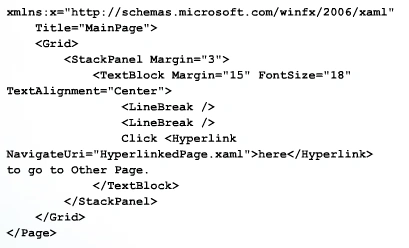
Hyperlinks are the easiest way to implement the navigation. It should be embedded in the text, so that they were placed in the elements that support them such as TextBlock. The following is the sample code for that.
Events Used in Navigation System
- Navigating- when its about to start navigation.
- Navigated- when navigation has begun.
- NavigationProgress- when navigation is in progress.
The above article has covered the very basic things that are required to develop a page based navigation system in WPF.
Join the conversation! Your thoughts help the community grow.