

Introduction
Partial views render a portion of View content. A partial view is the same as a user control of a web form application. It is reusable like a user control. We can render a partial view using a HTML helper, they provide a method to render partial views. We can call a partial view using Html.Partial or Html.RenderPartial. Html.Partial renders the specified partial view as an HTML-encoded string, which means it returns the string. Html.RenderPartial renders the specified partial view using the specified HTML helper and it returns void.
In our example we a create layout with header, sidebar, content area and footer. Since a sidebar will be reused in the entire application, we create a partial view for that. Whenever we want to reuse a view in a web application, we should go with a partial view. Let's see a step-by-step implementation of partial view in layout.
- Create a MVC project from the "Empty" template.
Right-click on "Controllers" and select "Add" >> "Controller...".
- Select "MVC 5 Controller - Empty" to add an empty controller. Click on the "Add" button.

- Name the controller as in the following:
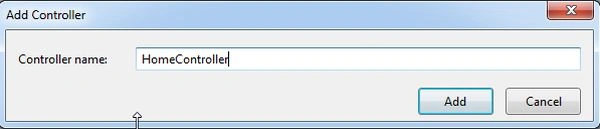
- Now we need to create a view.
Right-click on "Index" and select "Add View...".
- Name the view and select "Empty (without model)" as the template.
Click on the "Add" button.
- Right-click on "Views" and select "Add" >> "New Folder".

- Name the folder "Shared", this will create a "Shared" folder under the view.
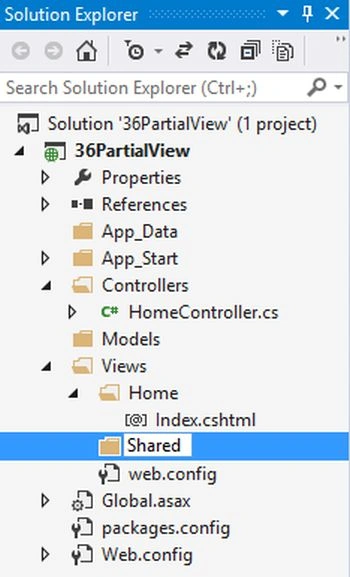
- Right-click on the "Shared" folder and select "Add" >> "View…".

- Name the view "_Layout" and select "Empty (without model)" as the template.

- Design your desired layout in _Layout.cshtml.
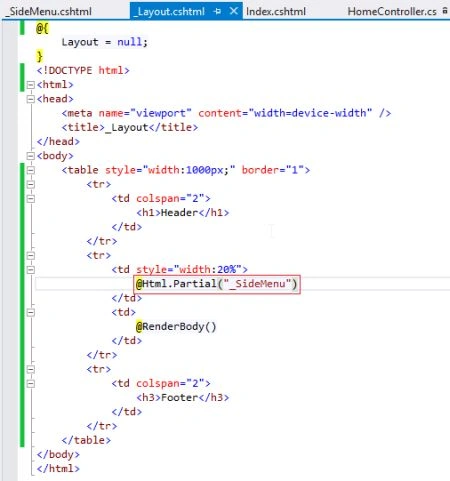
Here we create a header, footer, side bar and content area. The header, footer and side bar should be shown in all pages, so we create them in _Layout.cshtml. The variable portion of the site is the content area, where content is changed dynamically. In ASP.NET we use a "ContentPlaceHolder", in the same way in MVC we use "RenderBody()".
- Attach a layout page to Index.cshtml. Set the link of _Layout.cshtml in Index.cshtml.
Add the content in the body part of Index.cshtml.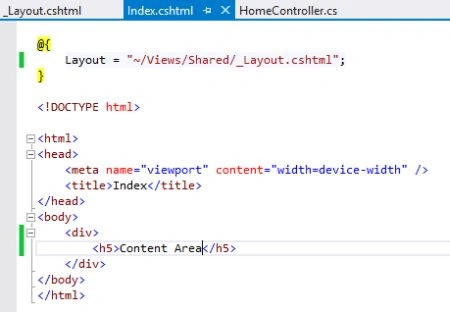
- Run the project and we can see the designed layout on the browser.
Now we want to render a partial view for the side bar portion.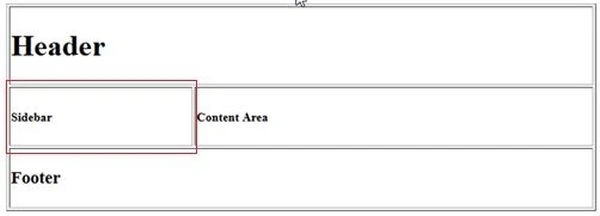
- Right-click on the "Shared" folder and select "Add" >> "View…".

- Name the view "_SideMenu" and select "Empty (without model)" as the template.
Check "Create as a partial view" since it should be a partial view.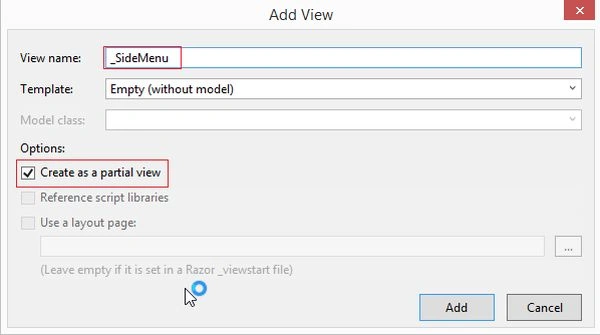
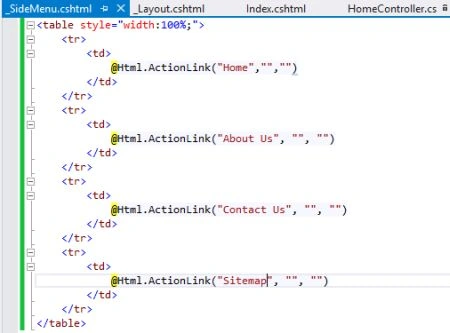
- Design side menu portion, in other words add some page links to this portion.
- Call a partial view using Html helper in the side bar table column. Here we can also use Html.RenderPartial instead of Html.Partial.
- Run the project and you can see the partial view is rendered in the side bar.

Alam KhanPosted Jan 19, 2018, 4:46 AM
Such a helpful article for me .....thnks sir
Manav PandyaPosted Jan 31, 2017, 12:54 AM
Such a helpful article for me ,,thanks sir
Munesh SharmaPosted May 28, 2016, 4:37 AM
nice
Mukesh KumarPosted Oct 25, 2015, 12:40 AM
Good job sir
yosr jemiliPosted Jul 9, 2015, 10:57 AM
nice article.is it a good idea to use your approach if I have only one page that will use the left menu and the right side will change according to the menuitem clicked.
praveen SinghPosted Nov 12, 2014, 4:45 AM
Thanks for providing this example..
Chandradev PrasadPosted Nov 11, 2014, 7:08 AM
Nice example.