
Overview
This solution contains two web parts where we are passing the data between them by changing the data into one web part that will reflect the change into the other web part. They are the connected web parts.
Implementation
- Create the directory with the name ‘Connected Web parts’.
- Create the solution by running Yeoxman generator using the below command.

- The generator will ask the below information about the new SPFx solution.

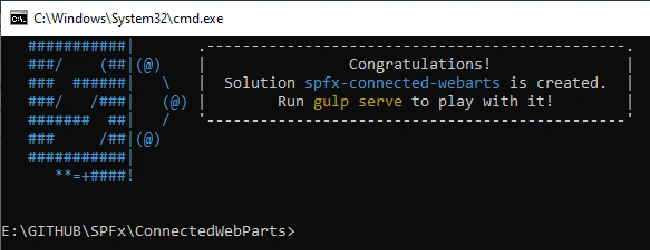
- Yeoman generator will scaffold the process to add the node packages to the existing SPFx solution. Once it is added to the solution, it will be shown with the below message.
- Create another web part, which will receive the data from the Source connected web part.
- To create the new web part into the existing solution, run the below command.
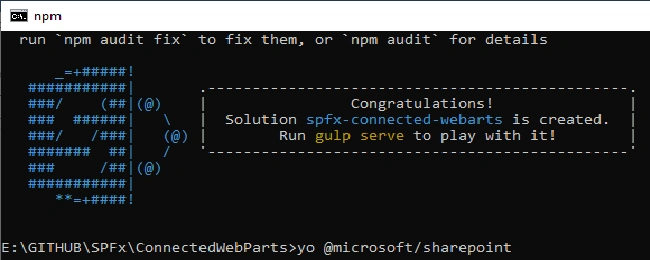
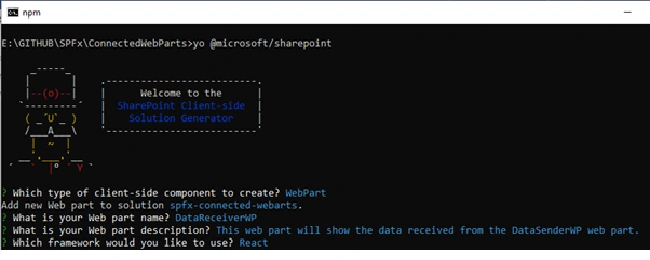
- It will ask which type of component to create. We will use the ‘WebPart’ component in our case as shown below with providing the below information about the new web part.
- Once the web part is created, open the solution code in the code editor (like Visual Studio Code) using the below command.

NPM Packages
Run the below command to add the packages into the solution.
- npm install rx-lite --save
- npm install @types/rx-lite --save
Update the Solution
Create the separate state files (‘IDataSenderWpState.ts’ and ‘IDataReceiverWpState.ts’) for both the web parts.
Create the new folder ‘RxJsEventEmitter’ inside the ‘webparts’ folder and create the ‘IEventData.ts’ and ‘RxJsEventEmitter.ts’ in the ‘RxJsEventEmitter’ folder.
The code structure for the current solution will be as below,

Open the ‘IDataSenderWpState.ts’ and define the state object as shown below.
- export interface IDataSenderWpState {
- userName: string;
- password:string;
- }
Open the ‘IDataReceiverWpState.ts’ and define the state object as shown below.
- export interface IDataReceiverWpState {
- userName: string;
- password:string;
- }
Open ‘IEventData.ts’ and copy the below code.
- export interface IEventData {
- sharedUserName: string;
- sharedUserPassword:string;
- }
- export default IEventData;
Open ‘RxJsEventEmitter.ts’ and copy the below code.
- import { Subject } from "rx-lite";
- import IEventData from "./IEventData";
- export class RxJsEventEmitter {
- public subjects: Object;
- private constructor() {
- this.subjects = {};
- }
- public static getInstance(): RxJsEventEmitter
- {
- if (!window["RxJsEventEmitter"]) {
- window["RxJsEventEmitter"] = new RxJsEventEmitter();
- }
- return window["RxJsEventEmitter"];
- }
- public emit(name: string, data: IEventData): void
- {
- if (!this.subjects[name]) {
- this.subjects[name] = new Subject();
- }
- this.subjects[name].onNext(data);
- }
- public on(name: string, handler: any): void
- {
- if (!this.subjects[name]) {
- this.subjects[name] = new Subject();
- }
- this.subjects[name].subscribe(handler);
- }
- }
Open the 'DataSenderWp.tsx' file and add the below imports.
- import { IDataSenderWpState } from './IDataSenderWpState';
- import IEventData from '../../RxJsEventEmitter/IEventData';
- import { RxJsEventEmitter } from '../../RxJsEventEmitter/RxJsEventEmitter';
Update the render method and add the other functions. The code for the 'DataSenderWp.tsx' is as below. On change of the UserName or password text field value update, it will pass the data into the other web part using the 'SendData' method. Also, define the object of 'RxJsEventEmitter' inside the class.
- import * as React from 'react';
- import styles from './DataSenderWp.module.scss';
- import { IDataSenderWpProps } from './IDataSenderWpProps';
- import { escape } from '@microsoft/sp-lodash-subset';
- import { IDataSenderWpState } from './IDataSenderWpState';
- import IEventData from '../../RxJsEventEmitter/IEventData';
- import { RxJsEventEmitter } from '../../RxJsEventEmitter/RxJsEventEmitter';
- export default class DataSenderWp extends React.Component<IDataSenderWpProps, IDataSenderWpState> {
- private readonly eventEmitter: RxJsEventEmitter = RxJsEventEmitter.getInstance();
- public constructor(props:IDataSenderWpProps, state:IDataSenderWpState){
- super(props);
- this.state = {
- userName: "",
- password : ""
- };
- }
- public render(): React.ReactElement<IDataSenderWpProps> {
- return (
- <div className={styles.dataSenderWp}>
- <h2>Sender Web Part</h2>
- <div>User Name:</div>
- <div>
- <input type="text" value={this.state.userName} onChange={this._onChangeUserName.bind(this)} />
- </div>
- <div>Password:</div>
- <div>
- <input type="text" value={this.state.password} onChange={this._onChangePassword.bind(this)} />
- </div>
- </div>
- );
- }
- private _onChangeUserName(event: any)
- {
- this.setState({
- userName : event.target.value
- });
- this.sendData(event.target.value, this.state.password);
- }
- private _onChangePassword(event: any)
- {
- this.setState({
- password : event.target.value
- });
- this.sendData(this.state.userName, event.target.value);
- }
- private sendData(userName:string, password:string): void
- {
- var eventBody = {
- sharedUserName: userName,
- sharedUserPassword:password
- } as IEventData;
- this.eventEmitter.emit("shareData", eventBody);
- }
- }

Aditya ReddyPosted Jul 2, 2020, 1:10 AM
Nicely explained, thanks for sharing.