Introduction
In this article we will learn how to integrate the PayU Money Payment gateway with our Asp.net MVC project. Along with that we will also learn how to use PayU Money, and what MerchantID, SaltID and many more are. So let's start our journey.
Prerequisite
Please install the latest version of Visual Studio before reading this article.
Procedure
Click here to see the
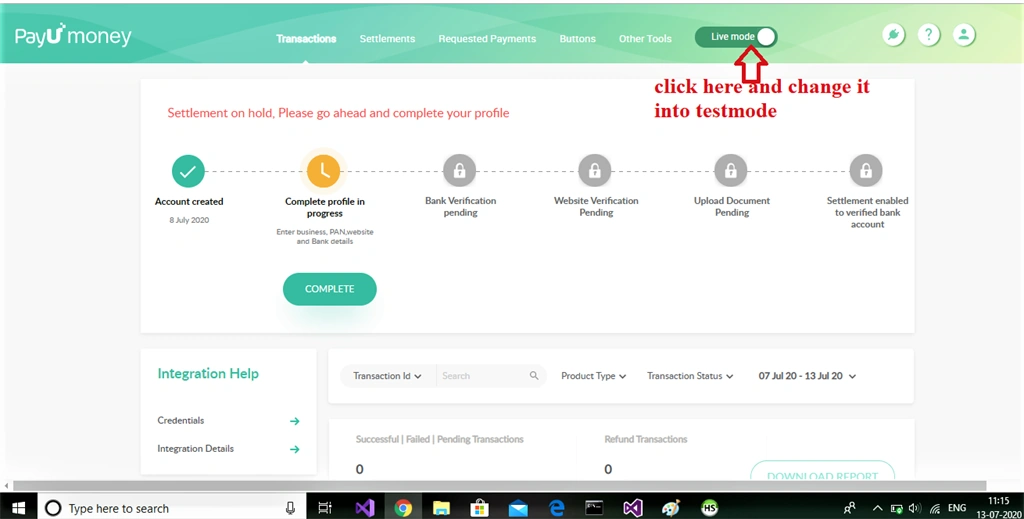
PayU Money website. You just have to create a new account or log in to it. Now switch to test mode from live mode because we are creating the project for testing purposes. You can also link your bank account with this and do the transaction with your project. All procedures we are doing here will be the same, you just have to choose the live option.
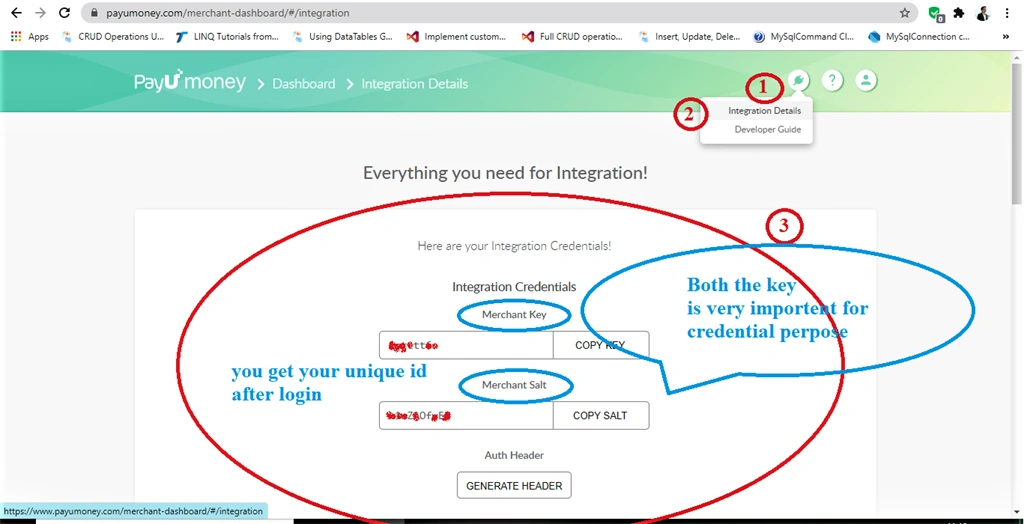
See that you got your unique Merchant ID and Salt ID. It is so useful for integrating your project with PayU.
You can also find lots of information in the DeveloperGuide section.
Now we will go in Visual Studio and start creating a demo project. If you don't know about how to create a project in MVC just see my
Previous article.
Let's start our project In ASP.NET MVC. So follow the steps to create a new project in Visual Studio.
- Click On Create New Project
- Write ASP.NET in Searchbar
- Select ASP.NET Web Application
- Give a name to your project (My Project Name:"PayUmoneytry")
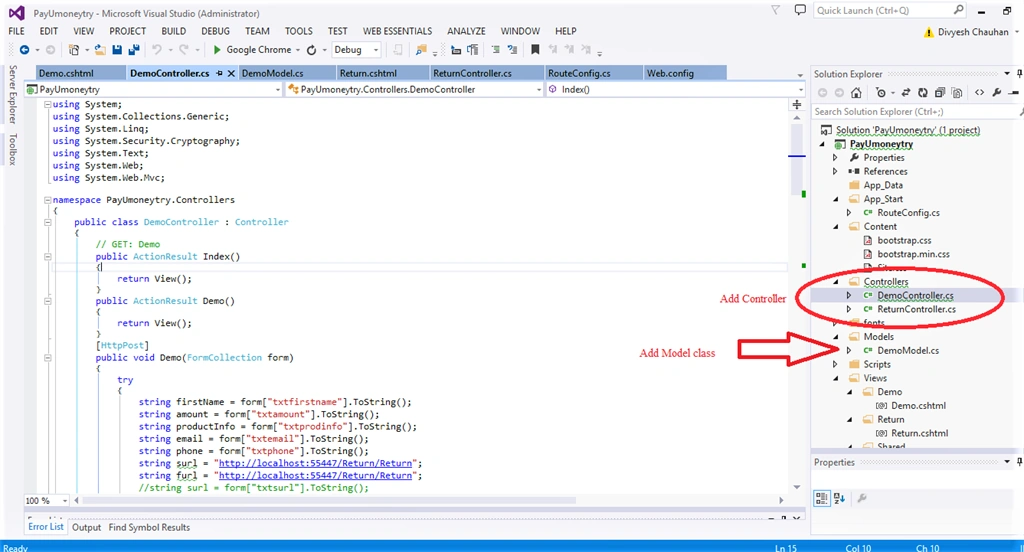
Now Add two Controllers and model class in it.
Add model (DemoModel) as you can see in the image.
- public class DemoModel
- {
- [Required]
- public string FirstName { get; set; }
- [Required]
- public string Amount { get; set; }
- [Required]
- public string Phone { get; set; }
- [Required]
- public string ProductInfo { get; set; }
- public string Email { get; set; }
- }
Now Add View for Demo Controller
- @model PayUmoneytry.Models.DemoModel
- @{
- ViewBag.Title = "Demo";
- }
-
- <h2>PayUMoney Form MVC</h2>
- @using (Html.BeginForm())
- {
- <div style="margin-left:20px">
- @Html.Label("Amount")<br
- @Html.TextBox("txtamount")<br />
- @Html.Label("First Name")<br />
- @Html.TextBox("txtfirstname")<br />
- @Html.ValidationMessageFor(model => model.firstName, " ", new { @class = "text-danger" })
- @Html.Label("Email Id")<br />
- @Html.TextBox("txtemail")<br />
- @Html.ValidationMessageFor(model => model.email, " ", new { @class = "text-danger" })
- @Html.Label("Product Information")<br />
- @Html.TextArea("txtprodinfo")<br />
- @Html.Label("Phone")<br />
- @Html.TextBox("txtphone")<br />
- <button type="submit">Submit</button>
- </div>
-
-
- }
Add method in democontroller.
- [HttpGet]
- public ActionResult Demo()
- {
- return View();
- }
- [HttpPost]
- public void Demo(FormCollection form)
- {
- try
- {
- string firstName = form["txtfirstname"].ToString();
- string amount = form["txtamount"].ToString();
- string productInfo = form["txtprodinfo"].ToString();
- string email = form["txtemail"].ToString();
- string phone = form["txtphone"].ToString();
- string surl = "http://localhost:55447/Return/Return"; //Change the success url here depending upon the port number of your local system.
- string furl = "http://localhost:55447/Return/Return"; //Change the failure url here depending upon the port number of your local system.
-
-
-
-
- RemotePost myremotepost = new RemotePost();
-
- string key = "add your MarchantID";
-
- string salt = "add your SaltID";
-
-
-
- myremotepost.Url = "https://sandboxsecure.payu.in/_payment";
- myremotepost.Add("key", "4ptctt6n");
- string txnid = Generatetxnid();
- myremotepost.Add("txnid", txnid);
- myremotepost.Add("amount", amount);
- myremotepost.Add("productinfo", productInfo);
- myremotepost.Add("firstname", firstName);
- myremotepost.Add("phone", phone);
- myremotepost.Add("email", email);
- myremotepost.Add("surl", "http://localhost:55447/Return/Return");//Change the success url here depending upon the port number of your local system.
- myremotepost.Add("furl", "http://localhost:55447/Return/Return");//Change the failure url here depending upon the port number of your local system.
- myremotepost.Add("service_provider", "payu_paisa");
- string hashString = key + "|" + txnid + "|" + amount + "|" + productInfo + "|" + firstName + "|" + email + "|||||||||||" + salt;
- string hash = Generatehash512(hashString);
- myremotepost.Add("hash", hash);
-
- myremotepost.Post();
- }
- catch(Exception exp)
- {
- throw;
- }
-
-
- }
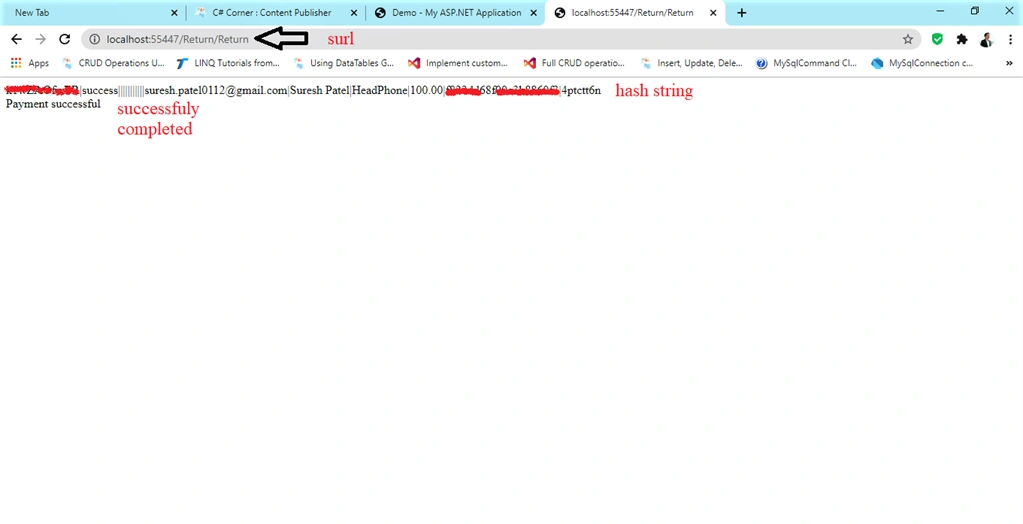
surl and furl change according to your code. surl = Success url. After successfuly completing your transaction it will redirect to this url.
furl = Fail url. If transaction fails then it will redirect to this url.
Also add this method into your Democontroller.
- private string Generatetxnid() {
- Random rnd = new Random();
- string strHash = Generatehash512(rnd.ToString() + DateTime.Now);
- string txnid1 = strHash.ToString().Substring(0, 20);
-
- return txnid1;
- }
-
- private string Generatehash512(string text) {
- byte[] message = Encoding.UTF8.GetBytes(text);
-
- UnicodeEncoding UE = new UnicodeEncoding();
- byte[] hashValue;
- SHA512Managed hashString = new SHA512Managed();
- string hex = "";
- hashValue = hashString.ComputeHash(message);
- foreach(byte x in hashValue) {
- hex += String.Format("{0:x2}", x);
- }
- return hex;
- }
- public class RemotePost {
- private System.Collections.Specialized.NameValueCollection Inputs = new System.Collections.Specialized.NameValueCollection();
-
-
- public string Url = "";
- public string Method = "post";
- public string FormName = "form1";
-
- public void Add(string name, string value) {
- Inputs.Add(name, value);
- }
-
- public void Post() {
- System.Web.HttpContext.Current.Response.Clear();
-
- System.Web.HttpContext.Current.Response.Write("<html><head>");
-
- System.Web.HttpContext.Current.Response.Write(string.Format("</head><body onload=\"document.{0}.submit()\">", FormName));
- System.Web.HttpContext.Current.Response.Write(string.Format("<form name=\"{0}\" method=\"{1}\" action=\"{2}\" >", FormName, Method, Url));
- for (int i = 0; i < Inputs.Keys.Count; i++) {
- System.Web.HttpContext.Current.Response.Write(string.Format("<input name=\"{0}\" type=\"hidden\" value=\"{1}\">", Inputs.Keys[i], Inputs[Inputs.Keys[i]]));
- }
- System.Web.HttpContext.Current.Response.Write("</form>");
- System.Web.HttpContext.Current.Response.Write("</body></html>");
-
- System.Web.HttpContext.Current.Response.End();
- }
Now we come to Return Controller.
Add view for Return() Action method.
- @{
- ViewBag.Title = "Return";
- }
-
- <h2>PayUMoney Response</h2>
-
- <h1> ViewData["Message"] </h1>
Add method in Return Controller.
- public void Return(FormCollection form)
- {
- try
- {
-
- string[] merc_hash_vars_seq;
- string merc_hash_string = string.Empty;
- string merc_hash = string.Empty;
- string order_id = string.Empty;
- string hash_seq = "key|txnid|amount|productinfo|firstname|email|udf1|udf2|udf3|udf4|udf5|udf6|udf7|udf8|udf9|udf10";
-
- if (form["status"].ToString() == "success")
- {
-
- merc_hash_vars_seq = hash_seq.Split('|');
- Array.Reverse(merc_hash_vars_seq);
- merc_hash_string = ConfigurationManager.AppSettings["SALT"] + "|" + form["status"].ToString();
-
-
- foreach (string merc_hash_var in merc_hash_vars_seq)
- {
- merc_hash_string += "|";
- merc_hash_string = merc_hash_string + (form[merc_hash_var] != null ? form[merc_hash_var] : "");
-
- }
- Response.Write(merc_hash_string);
- merc_hash = Generatehash512(merc_hash_string).ToLower();
-
-
-
- if (merc_hash != form["hash"])
- {
- Response.Write("Hash value did not matched");
-
- }
- else
- {
- order_id = Request.Form["txnid"];
-
- ViewData["Message"] = "Status is successful. Hash value is matched";
- ;
- Response.Write("<br/>Payment successful");
-
-
- }
-
- }
-
- else
- {
-
- Response.Write("Hash value did not matched");
-
-
- }
- }
-
- catch (Exception ex)
- {
- Response.Write("<span style='color:red'>" + ex.Message + "</span>");
-
- }
-
-
- }
Return() method will give the output accordingly after the transection completes or fails.
Also add this method in Returncontroller.
- public string Generatehash512(string text)
- {
-
- byte[] message = Encoding.UTF8.GetBytes(text);
-
- UnicodeEncoding UE = new UnicodeEncoding();
- byte[] hashValue;
- SHA512Managed hashString = new SHA512Managed();
- string hex = "";
- hashValue = hashString.ComputeHash(message);
- foreach (byte x in hashValue)
- {
- hex += String.Format("{0:x2}", x);
- }
- return hex;
-
- }
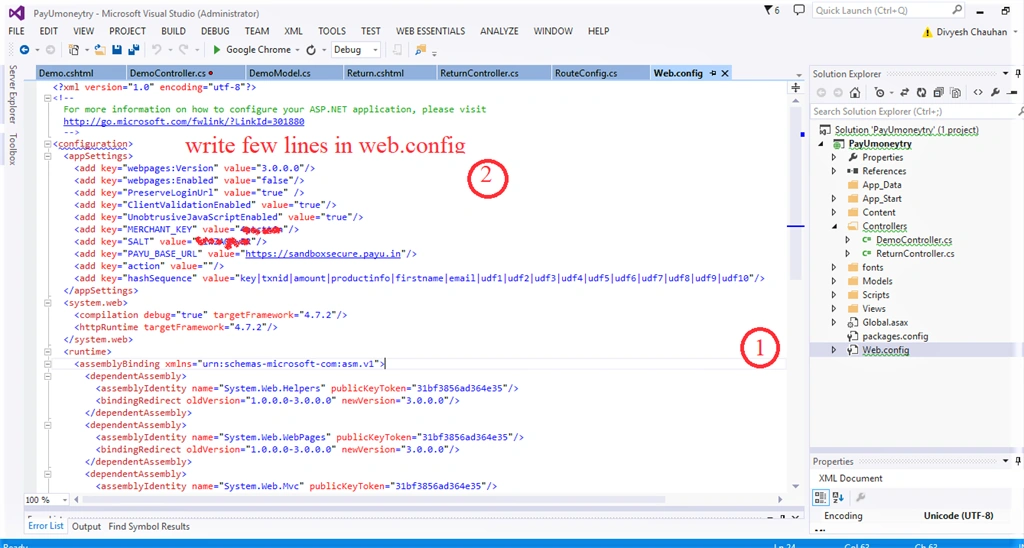
Add a few lines in your web.config file.
- <appSettings>
- <add key="webpages:Version" value="3.0.0.0"/>
- <add key="webpages:Enabled" value="false"/>
- <add key="PreserveLoginUrl" value="true" />
- <add key="ClientValidationEnabled" value="true"/>
- <add key="UnobtrusiveJavaScriptEnabled" value="true"/>
- <add key="MERCHANT_KEY" value="Add your marchantkey"/> //Add your marchantkey
- <add key="SALT" value="Add your salt key"/> //Add your Salt key
- <add key="PAYU_BASE_URL" value="https://sandboxsecure.payu.in"/>
- <add key="action" value=""/>
- <add key="hashSequence" value="key|txnid|amount|productinfo|firstname|email|udf1|udf2|udf3|udf4|udf5|udf6|udf7|udf8|udf9|udf10"/>
- </appSettings>
Now we are done with our project but before we build and run it give the proper route in route.config file.
Outputs
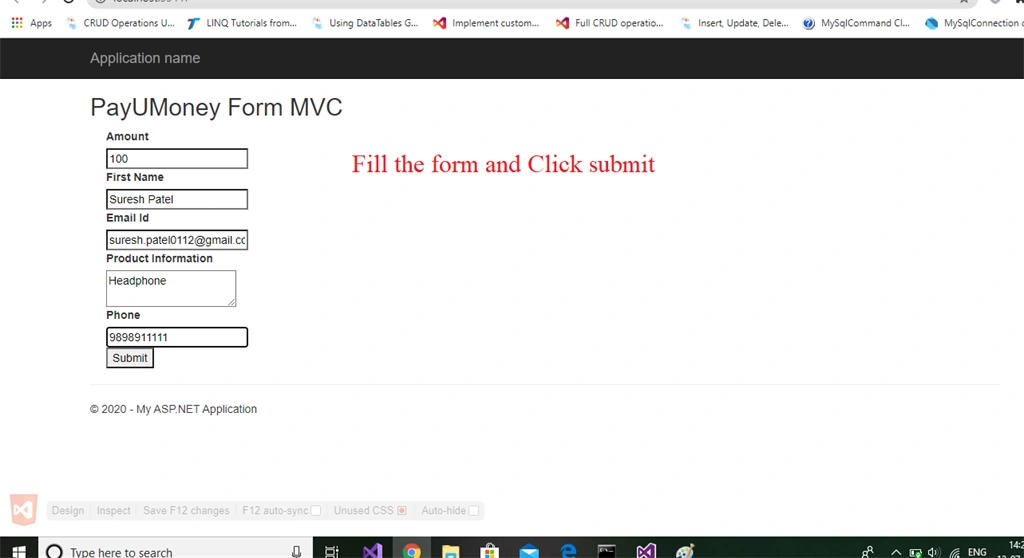
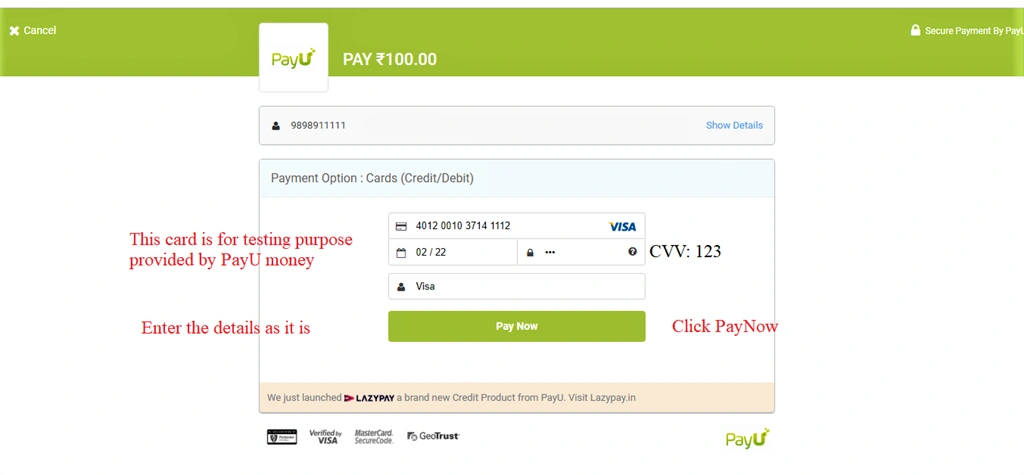
After submitting:
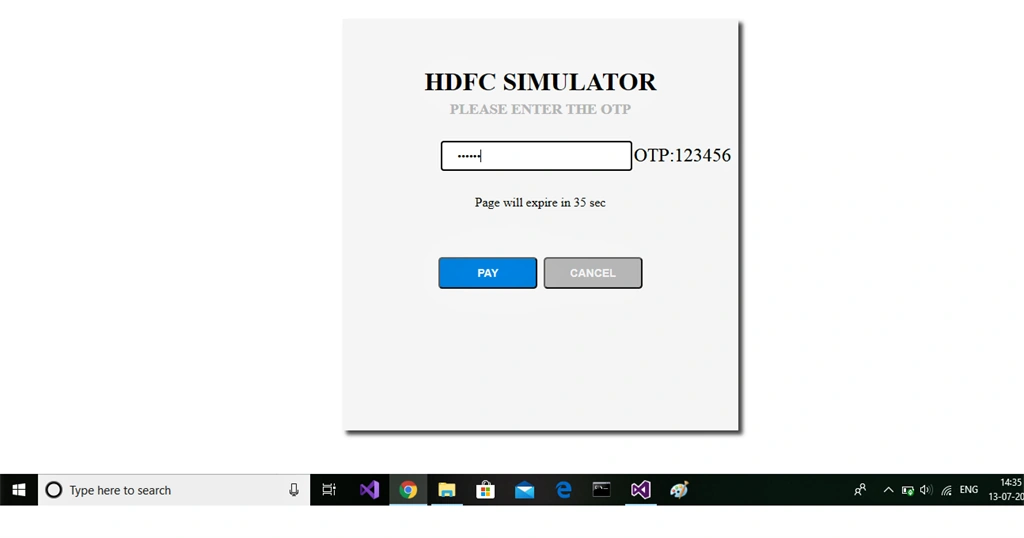
Enter OTP
Transaction completed successfully,
Thank you and happy learning.


Sasidharteja ChintalapatiPosted Sep 7, 2023, 9:16 AM
How to store the returned values in database can you please guide me
Darshil bhavsarPosted Mar 20, 2023, 7:29 AM
The above solution is perfect but when we create the dynamic form using System.Web.HttpContext.Current.Response.Write so it show the data on client side so for security purpose it may be risk so any alternate option is there we can use ???
bala ePosted Sep 3, 2022, 11:27 AM
When its get returned from returnUrl Session got expired why?
Imran khanPosted Feb 25, 2022, 10:55 PM
Hello Divy It's giving me an error saying Sorry We Are unable to process your payment i think only the failure scenario is running, please help me out thanks :)
Asht TPosted Oct 12, 2021, 5:52 AM
Please help me how to create webhook for payu...... my application is totally develop in ado.net .we integrate pay u using asp.net (Ado.net) .we don't know how to create webhook and all ............. as per security pay u want to create Enable verify API and Web hook call.... so please help how to create webhook in asp.net and how to host
Kirtesh ShahPosted Jul 20, 2021, 3:10 PM
Do we need to pay any charges to setup payment gateway??
Dipinti guptaPosted Jun 11, 2021, 12:57 PM
Payment is success but status error why plz help me
Aniket NarvankarPosted Dec 6, 2020, 10:53 PM
Giving me error sorry you are unable to process your request. followed all the steps mentioned. Also there is merchant Id and merchant key,so what needs to be used merchant Id or merchant key?
Asht TPosted Oct 23, 2020, 5:01 AM
How to get pending response if transaction is pending and after some time transaction is success, but i want to save response