

Introduction
This article is the continuation of the article “Inserting Data Into SQL Server Database Using ASP.NET Core 3 Razor Pages” where we have implemented the create razor page to insert a record inside the database. In this article, we will be working on editing and deleting a razor page to perform edit and delete functionality of the crud operations on the BookList objects in ASP.Net Core Razor Pages.
Creation of Edit razor page
Now we will create a razor page called Edit to edit and update the already-created data inside the SQL server database.
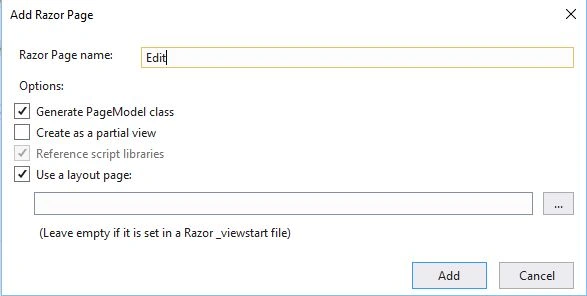
For that to happen, we need to make changes inside the Ind.cshtml file. Inside the edit button anchor tag, we need to pass the routing that is the asp-page will be an Edit page that we will be creating soon.
- @page
- @model BookList.IndModel
- <br />
- <div class="container row p-0 m-0">
- <div class="col-10">
- <h2 class="text-info">Book List</h2>
- </div>
- <div class="col-2">
- <a asp-page="Create" class="btn btn-info form-control text-white">Create New Book</a>
- </div>
- <div class="col-12 border p-3 mt-3">
- <form method="post">
- @if(Model.Books.Count()>0)
- {
- <table class="table table-striped border">
- <tr class="table-secondary">
- <th>
- <label asp-for="Books.FirstOrDefault().Name"></label>
- </th>
- <th>
- <label asp-for="Books.FirstOrDefault().Author"></label>
- </th>
- <th>
- <label asp-for="Books.FirstOrDefault().ISBN"></label>
- </th>
- <th>
- </th>
- </tr>
- @foreach(var item in Model.Books)
- {
- <tr>
- <td>
- @Html.DisplayFor(m => item.Name)
- </td>
- <td>
- @Html.DisplayFor(m => item.Author)
- </td>
- <td>
- @Html.DisplayFor(m => item.ISBN)
- </td>
- <td>
- <button asp-page-handler="Delete" asp-route-id="@item.Id" onclick="return confirm('Are you sure you want to delete?')" class="btn btn-danger btn-sm">Delete</button>
- <a asp-page="Edit" asp-route-id="@item.Id" class="btn btn-success btn-sm text-white">Edit</a>
- </td>
- </tr>
- }
- </table>
- }
- else
- {
- <p>No Books Available.</p>
- }
- </form>
- </div>
- </div>
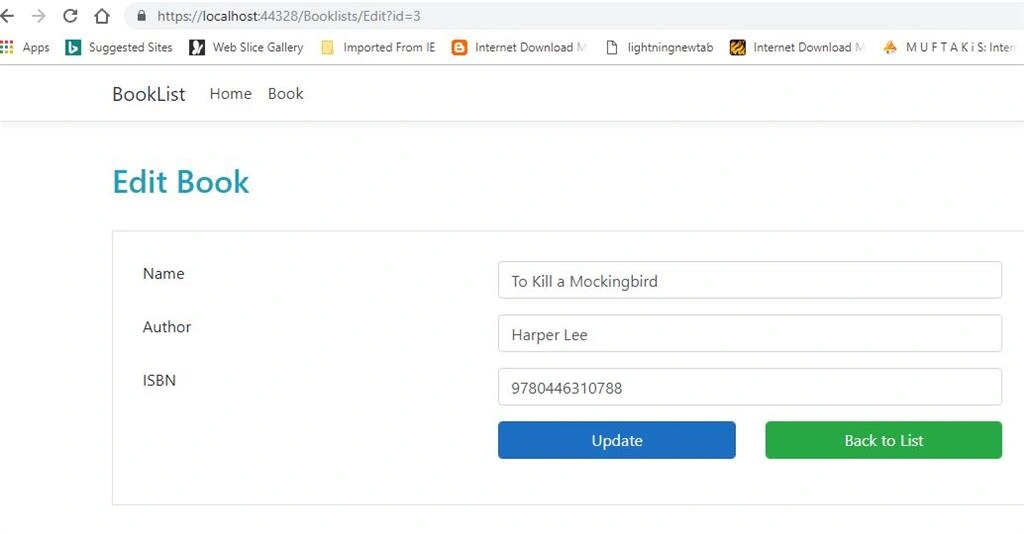
Whenever the user clicks on the edit button, we want to pass the ID of the field that they are editing. In this case that would be the ID of the book. So in order to pass that, we will be using another tag helper that is asp route and the name of the property that we want to pass.
Here we want to pass the ID of the book. This way when a user clicks on edit, it will go the edit razor page and it will also pass the ID as a parameter.
So now we have to create a new razor page named Edit where we will be defining the edit functionality as well as a user interface to retrieve book data for editing and updating it according to the user's needs.
- @page
- @model BookList.EditModel
- <br />
- <h2 class="text-info">Edit Book</h2>
- <br />
- <div class="border container" style="padding:30px;">
- <form method="post">
- <input type="hidden" asp-for="Book.Id" />
- <div class="form-group row">
- <div class="col-4">
- <label asp-for="Book.Name"></label>
- </div>
- <div class="col-6">
- <input asp-for="Book.Name" class="form-control" />
- </div>
- </div>
- <div class="form-group row">
- <div class="col-4">
- <label asp-for="Book.Author"></label>
- </div>
- <div class="col-6">
- <input asp-for="Book.Author" class="form-control" />
- </div>
- </div>
- <div class="form-group row">
- <div class="col-4">
- <label asp-for="Book.ISBN"></label>
- </div>
- <div class="col-6">
- <input asp-for="Book.ISBN" class="form-control" />
- </div>
- </div>
- <div class="form-group row">
- <div class="col-3 offset-4">
- <input type="submit" value="Update" class="btn btn-primary form-control" />
- </div>
- <div class="col-3">
- <a asp-page="Ind" class="btn btn-success form-control">Back to List</a>
- </div>
- </div>
- </form>
- </div>
Join the conversation! Your thoughts help the community grow.