

Overview
In projects, we get the requirement to import data into Dynamic CRM from 3rd party systems that are in different formats. For example:
- CSV files containing a list of products which need to be either updated or created in Dynamics CRM at regular intervals of time
- CSV files generated from Mainframe systems which need to be loaded into Dynamics CRM
Traditional Approach
In most of the projects, traditionally we undertake the approach where the physical file is shared over some shared drive over a machine, which is later loaded to the CRM through either
- Batch jobs -- SSIS : Kingsway Soft: Scribe or some other application which performs ETL processes ( Extraction : Transformation : Loading)
- Custom Development of Utilities consuming the services of an application
Going through the Azure Approach
Initially I will be sharing an approach wherein a 3rd Party System is generating a physical file which has been shared and placed over a specific folder.
For undertaking this approach we will be using the following components of Azure,
- Azure Blob Storage
- Azure File Sync
- Azure File Sync Agent
- Azure Functions
Kindly explore the all above components.
Steps for implementation,
- Azure File Sync Agent
It’s a small set up which needs to be installed on the local drive and is capable of moving the physical files from local drive to Azure Blob Storage.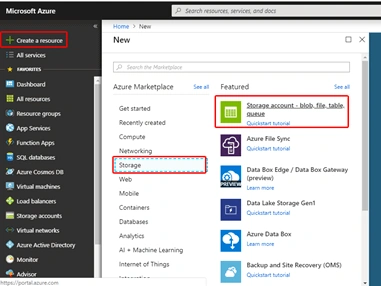
- Now we need to create Azure File Sync which will be used to sync the files from local drive to Blob as storage,
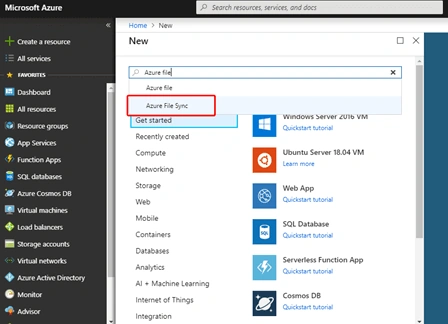
- Azure File Sync Agent
It’s a software which needs to be installed on the local server or system and needs little configurations to push the files from local drive to Azure Blob Storage - Azure Functions - (We can compare it with Triggers in SQL)
This is something very important, which undertakes the actions of loading/creating the records from the file extract received in blob to Dynamics CRM.
Alternatively, we can go for Microsoft Flows too. It has ready-to-use template/connector to set up a connection between the Azure Blob storage to that of Dynamics CRM application, making it much easier to implement for a Business user.
Sample Scenario for Explanation
Client requirement wherein bulk data has to be loaded to Dynamics CRM from CSV extracts on regular basis through schedulers and SSIS
- Successfully loaded records have to be created in Contact Entity
- Failed records need to be loaded to the custom entity for reference
The conventional ways to achieve this are mentioned below.
- Using the SSIS to read the records from the file extract shared at a specific location
- Loading this data to a specific Entity Collection
- Using iterator to get Entity from this collection
- Using the Execute method to take up the CREATE action individually for each record
- If the record is created successfully, it's fine, else make an individual call to create a record in custom entity
Using Azure
- Using Azure Sync Agent to sync the file extract shared to Azure blob
- Using Azure Function/ Microsoft Flows to load the data extract to CRM
Limitations
Everything goes up with certain limitations and constraints; the same applies to Azure.
- One time effort is a bit more as compared to the conventional approaches
- Need to buy a different set of services under the resource group
Observation/Benefits of Implementing the same
Regarding End to End Implementation
There have been multiple challenges and multiple road-blocks faced while I tried undertaking the same, so please feel free to get in touch if you feel stuck at any point.
Feel free to share your queries and of course feedback.
Join the conversation! Your thoughts help the community grow.