

Most people preparing for system design interviews jump straight into load balancers, databases, and microservices. It feels practical. It feels relevant.
But there’s a problem.
You can design large systems without understanding your own machine, until something goes wrong. Then suddenly, nothing makes sense. Latency spikes. Memory runs out. Caches behave unpredictably. And the system you designed starts to feel like a black box.
To understand systems at scale, you first need to understand the smallest unit they are built on: a computer.
What you write is not what the machine executes
When you run a program written in Python or C#, it feels immediate. You write code, press run, and it works.
But the machine does not understand your code.
At its core, a computer understands only 0s and 1s. Simple electrical signals, on and off. Everything - your variables, your functions, your data is reduced to bits.
So what actually happens?
Take a simple program:
x = 2 + 3That line is not executed directly.
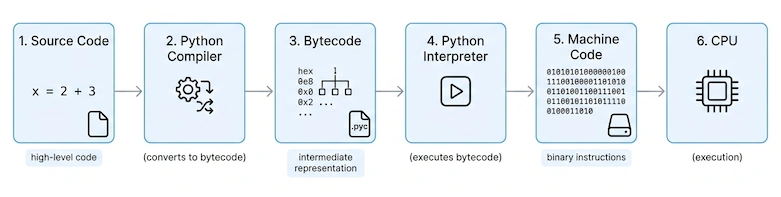
First, the code written in a high-level language is converted into an intermediate form, often called bytecode or something similar.
Then, a runtime or interpreter processes this intermediate form and translates it into instructions the machine can execute.
These instructions are ultimately represented as machine code, binary patterns of 0s and 1s.
At that point, the CPU can process it.
Even something as simple as a number or character is encoded. Systems like UTF-8 define how data becomes bytes before turning into bits.
Note: Different programming languages follow different execution models. Some are compiled directly to machine code, others use interpreters or virtual machines. This is a simplified, general flow to build intuition.
The Cost of Distance
A computer is not a flat system. It is a hierarchy.
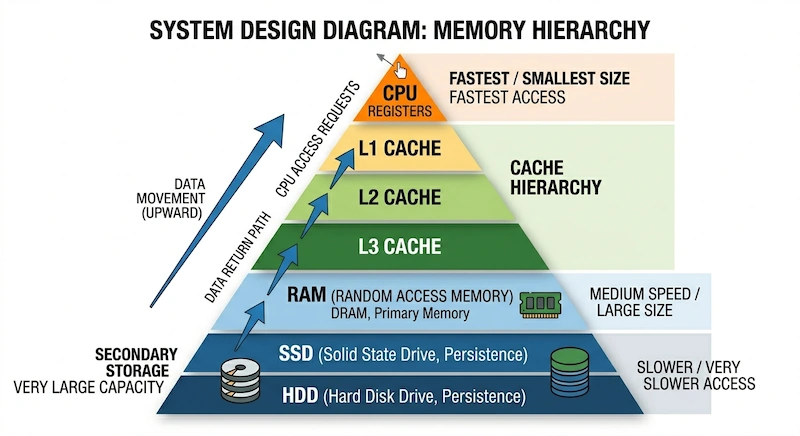
At the bottom, you have disk storage: large, persistent, and slow. This is where your files, applications, and operating system live.
Above it is RAM: smaller, temporary, but much faster. This is where your program actually runs.
Closer still is the CPU cache: tiny, but extremely fast. This is where frequently used data is kept.
And at the top sits the CPU, executing instructions.
Your program needs data. But that data is not always where the CPU needs it.
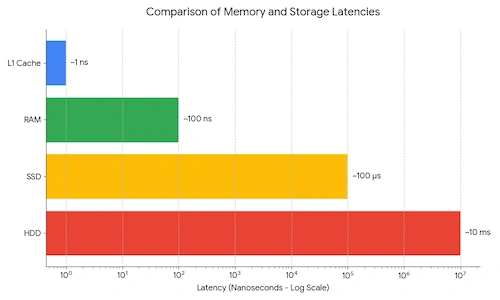
If the data is in cache, access is almost instant.
If it is in RAM, it is slower.
If it is on disk, it is dramatically slower.
This difference is not small. It is orders of magnitude.
So the system is designed to solve one problem:
How do we keep data as close to the CPU as possible?
Each layer exists as a tradeoff:
Disk gives you size and persistence
RAM gives you speed for active data
Cache gives you extreme speed for frequently used data
Instead of one perfect memory, we build layers. Each one optimizes for a different constraint.
The result is a system that is:
fast when data is close
slow when data is far
And this leads to the most important idea:
Performance is not just about computation.
It is about where your data is.We build layers because the CPU cannot afford to wait months for a single piece of data.
Why Some Operations Feel Slow
When you run a program, something very specific happens.
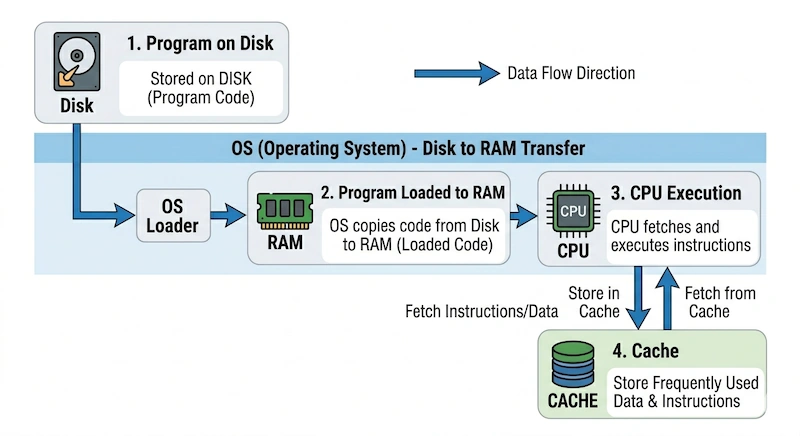
The operating system loads your program from disk into RAM. The CPU begins executing instructions. Frequently accessed data is copied into cache. Over time, the system “learns” what you need most and keeps it closer to the CPU.
When this works well, everything feels instant.
When it doesn’t, you feel latency.
That delay when opening an app.
That pause when querying a database.
That lag in a large system.
It often comes down to one thing:
the data was too far away.
Cache Hit vs Cache Miss
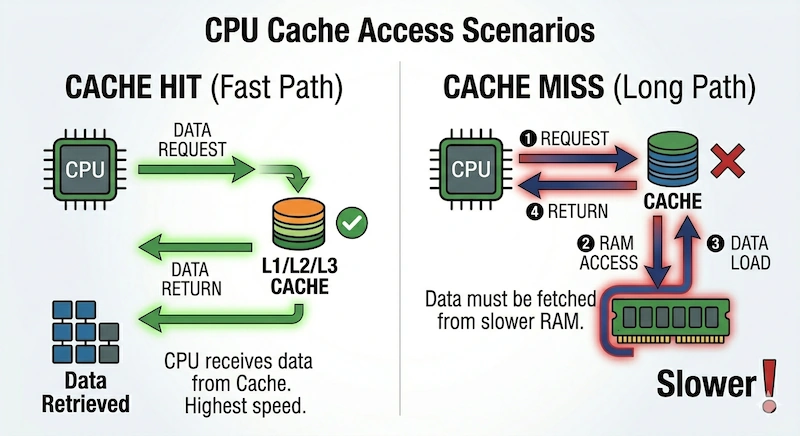
When the CPU needs data, it first checks the cache.
Cache hit:
The data is already in cache.
It is returned immediately.
This is the fast path.
Cache miss:
The data is not in cache.
The CPU must fetch it from RAM (or disk).
This adds delay.
The key difference is simple:
Cache hit → instant
Cache miss → wait
The same concept applies in systems like Redis. The principle does not change, only the scale does.
The Operating System
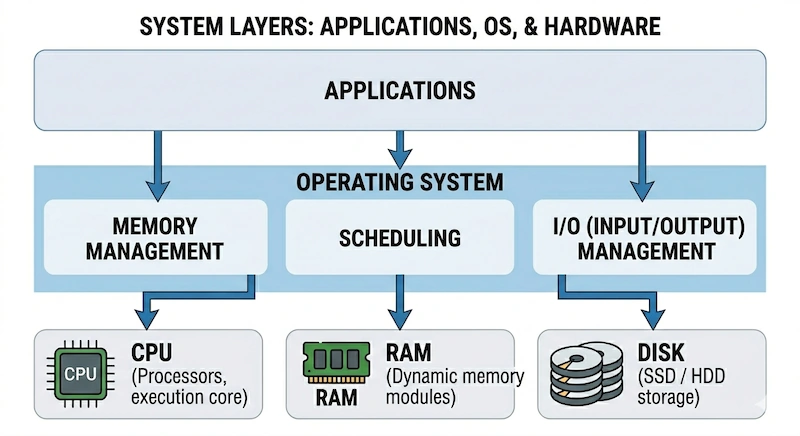
There is another layer most people ignore — the one quietly orchestrating everything.
The operating system decides:
which program runs
how memory is allocated
when data moves between disk and RAM
The CPU does not "know" how to read a file or manage a database. It simply executes the next instruction in its queue.
The Operating System provides the abstractions that make hardware usable. When your code needs data from a disk, the CPU triggers a request, but it's the OS that manages the complex dance of interrupts, DMA (Direct Memory Access), and page faults.
This matters more than it seems. Because when you scale systems, you aren't just writing an app, you are negotiating with these OS abstractions to move data efficiently.
From Machine to System Design
Now step back.
Why does any of this matter for system design?
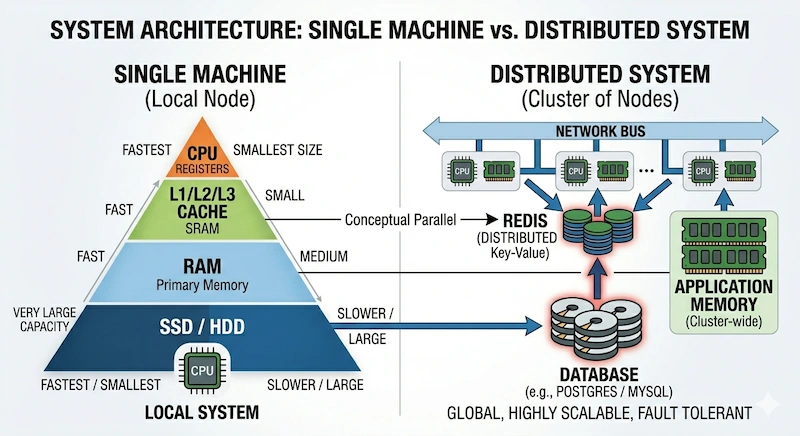
Because the same constraints repeat at scale.
Disk is slow → databases become bottlenecks
RAM is limited → caching becomes necessary
Data movement is expensive → systems are designed to minimize it
What happens inside a single machine is the same story that plays out across thousands of machines.
A cache in a CPU is not so different from a distributed cache like Redis.
Moving data from disk to RAM is not so different from fetching data across a network.
Again as I said before, the scale changes.
The principles do not.
The Core Idea
A computer is not just a processor running code.
It is a system constantly making tradeoffs:
speed vs size
cost vs performance
proximity vs capacity
Good system design starts here. With a clear understanding of one simple idea:
Performance is about keeping data as close as possible to where computation happens.
Everything else, caching strategies, database design, distributed systems is just an extension of this principle.
Join the conversation! Your thoughts help the community grow.