

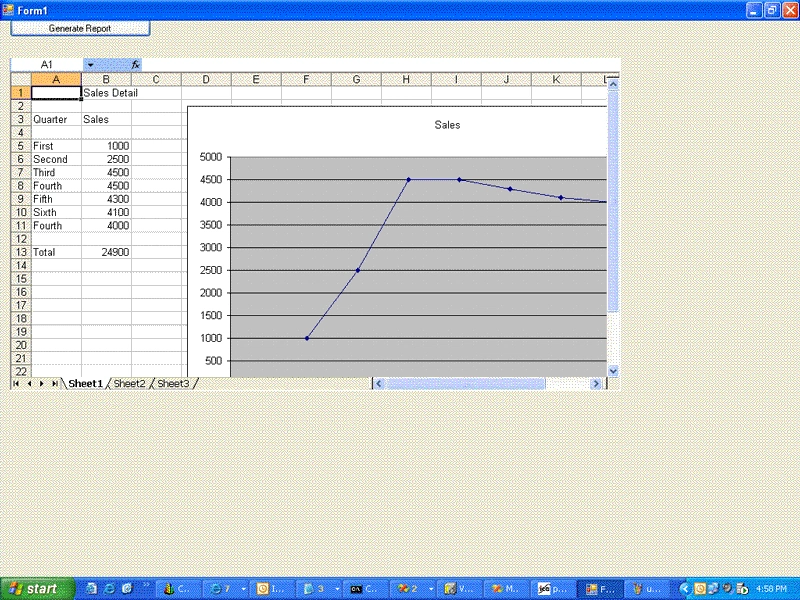
Here you can find how to pass value to the cells as well as generating Charts based on the Excel data. In this example I have used " Excel Object Library 11.0".
using System;
using System.Collections.Generic;
using System.ComponentModel;
using System.Data;
using System.Drawing;
using System.Text;
using System.Windows.Forms;
using Microsoft.Office.Core;
using interop = System.Runtime.InteropServices;
namespace excel
{
public partial class Form1 : Form
{
public Form1()
{
InitializeComponent();
}
// Excel.Application excel;
private Excel.Application m_oExcelApp;
private Excel.Workbooks m_oBooks;
private Excel._Workbook m_oBook;
private Excel._Worksheet m_oSheet;
private Excel.Range excelRange;
private void Form1_Load(object sender, EventArgs e)
{
}
private void button1_Click(object sender, EventArgs e)
{
//office.Application excel = null;
m_oExcelApp = new Excel.Application();
m_oExcelApp.Visible = false;
//m_oBooks = m_oExcelApp.Workbooks;
m_oSheet = null;
m_oBooks = null;
excelRange = null;
object missing = Type.Missing;
try
{
m_oBooks = m_oExcelApp.Workbooks;
m_oBook = m_oExcelApp.Workbooks.Add(missing);
m_oSheet = (Excel._Worksheet)m_oBook.ActiveSheet;
excelRange = m_oSheet.get_Range("B1", missing);
excelRange.Value2 = "Sales Detail";
m_oSheet.get_Range("B1", missing).Font.Bold = false;
excelRange = m_oSheet.get_Range("A3", missing);
m_oSheet.get_Range("A3", missing).Font.Bold = false;
excelRange.Value2 = "Quarter";
excelRange = m_oSheet.get_Range("B3", missing);
m_oSheet.get_Range("B3", missing).Font.Bold = false;
excelRange.Value2 = "Sales";
excelRange = m_oSheet.get_Range("A5", missing);
excelRange.Value2 = "First";
excelRange = m_oSheet.get_Range("B5", missing);
excelRange.Value2 = 1000.0;
excelRange = m_oSheet.get_Range("A6", missing);
excelRange.Value2 = "Second";
excelRange = m_oSheet.get_Range("B6", missing);
excelRange.Value2 = 2500.0;
sudhinPosted Dec 1, 2011, 3:39 PM
how to open excel file using webbrowser controlin windows application?i tried it but it opens ups in a different window.can anybody tell me how it can be done.for eg my code...webbrowser.navigate(@"D:\text.xlsx",false); If i enter url instead of file path itworks as expected..ir the entered url opens up within webbrowser control
park junesPosted Aug 8, 2009, 7:09 PM
a happy, thank you!!!
Jayesh SharmaPosted Jan 29, 2008, 1:33 AM
its fantastic bt i hav to show only graph on winform. so, hw cn do it? plz help me out. thanx.
naish shrPosted Dec 5, 2007, 5:43 PM
But how to make two series in one graph? I have column A and colomn B. And want todisplay two diff. series in a one graph.... I can make it in two different graph. Any suggests. Thanks, Naish
DineshPosted Jun 29, 2007, 5:20 AM
I've gone through generation of excel using C#.. but how can we do the same(automate excel) in web application using asp .net/C#