

In this article we are going to learn how to populate a drop down list using
JavaScript in asp.net. JavaScript is a client side scripting language which
offers an advantage of reducing the load on the server side. Reducing the load
term means that some part such as checking whether all the mandatory details are
being filled or not in an registration form, or any other type of validation. If
we try to perform all the validation on the server side naturally the server is
going to take time for processing the details and finally it will give a
response to client so this is not an efficient way to do the validation because
in multi user environment many user are connecting to your web site and to
perform validation on the server side is not the efficient way. So in this type
of scenario we can always make a use of JavaScript technology which offers
validation at the client side itself.
Code written in javascript are validate and executed at the client side only.
The server is not known about the values which are generated at the client side.
Moving to our designing part.
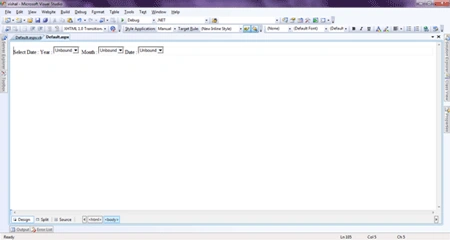
Following is the source code for design of our Default.aspx page.
<%@
Page Language="VB"
AutoEventWireup="false"
CodeFile="Default.aspx.vb"
Inherits="_Default"
%>
<!DOCTYPE html PUBLIC "-//W3C//DTD XHTML 1.0 Transitional//EN" "http://www.w3.org/TR/xhtml1/DTD/xhtml1-transitional.dtd">
<html xmlns="http://www.w3.org/1999/xhtml">
<head runat="server">
<title>Untitled Page</title>
<script type="text/javascript">
var month = new Array(11);
month[0] = "Jan";
month[1] = "Feb";
month[2] = "Mar";
month[3] = "Apr";
month[4] = "May";
month[5] = "Jun";
month[6] = "Jul";
month[7] = "Aug";
month[8] = "Sep";
month[9] = "Oct";
month[10] = "Nov";
month[11] = "Dec";
var date = new Date();
function getYear()
{
var opt = new Option("Select Year", "Select Year");
document.forms[0]["ddYear"].options.add(opt);
var currentyear = date.getYear();
for (var i = 1977; i < currentyear - 3; i++)
{
var item = new Option(i, i);
document.forms[0]["ddYear"].options.add(item);
}
}
function getMonth() {
var opt = new Option("Select Month", "Select Month");
document.forms[0]["ddMonth"].options.add(opt);
for (var i = 0; i <= 11; i++) {
var item = new Option(month[i], month[i]);
document.forms[0]["ddMonth"].options.add(item);
}
}
function getDays() {
//to clear all the items from ddDay drop down list simply set the length property to 0.
document.forms[0]["ddDay"].length = 0;
if (document.forms[0]["ddYear"].selectedIndex > 0 && document.forms[0]["ddMonth"].selectedIndex > 0) {
var yy = document.forms[0]["ddYear"].value;
var mm = document.forms[0]["ddMonth"].selectedIndex;
// alert(yy + "\n" + mm);
switch (mm) {
case 1:
case 3:
case 5:
case 7:
case 8:
case 10:
case 12:
for (var i = 1; i <= 31; i++) {
var item = new Option(i, i);
document.forms[0]["ddDay"].options.add(item);
}
break;
case 4:
case 6:
case 9:
case 11:
for (var i = 1; i <= 30; i++) {
var item = new Option(i, i);
document.forms[0]["ddDay"].options.add(item);
}
break;
case 2:
//to calculate if the year is a leap year or not.
if ((yy % 400 == 0) || (yy % 100 != 0 && yy % 4 == 0)) {
for (var i = 1; i <= 29; i++) {
var item = new Option(i, i);
document.forms[0]["ddDay"].options.add(item);
}
}
else {
for (var i = 1; i <= 28; i++) {
var item = new Option(i, i);
document.forms[0]["ddDay"].options.add(item);
}
}
}
}
}
</script>
<noscript>
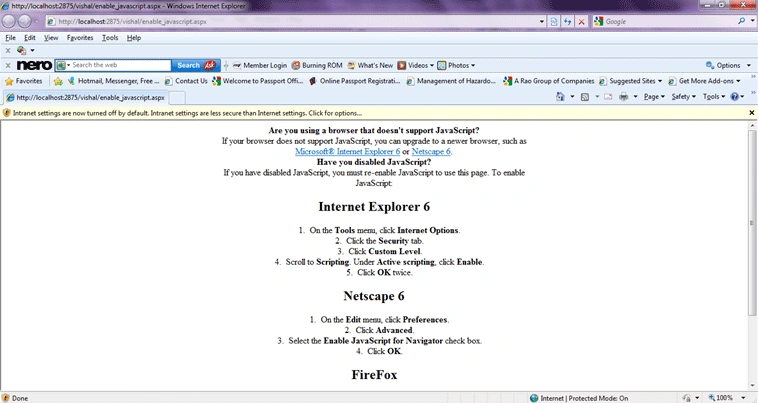
<%--Redirecting Browser to a page if JavaScript support is not there
If you have developed a page which depends on JavaScript for form
validation or for any other purposes then you would be interested
in detecting the setting of the client browser and would like to redirect
to a different page explaining how to enable or disable JavaScript. Here we
will discuss how to check this setting and redirect to a different page accordingly.
We can detect this by using noscript tag and if the JavaScript is disabled then the
code within this noscript tag will be executed. Here is the code to do that. This code will
detect if the script setting is disabled and will redirect to a page explaining how to enable
or disable JavaScript with meta refresh in 2 seconds.
--%>
<meta http-equiv="refresh" content="2; URL=enable_javascript.aspx">
</noscript>
</head>
<body onload="getYear();getMonth()">
<form id="form1" runat="server">
<div>
Select Date : Year :
<asp:DropDownList ID="ddYear" runat="server">
</asp:DropDownList>
Month :
Rimpi ManujaPosted Aug 2, 2014, 4:36 AM
sir can u help me about how to bind datagrid using javaScript
Angelina ErinPosted Aug 1, 2011, 2:05 AM
Nice Article