Introduction
This document covers how to populate a DataGridView from XML and how to save DataGridView values back to XML.
Steps to configure
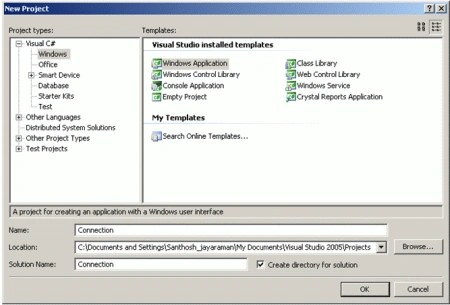
1. Open Visual Studio and create a new Windows application.
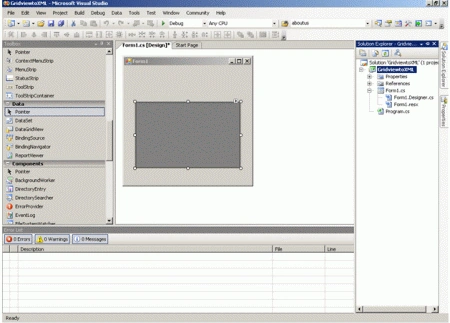
2. Add a DataGridView to the form.
3. Create a XML file in your local drive (Say D:\ drive) with the following code.
<Dataset>
<Table1>
<Server>Server1</Server>
<Database>Database1</Database>
</Table1>
<Table1>
<Server>Server2</Server>
<Database>Database2</Database>
</Table1>
</Dataset>
4. Add the following code in the form load event.
private void Form1_Load(object sender, EventArgs e)
{
//the path in which XML file is saved
string path = "D:\\Santhosh\\XMLFile1.xml";
DataSet ds=new DataSet();
//Reading XML file and copying to dataset
ds.ReadXml(path);
dataGridView1.DataSource = ds;
dataGridView1.DataMember = "table1";
}
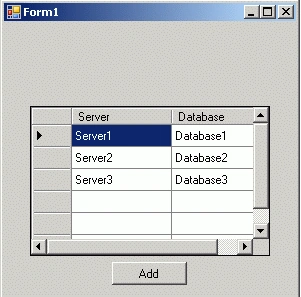
5. Add a Button "Add" below the DataGridView as shown below.
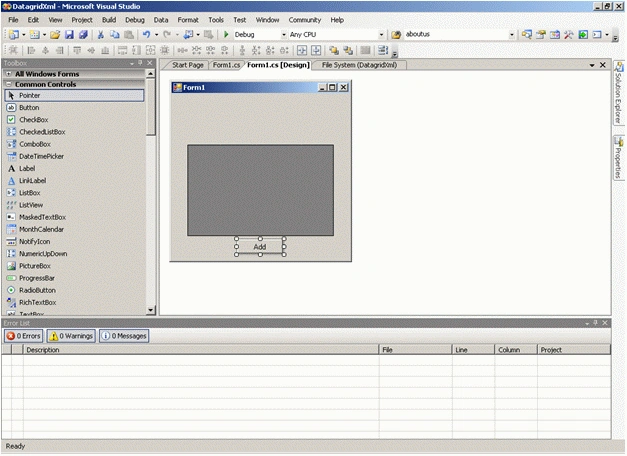
6. Add the following code in the Button click event.
private void button1_Click(object sender, EventArgs e)
{
//path of XML file
string path = "D:\\Santhosh\\XMLFile1.xml";
DataSet ds = new DataSet();
DataTable dt = new DataTable();
//Adding columns to datatable
foreach (DataGridViewColumn col in dataGridView1.Columns)
{
dt.Columns.Add(col.DataPropertyName, col.ValueType);
}
//adding new rows
foreach (DataGridViewRow row in dataGridView1.Rows)
{
DataRow row1 = dt.NewRow();
for (int i = 0; i < dataGridView1.ColumnCount; i++)
//if value exists add that value else add Null for that field
row1[i] = (row.Cells[i].Value == null ? DBNull.Value : row.Cells[i].Value);
dt.Rows.Add(row1);
}
//Copying from datatable to dataset
ds.Tables.Add(dt);
//writing new values to XML
ds.WriteXml(path);
MessageBox.Show("Successfully added ", "Success");
this.Close();
}
7. Run the solution. The following form should be displayed.
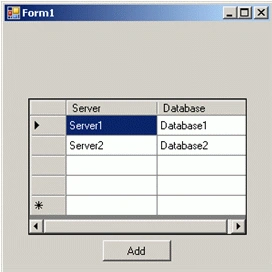
8. Now enter the new values in the DataGridView and click Add. Ensure that the values are being added.
9. Now check that the new value is being added in the XML file.
<?xml version="1.0" standalone="yes"?>
<NewDataSet>
<Table1>
<Server>Server1</Server>
<Database>Database1</Database>
</Table1>
<Table1>
<Server>Server2</Server>
<Database>Database2</Database>
</Table1>
<Table1>
<Server>Server3</Server>
<Database>Database3</Database>
</Table1>
</NewDataSet>
Using the above concept to create connection string from XML
This can be used to configure a connection string at run time from XML. So the user can add his server name and database in XML and create connections at run time. Now add a DropDown and Button above the DataGridView as shown below. Add the following code in the form load event to populate databases in the dropdown as below.
//Populating databases value in dropdown
XmlDocument XMLDoc = new XmlDocument();
XMLDoc.Load(path);
//Give Node name here
XmlNodeList nodelist = XMLDoc.SelectNodes("NewDataSet/Table1");
foreach(XmlNode node in nodelist)
{
comboBox1.Items.Add(node.SelectSingleNode("Database").InnerText);
}
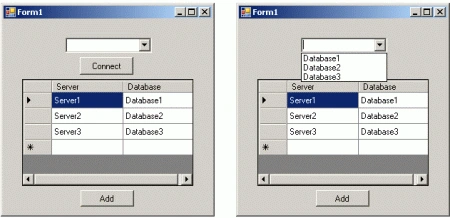
Now add the following code to fetch a server name on selecting a database in the DropDown and click on Connect.
private void button2_Click(object sender, EventArgs e)
{
string path = "D:\\Santhosh\\XMLFile1.xml";
string server="";
XmlDocument XMLDoc = new XmlDocument();
XMLDoc.Load(path);
//Give Node name here
XmlNodeList nodelist = XMLDoc.SelectNodes("NewDataSet/Table1");
foreach (XmlNode node in nodelist)
{
if ((node.SelectSingleNode("Database").InnerText) == comboBox1.SelectedItem.ToString())
{
server = node.SelectSingleNode("Server").InnerText;
}
}
}
Now using the database and server, create a new SqlConnection as usual.
Conclusion
By using the above code, a user can populate a DataGridView from XML and again save back the new values to the XML file. This can be very useful in creating a connection string also.
//Added solution file using VS2010


Suleiman Mohammed FahimPosted Apr 19, 2021, 11:52 PM
ComboBox1.Items.Add(node.SelectSingleNode("Database").InnerText); Error An unhandled exception of type 'System.NullReferenceException' occurred in XMLtoGridViewAndViceversa.exe Additional information: Object reference not set to an instance of an object.
william albertPosted Jun 11, 2012, 6:13 AM
Data grid concept is really an interesting concept.Thanks for giving more information regarding it.Its nice written article. http://www.dapfor.com/en/net-suite/net-grid/features/headers-and-columns
MementoeditedPosted Apr 7, 2012, 5:04 AMEdited Apr 7, 2012, 5:11 AM
In my table i need column headers as numbers: 01, 02..etc. So piece of my code is: <01>someText</01> But I get an error message: "Name cannot begin with the 0 character, hexadecimal value 0x30". What is the solution, pls!
MementoPosted Apr 3, 2012, 7:55 PM
You article is in a very - cs-Style: Clever and Strict. It allready helped me - with my small newProject. ThanksAgain - and - continue Writing, pls. BestRegardsFromEurope.
Stelia JacksonPosted Feb 23, 2012, 11:36 PM
good job....
James LerdorfPosted Feb 23, 2012, 6:50 AM
Hi, Really this is very great article and useful.
Monika AroraPosted Feb 22, 2012, 11:54 PM
Hi Santhosh. Its a very nice and useful article.
Amit MaheshwariPosted Feb 22, 2012, 10:56 PM
Hi, Santhosh it's a great stuff to accomplish the task about populate value from XML to datagridview and vice-versa as well, So keep it up and thanks for sharing....