

How to complete the login operation in Angular
First, you have to create an application in angular using the " ng new demo" command. After successfully creating the application you have to create a separate module for your application using the command "ng g module".
- then create a component using the command " ng g component demo"
- then create a wrapper class.
- then create a service using the command " ng g service".
- then create a brought file using the command "ng g component".
Now go to the module.ts file and write the code
- import {NgModule } from '@angular/core';
- import { logincomponent } from './login.component';
- import { BrowserModule } from '@angular/platform-browser';
- import { FormsModule} from '@angular/forms';
- import { userservice } from '../service/userservice';
- import { HttpClientModule} from '@angular/common/http' ;
- import{ RouterModule } from "@angular/router";
- import { routes } from '../loginmodule/login.rout';
- import { welcomeComponent } from '../welcome/welcome.Component';
- import { homecomponent } from '../home/home.component';
- import { ReactiveComponent } from '../reactive/reactive.component';
- import { ReactiveFormsModule} from '@angular/forms'
- @NgModule({
- declarations: [logincomponent, welcomeComponent, homecomponent, ReactiveComponent],
- imports: [BrowserModule, FormsModule, HttpClientModule, ReactiveFormsModule, RouterModule.forRoot(routes)],
- providers: [userservice],
- bootstrap: [homecomponent]
- })
- export class loginmodule {}
In this module, the user registered all the component services and modules.
Now go to the services and write code
- import {Injectable} from '@angular/core';
- import{HttpClient} from '@angular/common/http';
- @Injectable()
- export class userservice {
- constructor(private http: HttpClient) {}
- loginuser(obj) {
- return this.http.post(" API ", obj);
- }
- }
In the route's component write the code
- import{Routes } from "@angular/router";
- import { logincomponent } from '../loging/login.component';
- import { welcomeComponent } from '../welcome/welcome.Component';
- import { ReactiveComponent } from '../reactive/reactive.component';
- export const routes: Routes = [{
- path: '',
- component: logincomponent
- }, {
- path: 'movies/:email ',
- component: ReactiveComponent
- }, {
- path: 'loging',
- component: logincomponent
- }, {
- path: 'reactive',
- component: ReactiveComponent
- }, {
- path: '**',
- component: logincomponent
- }]
In the routes file section user creates the path of the application where the user wants to render your application after logging in or which part it displays first.
Now go to the wrapper class and write the code.
- export class Usermodel{
- public email: string;
- public password: number;
- }
In the wrapper class user take the username and password in a class that the class object creates in the login.ts component.
Go to the HTML component and write the code
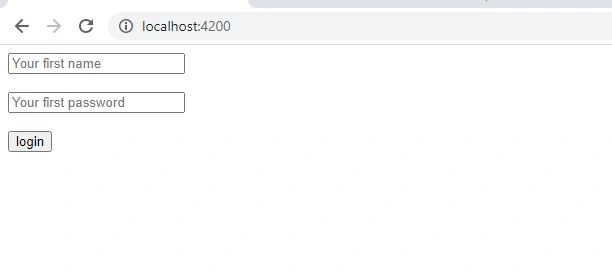
login.html
- <form (ngSubmit)="loginUser()">
- <input [(ngModel)]="objUser.email" type="email" name="email" placeholder="Your first name" required ngModel>
- <br>
- <br>
- <input [(ngModel)]="objUser.password" type="password" class="password" name="password" placeholder="Your first password" required ngModel>
- <br>
- <br>
- <input type="submit" name="submit" class="submit" value="login" >
- </form>
In the HTML component the user creates a form and a function in the form. which function is created in the service class.
Go to the ts component and write the code
- import { Component } from '@angular/core';
- import { Usermodel } from '../model/Usermodel';
- import { userservice } from '../service/userservice';
- import{Router } from '@angular/router';
- @Component({
- selector: ' login',
- templateUrl: './login.component.html',
- styleUrls: ['./login.component.css']
- })
- export class logincomponent {
- title = "chaman";
- localsdata = "";
- sessionsdata = " ";
- objUser: Usermodel = new Usermodel();
- constructor(private userservice: userservice, private route: Router) {
- this.localsdata = localStorage.getItem('localskey');
- this.sessionsdata = sessionStorage.getItem('sessionkey');
- }
- loginUser(objUser) {
- this.userservice.loginuser(this.objUser).subscribe(x => {
- if (x != undefined && x != null && x != '') {
- //this.route.navigate(['./reactive'],{ queryParams: {name:'Chaman Gautam'} });
- // this.route.navigate(['./welcome',{ name:'chaman'}]);
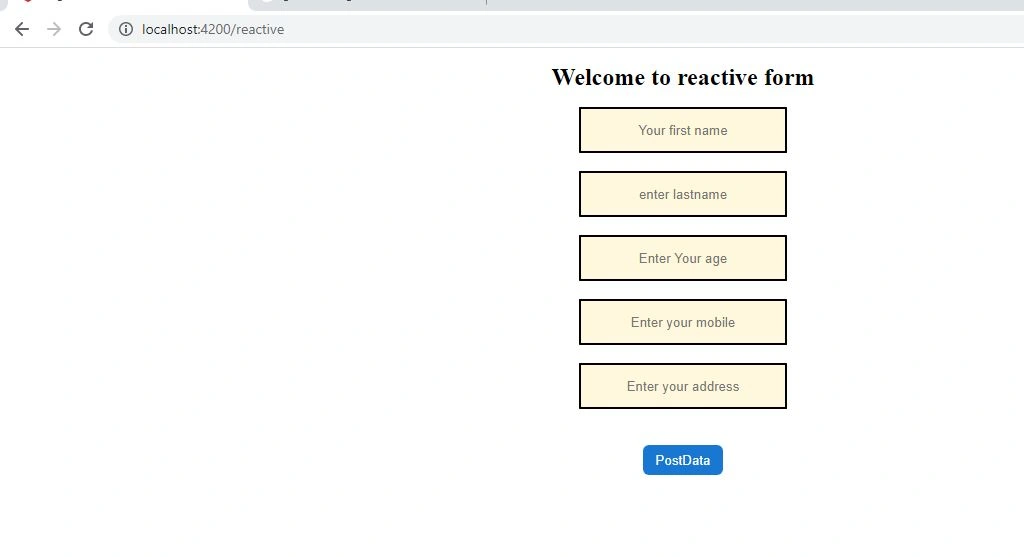
- this.route.navigate(['./reactive']);
- } else {
- alert('fail');
- }
- })
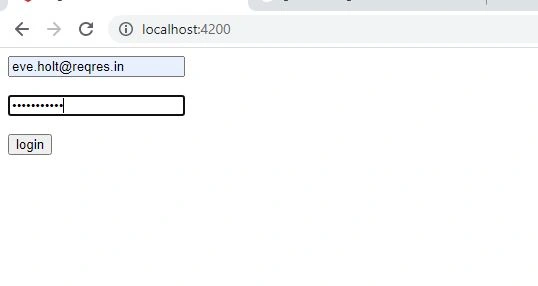
In this code user has created an object of wrapper class and registered a service and routes into the constructor. Then create an object and then create a query in this object, and then set the path using navigate. and add an alert box into the object that if you have entered the correct email or password then login successfully otherwise alert shows that your user id and password are incorrect.
Now go to the .css class to make your form attractive.
Now go to the .css file and write code.
login.css
- .form-control{
- text-align: center;
- width: 200px;
- height: 40px;
- color: black;
- border-color: black;
- background-color: cornsilk;
- border-radius: 1px;
- border-style: 0.5px;
- }
- .btn-btn-primary{
- text-align: center;
- border-radius: 6px;
- background-color: #1976d2;
- width: 80px;
- height:30px;
- border-style: hidden;
- color: white;
- }
- input.ng-invalid.ng-touched{
- border-color: red;
- }
- .text{
- text-align: center;
- font-size: x-large;
- }
- .container{
- text-align: center;
- }
Join the conversation! Your thoughts help the community grow.