

Let's look at how these three DAX functions work using a simple example with Product and Total Units Sold.
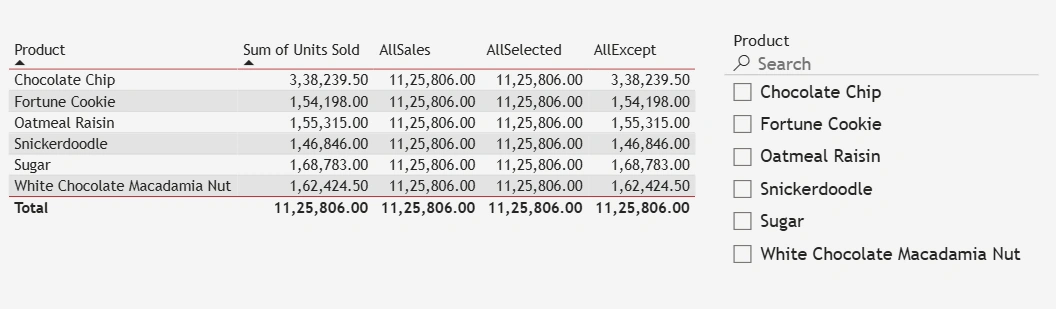
Below is the table when no filters are applied:
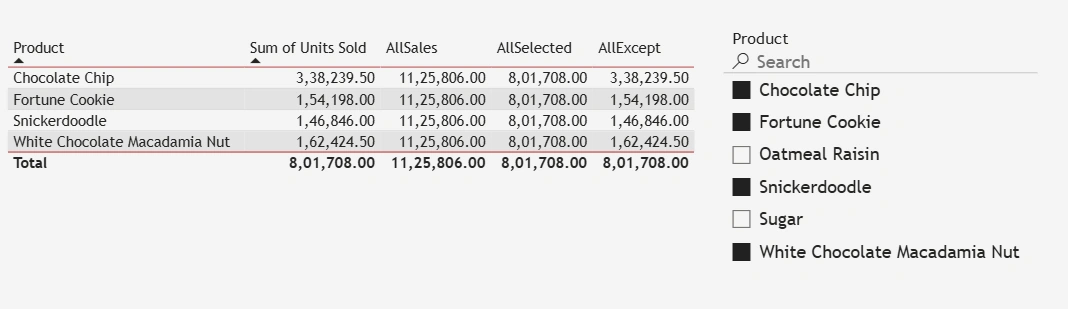
Below is the table when filters are applied:
ALL
What it does: Removes all filters from the specified table or column(s).
Effect: Ignores any slicers, filters, or row context for that column/table.
Example:
AllSales = CALCULATE(SUM(Orders[Units Sold]), ALL(Orders[Product]))This gives total sales for all products, no matter what filters are applied (as shown in the second image).
When to use: You want a grand total that ignores all filtering.
ALLSELECTED
What it does: Removes filters inside a visual or selection, but keeps outer context filters (like slicers or page filters).
Effect: Respects what the user has selected in visuals, but ignores row-level context.
Example:
AllSelected = CALCULATE(SUM(Orders[Units Sold]), ALLSELECTED(Orders[Product]))If you select a few products in a slicer, it uses only those selections but ignores row-level filters in the visual. In other words, it shows the total sales for all the selected products (as shown in the second image).
When to use: You want totals based on user selections.
ALLEXCEPT
What it does: Removes all filters except the specified column(s).
Effect: Keeps filters on certain columns while ignoring the rest.
Example:
AllExcept = CALCULATE(SUM(Orders[Units Sold]), ALLEXCEPT(Orders,Orders[Product]))This calculates total sales per product, ignoring filters on other columns like customer ID or region.
When to use: You want totals based on specific columns while ignoring all other filters.
📌 Quick Comparison Table
| Function | Removes Filters | Keeps Filters | Typical Use Case |
|---|---|---|---|
| ALL | All | None | Total values, ignoring slicers |
| ALLSELECTED | Row context | Outer selections | Percent of selected items in visuals |
| ALLEXCEPT | All except specified columns | Specified columns | Totals per group, ignoring other filters |
Join the conversation! Your thoughts help the community grow.