The following is the procedure.
Note: To use Crystal Reports in Visual Studio 2010, you need to download CRforVS_13_0.exe and install it.
Step 1
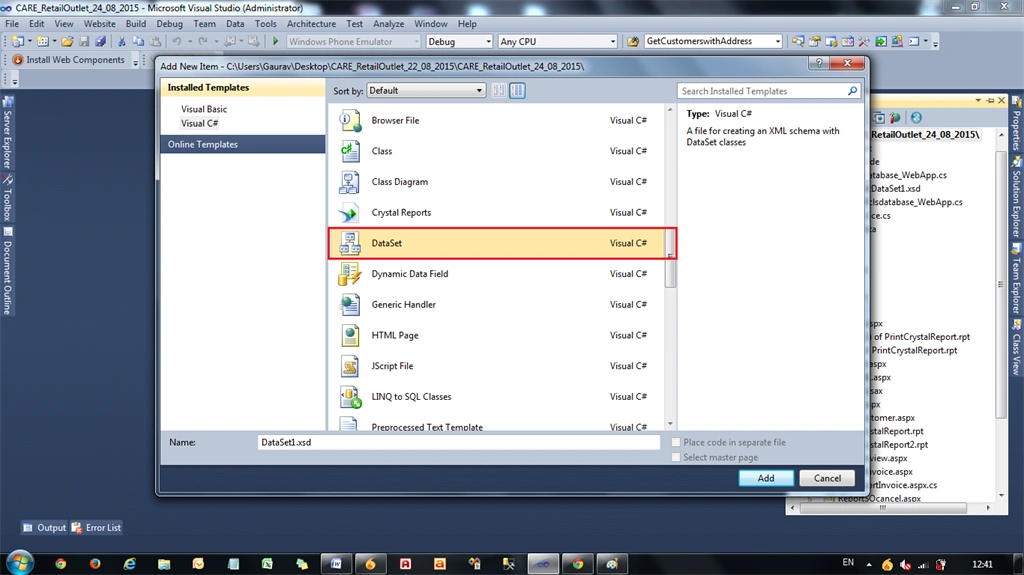
Create a new Dataset in your existing project.
In Solution Explorer select Add New Item, then Dataset1.
Step 2
In Dataset
Add, then click
Table Adapter.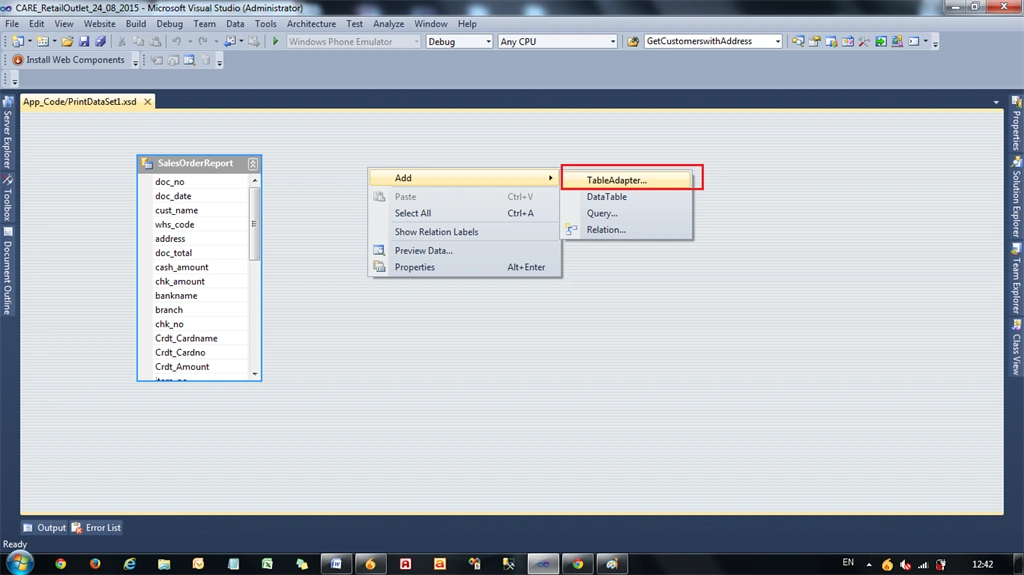 Step 3
In this Table Adapter, Add Columns depending on the Database Tables fields.
Note: In this Table Adapter the column name must be the same as the database table fields.
Step 4
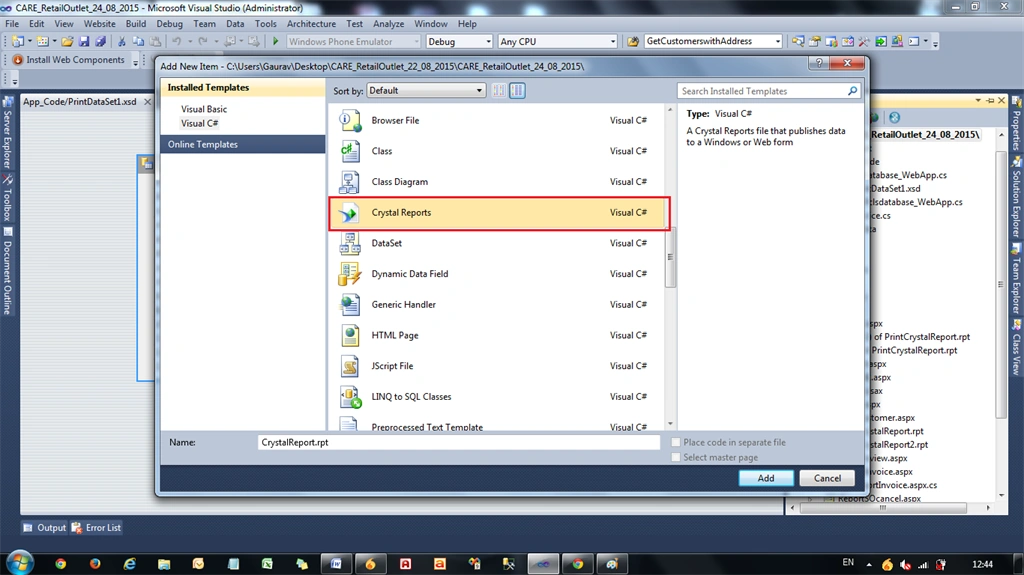
Add New Item, then select
Crystal Reports.
 Step 5
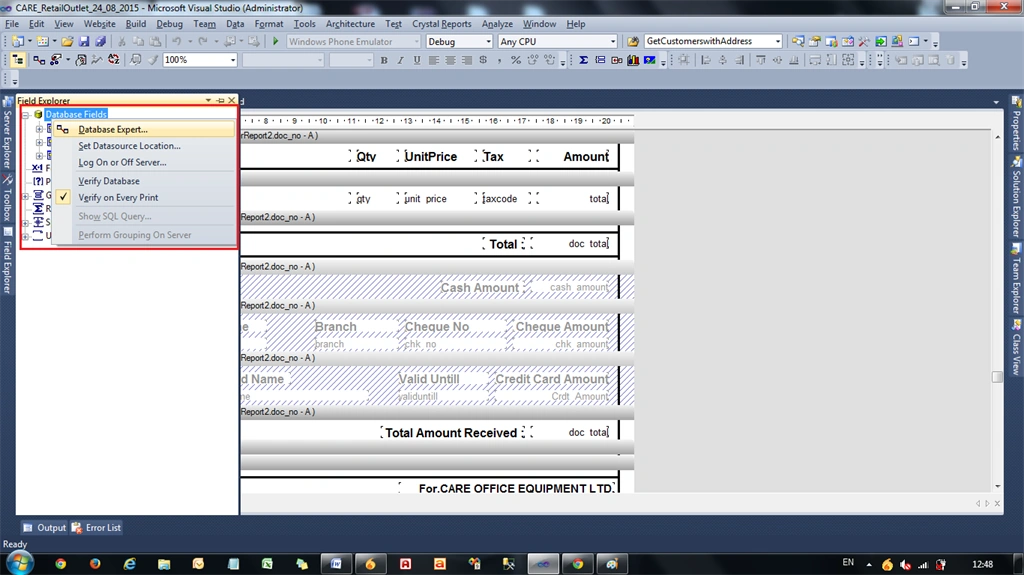
In the Crystal Reports Field Explorer Menu select Database Fields -> Database Expert.
 Step 6
Choose the previously created Dataset from the List then drag any DataTableAdapter to the right side.

Click Next
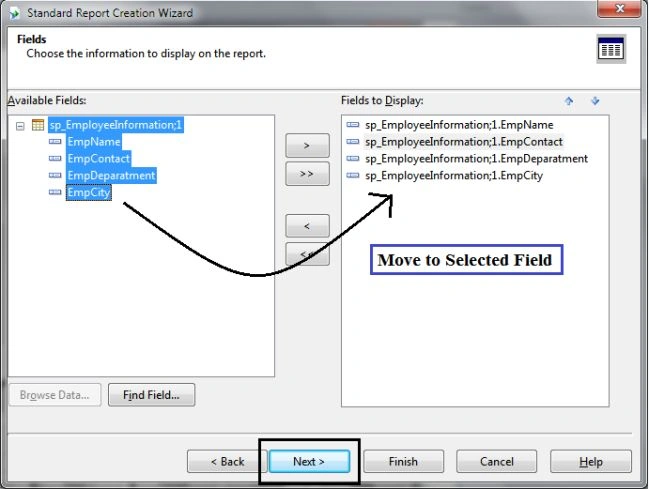
Choose the field to display.
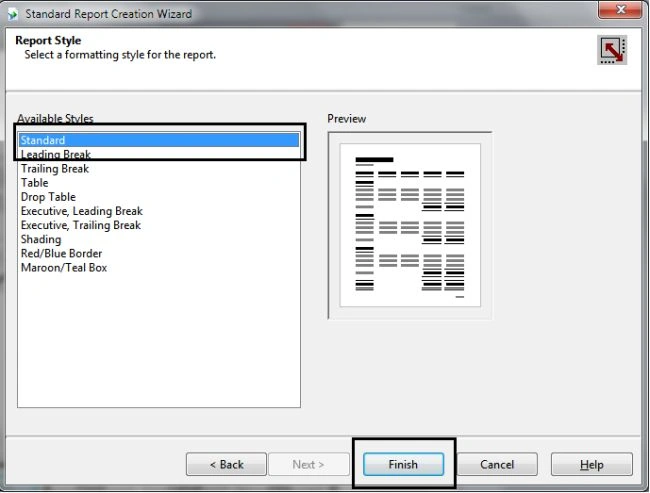
Choose Report Display Format.
Click Finish.
Step 7
After binding with the Dataset, design the Crystal Reports report by dragging fields one by one to the Crystal Reports report.
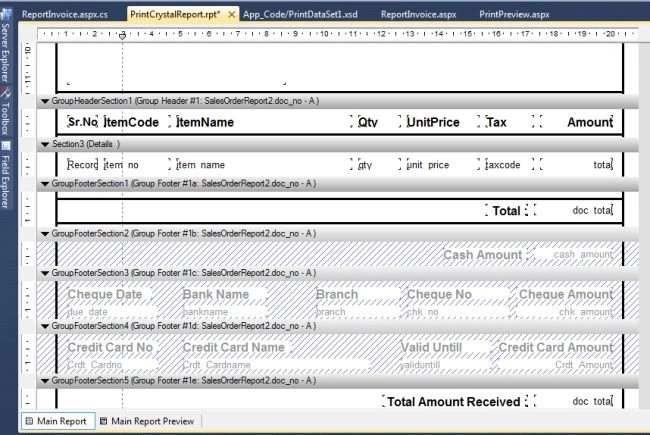
Finally your Design Page is ready as in the image.
Step 8
Now select Add New Item and name it NewWebform.aspx.
Step 9
Add the CrystalReportViewer to NewWebform.aspx. Do not choose a Report Source.
Step 10
Now write code to view the data in Crystal Reports depending on your condition.
Code Behind
For the preview of Crystal Report Data:
- using System.Data.SqlClient;
- using System.Data;
- using CrystalDecisions.CrystalReports.Engine;
- using System.Configuration;
- public partial class ReportInvoice: System.Web.UI.Page {
- SqlDataAdapter sqlda = new SqlDataAdapter();
- SqlCommand com = new SqlCommand();
- DataTable dt;
- PrintDataSet1 ds = new PrintDataSet1();
- ReportDocument rptDoc = new ReportDocument();
- protected void Page_Load(object sender, EventArgs e) {
- if (!IsPostBack) {
- bindCrystal();
- }
- }
- public void bindCrystal() {
- SqlConnection conn = new SqlConnection(ConfigurationManager.ConnectionStrings["con1"].ConnectionString);
- dt = new DataTable();
- dt.TableName = "Crystal Report Example";
- com.Connection = conn;
- string sql = "SELECT * from Table1 ";
- com.CommandText = sql;
- sqlda = new SqlDataAdapter(com);
- sqlda.Fill(dt);
- ds.Tables[0].Merge(dt);
- rptDoc.Load(Server.MapPath("PrintCrystalReport.rpt"));
- rptDoc.SetDatabaseLogon("Username", "password", @"IPADDRESS\SERVERR2", "DB_DatabaseName");
- rptDoc.SetDataSource(ds);
- CrystalReportViewer1.ReportSource = rptDoc;
- }
- }
Finally, the Print Preview is done in the Crystal Report Viewer.
Procedure to Print this Report from a client-side printer.
UI Design Side
Step 11
Add a HTML button (Print button) to the Webform, not asp:Button.
- <input id="btnPrint" type="button" value="Print" onclick="Print()" />
Put Crystal ReportViewer in a <Div> tag as in the following:
- <div id="dvReport">
- <CR:CrystalReportViewer ID="CrystalReportViewer1" runat="server"AutoDataBind="true" ToolPanelView="None" EnableDatabaseLogonPrompt="False"PrintMode="Pdf" />
- </div>
Use JavaScript in a Design Page as in the following:
- <script type="text/javascript">
- function Print() {
- var dvReport = document.getElementById("dvReport");
- var frame1 = dvReport.getElementsByTagName("iframe")[0];
- if (navigator.appName.indexOf("Internet Explorer") != -1 || navigator.appVersion.indexOf("Trident") != -1) {
- frame1.name = frame1.id;
- window.frames[frame1.id].focus();
- window.frames[frame1.id].print();
- } else {
- var frameDoc = frame1.contentWindow ? frame1.contentWindow : frame1.contentDocument.document ? frame1.contentDocument.document : frame1.contentDocument;
- frameDoc.print();
- }
- }
- </script>
Step 12
Browser Side
Now you can run the report in the browser and see the following:
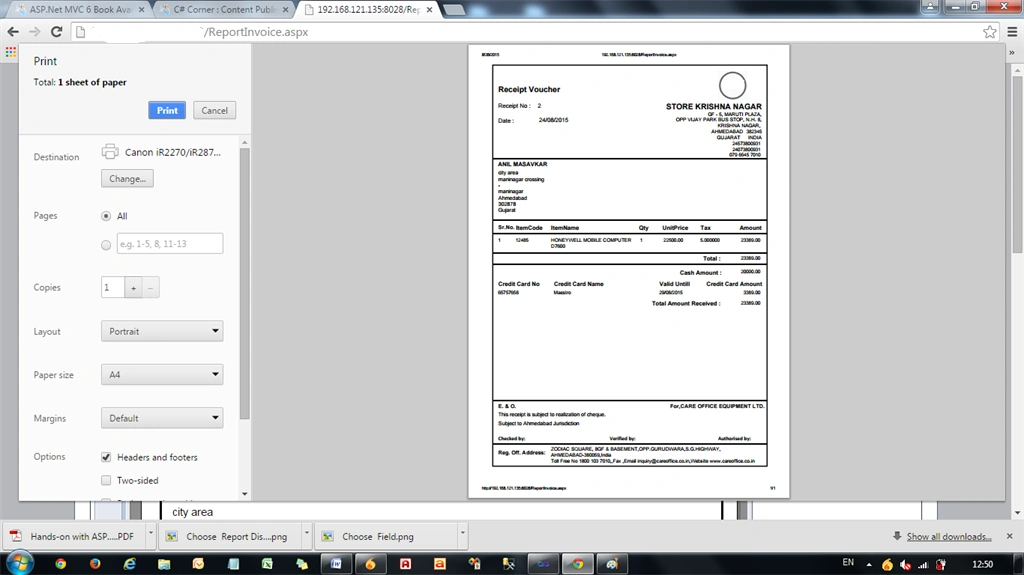
Finally, the printing is done perfectly.
Note: If you want to change the printer then click on the Change Button and you can save this file as a PDF from this option.
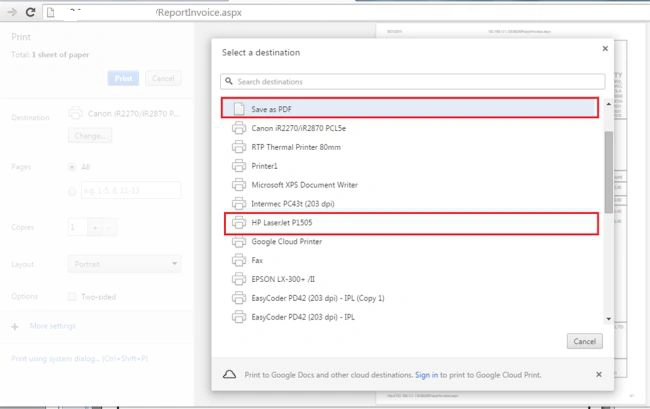
Note: If you want to not print the header and footer URL and PageNo and Page1of1, then UncheckHeaders and Footers option.
I hope you liked my article. If you have any query regarding this, feel free to comment for me.


Charan SinghPosted Aug 8, 2025, 11:25 AM
Only print single page please help me
Nagaveni KatariPosted May 2, 2025, 11:26 AM
I am getting space in the button of pdf
amresh sinhaPosted Nov 25, 2022, 4:37 PM
Above code is good for printing single page report. but how to print all pages of crystal report using above code. It only prints single page which is diplaying currently on screen.
Joven DatinginooPosted Aug 11, 2020, 4:11 AM
Thanks for this solution.
Uzair AhmedPosted Mar 26, 2018, 2:57 AM
How to do it in MVC? please guide me..
Chaitanya PPosted Mar 20, 2018, 6:03 AM
What to do if it is a multiple Page report. When I does this it just try to print first page
srivani annapurnaPosted Oct 31, 2017, 10:57 AM
Very Nice Article . This is working awesome.
Tevfik YörükPosted Sep 26, 2017, 6:07 PM
Thank you so much. Very Nice Article..
Kaushik VyasPosted Jul 29, 2017, 7:19 AM
Only print first page, and does not print other pages please help
Shiva VPosted Dec 26, 2016, 8:28 AM
IFRAME element is used for displaying the Crystal Report by the Crystal Report Viewer control -----------> But I am unable to get from the Crystal report.. Can you please expalin how to get from the report?
Kamrul HasanPosted Dec 13, 2016, 6:46 AM
I do one page print this solution but I want to multiple page print and preview. How can I do ?
Shiva VPosted Nov 23, 2016, 2:29 AM
Var frame1 = dvReport.getElementsByTagName("iframe")[0]; what is iframe ?
Prasanna MuraliPosted Nov 5, 2016, 9:01 AM
Nice post Nikunj Trivedi sir...
Prakash kumarPosted Jun 23, 2016, 2:55 AM
Hi Nikunj can you help for the multiple page
Sonu ChaudharyPosted Mar 31, 2016, 12:02 PM
nice one
Sayed HassanPosted Mar 12, 2016, 1:57 PM
Work great for me. Thanks.
Shaiwal TripathiPosted Sep 25, 2015, 7:44 AM
Hi Nikunj. It's not working properly when there are multiple pages in crystal report. Suppose if I have 5 pages. I go to 3rd page and click on print page then it is printing only 3rd page. I want to print all page. Please can you help ?
Santhakumar MunuswamyPosted Aug 29, 2015, 4:43 AM
Nice article. Thanks for sharing
Nikunj TrivediPosted Aug 28, 2015, 9:18 AM
Thank u sir......Dear sir here in this example its not an Employee image, but its an organization logo.
RakeshPosted Aug 28, 2015, 4:34 AM
Good work Nikunj but remove employee display image it's not a part to sales report......:)
Pankaj Kumar ChoudharyPosted Aug 27, 2015, 9:07 PM
Nice Article Sir..........
Rajeesh MenothPosted Aug 27, 2015, 1:31 PM
Nice Share
Gowtham KPosted Aug 27, 2015, 10:17 AM
Good one
Gowtham RajamanickamPosted Aug 27, 2015, 9:44 AM
good
Yashwanth MuthineniPosted Aug 27, 2015, 7:06 AM
Nice Share
Karthikeyan KPosted Aug 27, 2015, 4:36 AM
Good one sir..Thanks for sharing
Former memberPosted Aug 27, 2015, 4:03 AM
suppose my report has many pages which appear when user click on next prev button on crystal report toolbar. suppose i am in page one and if i take printout the way you shown then does it print current or first page or all the pages. please guide me for this printing js code.
Mohammed IbrahimPosted Aug 27, 2015, 3:48 AM
nice