

Let's start with Provider Hosted MVC App with AngularJS - Part 2. In this part we are going to perform CRUD operation's with SharePoint APP Model and AngularJS.
Please Reference below link to understand how to create Provider Hosted MVC App With AngularJS.
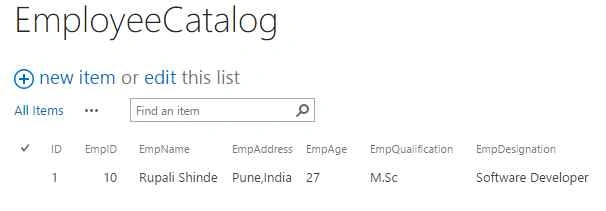
SharePoint HostWeb List Structure
The following is a list structure which we are referencing for our application.
We are going to create the following CRUD operation UI Design and final output format.
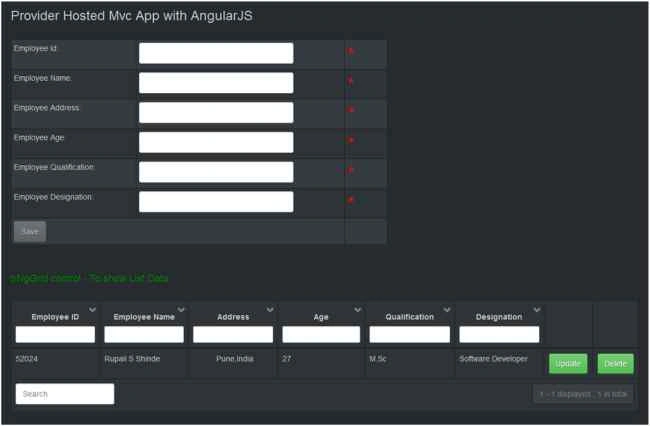
Lets start with user data entry form design. when we are saying user entry form, it means we need to have validation applied to controls.
AngularJS validation logic reside in specific JavaScript file named angular-messages.js, so we need to add reference of that file in our project first.

When we think about validation, <form></form> control comes in existence. When end user enter valid data and submits data to the server, other stay on same page till the user fill correct form entries.
Let's check the following code & try to understand which property is used for which purpose in code.
Step 1: Add form tag with unique name so we can reference that name to check state of form- Valid/InValid.
- <form name="EmployeeForm" class="elegant-aero">
Add html control with unique name. If the form field is required, then add " required " attribute to it.
Error Message: The ngModel directive expose an $error object. We can integrate $errro object with ngMessages to display control error message in easy way.
- ng-message="required": It corresponds to attribute we added to HTML control.
- <input type="text" class="form-control" ng-model="Employee.EmpID" name="EmployeeID" required />
- <div ng-messages="EmployeeForm.EmployeeID.$error">
- <div ng-message="required" class="ErrorSymbol">*</div>
- </div>
- ng-message="pattern": It corresponds to error message if specified pattern is not matching with user input data.
- <input type="text" class="form-control" ng-model="Employee.EmpAge" name="EmployeeAge" ng-pattern="/^[0-9]+$/" required />
- <div ng-messages="EmployeeForm.EmployeeAge.$error">
- <div ng-message="required" class="ErrorSymbol">*</div>
- <div ng-message="pattern" class="ErrorText">Must be a digit</div>
- </div>
Save Button
In the starting save button is disabled. When user fills the form with valid data, save button gets activated.
- <button ng:click="save($event)" ng:disabled="isSaveDisabled()" class="btn btn-small btn-primary">Save </button>
The following code indicates how to check form state and return value as true or false.
- $scope.isSaveDisabled = function () {
- var Status = this.EmployeeForm.$invalid;
- return Status;
Form control:
- <form name="EmployeeForm" class="elegant-aero">
- <table class="table table-condensed table-striped table-bordered">
- <tr>
- <td class="LblColumn">Employee Id:</td>
- <td class="DataColumn">
- <input type="text" class="form-control" ng-model="Employee.EmpID" name="EmployeeID" required />
- </td>
- <td class="ErrorColumn">
- <div ng-messages="EmployeeForm.EmployeeID.$error">
- <div ng-message="required" class="ErrorSymbol">*</div>
- </div>
- </td>
- </tr>
- <tr>
- <td class="LblColumn">Employee Name:</td>
- <td class="DataColumn">
- <input type="text" class="form-control" ng-model="Employee.EmpName" name="EmployeeName" required />
- </td>
- <td class="ErrorColumn">
- <div ng-messages="EmployeeForm.EmployeeName.$error">
- <div ng-message="required" class="ErrorSymbol">*</div>
- </div>
- </td>
- </tr>
- <tr>
- <td class="LblColumn">Employee Address:</td>
- <td class="DataColumn">
- <input type="text" class="form-control" ng-model="Employee.EmpAddress" name="EmployeeAddress" required />
- </td>
- <td class="ErrorColumn">
- <div ng-messages="EmployeeForm.EmployeeAddress.$error">
- <div ng-message="required" class="ErrorSymbol">*</div>
- </div>
- </td>
- </tr>
- <tr>
- <td class="LblColumn">Employee Age:</td>
- <td class="DataColumn">
- <input type="text" class="form-control" ng-model="Employee.EmpAge" name="EmployeeAge" ng-pattern="/^[0-9]+$/" required />
- </td>
- <td class="ErrorColumn">
- <div ng-messages="EmployeeForm.EmployeeAge.$error">
- <div ng-message="required" class="ErrorSymbol">*</div>
- <div ng-message="pattern" class="ErrorText">Must be a digit</div>
- </div>
- </td>
- </tr>
- <tr>
- <td class="LblColumn">Employee Qualification:</td>
- <td class="DataColumn">
- <input type="text" class="form-control" ng-model="Employee.EmpQualification" name="EmployeeQualification" required />
- </td>
- <td class="ErrorColumn">
- <div ng-messages="EmployeeForm.EmployeeQualification.$error">
- <div ng-message="required" class="ErrorSymbol">*</div>
- </div>
- </td>
- </tr>
- <tr>
- <td class="LblColumn">Employee Designation:</td>
- <td class="DataColumn">
- <input type="text" class="form-control" ng-model="Employee.EmpDesignation" name="EmployeeDesignation" required />
- </td>
- <td class="ErrorColumn">
- <div ng-messages="EmployeeForm.EmployeeDesignation.$error">
- <div ng-message="required" class="ErrorSymbol">*</div>
- </div>
- </td>
- </tr>
- <tr>
- <td colspan="2">
- @*<input type="button" id="btnaddcategory" value="Save" ng-click="save($event)" class="btn btn-small btn-primary" />*@
- <button ng:click="save($event)" ng:disabled="isSaveDisabled()" class="btn btn-small btn-primary">Save </button>
- </td>
- <td>
- <input type="text" class="form-control" ng-model="Employee.ID" style="visibility:hidden">
- </td>
- </tr>
- </table>
- lt;/form>
We want to perform CRUD operation so need to add update & delete button. Therefore, I added that button to table via AngularJS.
Article Part-1 <table></table> control and this table control you notice some difference here.
Inside <tbody></tbody> control I added a row with two column , first for Update button & second for Delete button.
- Update button: ng-click="loadRecord(gridItem, $event)".
- Delete button: ng-click="DeleteItem(gridItem.ID, $event)".
- <table tr-ng-grid="" items="EmployeeMaster" locale="en">
- <thead>
- <tr>
- <th field-name="EmpID" display-name="Employee ID"></th>
- <th field-name="EmpName" display-name="Employee Name"></th>
- <th field-name="EmpAddress" display-name="Address"></th>
- <th field-name="EmpAge" display-name="Age"></th>
- <th field-name="EmpQualification" display-name="Qualification"></th>
- <th field-name="EmpDesignation" display-name="Designation"></th>
- </tr>
- </thead>
- <tbody>
- <tr>
- <td>
- <input type="button" id="btnUpdatEmployee" class="btn btn-success"
- value="Update"
- ng-click="loadRecord(gridItem, $event)" />
- </td>
- <td>
- <input type="button" id="btnDeleteEmployee" class="btn btn-success"
- value="Delete"
- onclick="javascript: confirm('Do you want to delete record ??');"
- ng-click="DeleteItem(gridItem.ID, $event)" />
- </td>
- </tr>
- </tbody>
- </table>
Index.cshtml Source Code
Please check below the following source code changes like new script reference, <table> control change,<form> control integration in order to design above UI.
- @{
- ViewBag.Title = "Home Page";
- }
- <!-- Javascript from hives Layout folder -->
- <script type="text/javascript" src="/_layouts/15/sp.runtime.js"></script>
- <script type="text/javascript" src="/_layouts/15/sp.js"></script>
- <script type="text/ecmascript" src="/_layouts/SP.Core.js"></script>
- <script type="text/javascript" src="https://ajax.aspnetcdn.com/ajax/4.0/1/MicrosoftAjax.js"></script>
- <!-- Basic JS Files -->
- <script src="~/AngularJSScript/BasicJS/angular.min.js"></script>
- <script src="~/AngularJSScript/BasicJS/trNgGrid.js"></script>
- <script src="~/AngularJSScript/BasicJS/angular-messages.js"></script>
- <!-- Custom JS Files -->
- <script src="~/AngularJSScript/CustomJS/app-constants.js"></script>
- <script src="~/AngularJSScript/CustomJS/app-main.js"></script>
- <script src="~/AngularJSScript/CustomJS/app-data-service.js"></script>
- <script src="~/AngularJSScript/CustomJS/app-home-controller.js"></script>
- <link href="~/Content/bootstrap.min.css" rel="stylesheet" />
- <link href="~/Content/trNgGrid.min.css" rel="stylesheet" />
- <style>
- .LblColumn {
- width: 15%;
- }
- .DataColumn {
- width: 25%;
- }
- .ErrorSymbol {
- color: red;
- font-size: 30px;
- }
- .ErrorText {
- color: red;
- }
- .ErrorColumn{
- width:5%;
- }
- </style>
- <div ng-app="AngularApp">
- <div ng-controller="HomeController">
- <div>
- <h3>Provider Hosted Mvc App with AngularJS</h3>
- </div><br />
- <div style="width:60%">
- <form name="EmployeeForm" class="elegant-aero">
- <table class="table table-condensed table-striped table-bordered">
- <tr>
- <td class="LblColumn">Employee Id:</td>
- <td class="DataColumn">
- <input type="text" class="form-control" ng-model="Employee.EmpID" name="EmployeeID" required />
- </td>
- <td class="ErrorColumn">
- <div ng-messages="EmployeeForm.EmployeeID.$error">
- <div ng-message="required" class="ErrorSymbol">*</div>
- </div>
- </td>
- </tr>
- <tr>
- <td class="LblColumn">Employee Name:</td>
- <td class="DataColumn">
- <input type="text" class="form-control" ng-model="Employee.EmpName" name="EmployeeName" required />
- </td>
- <td class="ErrorColumn">
- <div ng-messages="EmployeeForm.EmployeeName.$error">
- <div ng-message="required" class="ErrorSymbol">*</div>
- </div>
- </td>
- </tr>
- <tr>
- <td class="LblColumn">Employee Address:</td>
- <td class="DataColumn">
- <input type="text" class="form-control" ng-model="Employee.EmpAddress" name="EmployeeAddress" required />
- </td>
- <td class="ErrorColumn">
- <div ng-messages="EmployeeForm.EmployeeAddress.$error">
- <div ng-message="required" class="ErrorSymbol">*</div>
- </div>
- </td>
- </tr>
- <tr>
- <td class="LblColumn">Employee Age:</td>
- <td class="DataColumn">
- <input type="text" class="form-control" ng-model="Employee.EmpAge" name="EmployeeAge" ng-pattern="/^[0-9]+$/" required />
- </td>
- <td class="ErrorColumn">
- <div ng-messages="EmployeeForm.EmployeeAge.$error">
- <div ng-message="required" class="ErrorSymbol">*</div>
- <div ng-message="pattern" class="ErrorText">Must be a digit</div>
- </div>
- </td>
- </tr>
- <tr>
- <td class="LblColumn">Employee Qualification:</td>
- <td class="DataColumn">
- <input type="text" class="form-control" ng-model="Employee.EmpQualification" name="EmployeeQualification" required />
- </td>
- <td class="ErrorColumn">
- <div ng-messages="EmployeeForm.EmployeeQualification.$error">
- <div ng-message="required" class="ErrorSymbol">*</div>
- </div>
- </td>
- </tr>
- <tr>
- <td class="LblColumn">Employee Designation:</td>
- <td class="DataColumn">
- <input type="text" class="form-control" ng-model="Employee.EmpDesignation" name="EmployeeDesignation" required />
- </td>
- <td class="ErrorColumn">
- <div ng-messages="EmployeeForm.EmployeeDesignation.$error">
- <div ng-message="required" class="ErrorSymbol">*</div>
- </div>
- </td>
- </tr>
- <tr>
- <td colspan="2">
- @*<input type="button" id="btnaddcategory" value="Save" ng-click="save($event)" class="btn btn-small btn-primary" />*@
- <button ng:click="save($event)" ng:disabled="isSaveDisabled()" class="btn btn-small btn-primary">Save </button>
- </td>
- <td>
- <input type="text" class="form-control" ng-model="Employee.ID" style="visibility:hidden">
- </td>
- </tr>
- </table>
- </form>
- </div><br />
- <div style="color:green">
- <h4>trNgGrid control - To show List Data</h4>
- </div><br />
- <table tr-ng-grid="" items="EmployeeMaster" locale="en">
- <thead>
- <tr>
- <th field-name="EmpID" display-name="Employee ID"></th>
- <th field-name="EmpName" display-name="Employee Name"></th>
- <th field-name="EmpAddress" display-name="Address"></th>
- <th field-name="EmpAge" display-name="Age"></th>
- <th field-name="EmpQualification" display-name="Qualification"></th>
- <th field-name="EmpDesignation" display-name="Designation"></th>
- </tr>
- </thead>
- <tbody>
- <tr>
- <td>
- <input type="button" id="btnUpdatEmployee" class="btn btn-success"
- value="Update"
- ng-click="loadRecord(gridItem, $event)" />
- </td>
- <td>
- <input type="button" id="btnDeleteEmployee" class="btn btn-success"
- value="Delete"
- onclick="javascript: confirm('Do you want to delete record ??');"
- ng-click="DeleteItem(gridItem.ID, $event)" />
- </td>
- </tr>
- </tbody>
- </table>
- </div>
- </div>
Amol GadgePosted Dec 29, 2016, 4:19 PM
Nice Article, mam i want demo plz send [email protected]
Santhakumar MunuswamyPosted Oct 18, 2015, 5:03 AM
Good article
Abhay ShankerPosted Oct 17, 2015, 5:24 AM
Nice Article
Rupali ShindePosted Oct 12, 2015, 2:51 AM
welcome
Sagar DonthineniPosted Oct 12, 2015, 2:13 AM
Thanks for such a nice article..
Rahul SuryawanshiPosted Oct 9, 2015, 12:05 PM
Very nice article
Sibeesh VenuPosted Oct 9, 2015, 5:16 AM
Nice Share
Vinodh NarayananPosted Oct 8, 2015, 10:01 AM
Pretty awesome thanks for sharing
Nilesh JadavPosted Oct 8, 2015, 9:07 AM
Nice work !!
Priyaranjan K SPosted Oct 8, 2015, 9:05 AM
This is pretty cool stuff ! Great work you have done here ! Kudos ...
Harshad PansuriyaPosted Oct 8, 2015, 7:33 AM
Nice one