

Introduction
This article explains publishing MySQL data with a PDO extension in PHP, the PHP Data Object (PDO) extension in PHP. The PDO extension defines a light-weight, consistent interface for accessing databases in PHP. Every database driver that implements the PDO interface can expose database-specific options as regular extension functions. Learn more details about a PDO in my previous article PDO introduction. But this article explains basic connections with PDO, returns data with PDO, update and insert data with the PDO extension. Before using these functions, however, you will check your PDO extension setting in the php.ini file to determine whether the PDO extension is enabled.
;extension=php_pdo_mssql.dll
extension=php_pdo_mysql.dll//only require this for pdo to mysql
;extension=php_pdo_oci.dll
And for the next step you will create a table for storing, updating and retrieving your messages.

Example
<!DOCTYPE html PUBLIC "-//W3C//DTD XHTML 1.0 Transitional//EN" "http://www.w3.org/TR/xhtml1/DTD/xhtml1-transitional.dtd">
<html xmlns="http://www.w3.org/1999/xhtml">
<head>
<meta http-equiv="Content-Type" content="text/html; charset=iso-8859-1" />
<title>Untitled Document</title>
</head>
<body>
<p>
<?php
echo $result;
?>
</p
</body>
</html>
The following example explains how to create a PDO object and configure the MySQL connection with PDO.
<?php
try
{
$con = new PDO('mysql:host=localhost;dbname=demo', 'root','');
$con->setAttribute(PDO::ATTR_ERRMODE, PDO::ERRMODE_EXCEPTION);
$con->exec('SET NAMES "utf8"');
}
catch (PDOException $msg)
{
$result = 'not able to connect to the database server'.$msg->getMessage();
include 'result.php';
exit();
};
$result = 'Your database connection established.';
include 'result.php';
?>
Output

First of all, you will configure the connection. To do that call the PDO object's setAttribute method. If you want to set the PDO attribute that controls the error mode then use this method (PDO::ATTR_ERRMODE) to the mode that throws exceptions (PDO::ERRMODE_EXCEPTION).
$con->setAttribute(PDO::ATTR_ERRMODE, PDO::ERRMODE_EXCEPTION);
Sending SQL Queries With PHP
The PDO object is a similar mechanism as the exec method.
<?php
try
{
$con = new PDO('mysql:host=localhost;dbname=demo', 'root','');
//without setAttribute not work your exception
$con->setAttribute(PDO::ATTR_ERRMODE, PDO::ERRMODE_EXCEPTION);
//$con->exec('SET NAMES "utf8"');
$query = 'CREATE TABLE hello (
hello_id INT NOT NULL AUTO_INCREMENT PRIMARY KEY,
hello_text TEXT,
hello_date DATE NOT NULL
) DEFAULT CHARACTER SET utf8 ENGINE=InnoDB';
$con->exec($query);
}
catch (PDOException $msg)
{
$result = 'Error creating hello table: '."<br>" . $msg->getMessage()."<br>";
include 'result.php';
exit();
}
$result = 'hello table has created.';
include 'result.php';
?>
Output


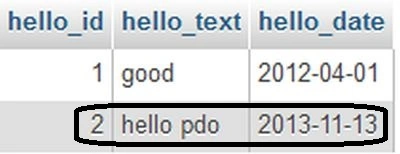
Update Queries with PDO
<?php
try
{
$con = new PDO('mysql:host=localhost;dbname=demo', 'root','');
//without setAttribute not work your exception
$con->setAttribute(PDO::ATTR_ERRMODE, PDO::ERRMODE_EXCEPTION);
//$con->exec('SET NAMES "utf8"');
$query = 'UPDATE hello SET hello_date="2012-04-01"
WHERE hello_text LIKE "%good%"';
$excuterow = $con->exec($query);
}
catch (PDOException $msg)
{
$result = 'Error performing update: ' . $msg->getMessage();





Join the conversation! Your thoughts help the community grow.