

Introduction
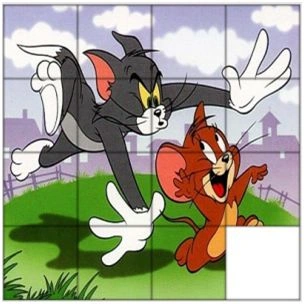
This is a simple puzzle game developed using pure HTML and jQuery. This puzzle consists of an image which is divided into fifteen small parts or we could call them segments. These parts are randomly arranged on the puzzle board. Your task isthat you have to rearrange the image segments in proper order. There are no limitations for moves or time; you can take your own time to complete this puzzle.
Background
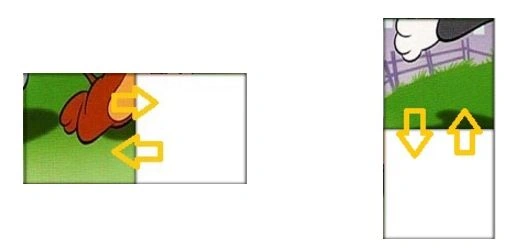
This puzzle game is mainly based on swapping of divs on puzzle board, Puzzle board consist s of a total of 16 small divs, 15 image divs and one empty div. Div position is set on the puzzle board on random basis. When you click on any div adjacent to the empty div position of selected div and empty div gets changed.
Check Live Demo here.
Code
To swap clicked square and the current empty square, I have written the below function which will swap the position of these divs or segments using left and top co-ordinates.
- function Move(clicked_square, square_size) {
- var ismovable = false;
- // Swap x/y between the clicked square and the currently empty square
- var oldx = $('#board').children("div:nth-child(" + EmptySquare + ")").css('left');
- var oldy = $('#board').children("div:nth-child(" + EmptySquare + ")").css('top');
- var newx = $(clicked_square).css('left');
- var newy = $(clicked_square).css('top');
- // The clicked square is north of the empty square
- if (oldx == newx && newy == (parseInt(oldy) - square_size) + 'px')
- ismovable = true;
- // The clicked square is south of the empty square
- if (oldx == newx && newy == (parseInt(oldy) + square_size) + 'px')
- ismovable = true;
- // The clicked square is west of the empty square
- if ((parseInt(oldx) - square_size) + 'px' == newx && newy == oldy)
- ismovable = true;
- // The clicked square is east of the empty square
- if ((parseInt(oldx) + square_size) + 'px' == newx && newy == oldy)
- ismovable = true;
- if (ismovable) {
- // Increment zindex so the new tile is always on top of all others
- $(clicked_square).css('z-index', zi++);
- // Swap squares... Animate new square into old square position
- $(clicked_square).animate({ left: oldx, top: oldy }, 200, function() {
- //Move old square into new square position
- $('#board').children("div:nth-child(" + EmptySquare + ")").css('left', newx);
- $('#board').children("div:nth-child(" + EmptySquare + ")").css('top', newy);
- });
- }
- }
Rambabu ChintapantiPosted Jun 1, 2016, 8:17 AM
Nice Article.If possible share the source code.
RajaPosted Jun 1, 2016, 5:40 AM
Nice...
Bhuvanesh MohankumarPosted May 30, 2016, 1:18 PM
Good one
Vignesh ManiPosted May 30, 2016, 9:33 AM
Good one
Manoj BhoirPosted May 30, 2016, 7:58 AM
Thanks all of you.
Dipendra ShekhawatPosted May 30, 2016, 4:43 AM
very nice !!
Thiruppathi RPosted May 30, 2016, 4:33 AM
Good..
Shaili DashoraPosted May 30, 2016, 2:36 AM
Nice creation
Debasis SahaPosted May 30, 2016, 1:15 AM
Nice share..