

Introduction
Display numerical data in graph or any modern way to increase the user interface and broad range of radial gauges for displaying distance, speed, duration or any other dynamic data.
Create a new Windows 10 UWP app and name it as you wish.
Next right click your project and select Manage NuGet Packages and add the WinRTXamlToolkitControls.Gauge.UWP like the following image.
It’s a free toolkit for Windows UWP App.
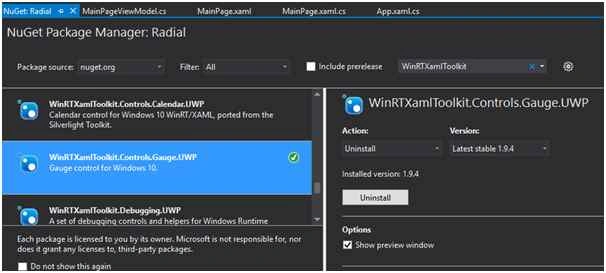 Then add the following XAML code in your XAML page:
Let’s see the steps
- xmlns:controls="using:WinRTXamlToolkit.Controls"
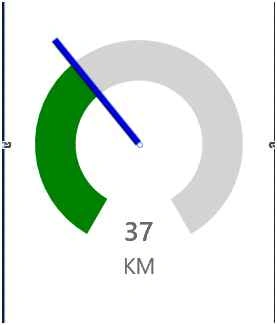
Finally, add the following XAML code inside the Grid to design your Radial Gauge:
- <controls:Gauge x:Name="myGrapg" Value="37" Unit="KM" ScaleTickBrush="Transparent" TickBrush="Transparent" ScaleWidth="30" CanDrag="True">
- <controls:Gauge.NeedleBrush>
- <LinearGradientBrush EndPoint="1,0">
- <GradientStop Color="Black" />
- <GradientStop Color="Blue" Offset=".5" />
- <GradientStop Color="Black" Offset="3" />
- </LinearGradientBrush>
- </controls:Gauge.NeedleBrush>
- <controls:Gauge.TrailBrush>
- <SolidColorBrush Color="Green" Opacity="25" />
- </controls:Gauge.TrailBrush>
- </controls:Gauge>
Максим ТимофеевPosted May 6, 2016, 6:37 AM
how to create compass?
Asfend YarPosted Feb 29, 2016, 3:38 AM
thanks
Joe WilsonPosted Dec 29, 2015, 4:17 AM
Thank you very much for sharing.
Suresh MPosted Dec 28, 2015, 11:31 PM
Source code link is also provided at the bottom.
Santhakumar MunuswamyPosted Dec 28, 2015, 11:20 PM
Thanks for sharing. Can you please upload source code?