

Introduction
This article explains Range Validation in the ASP.Net MVC4 Web API. Range Validation applies to ensuring that the user input value is within the specified range. We can use Range Validation on both strings and numbers. He will use Range Validation on the number.
Use the following procedure to create a sample application.
Step 1
- Start Visual Studio 2013.
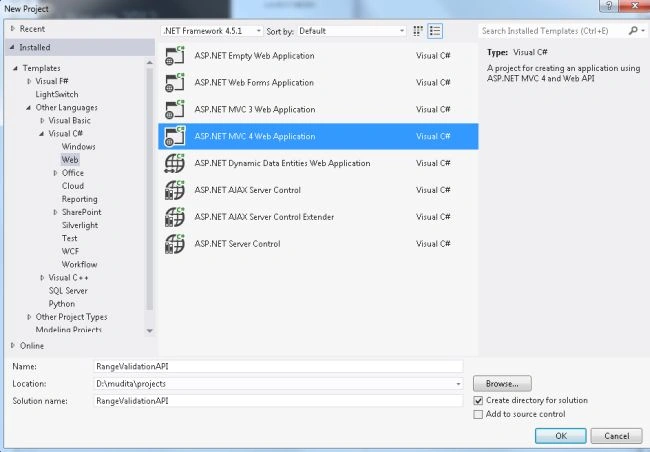
- From the Start Window select "New Project".
- From the New project window select "Installed" -> "Visual C#" -> "Web" -> "Visual Studio 2012".
- Select "ASP.NET MVC4 Web Application" and click the "OK" button.
- From the "MVC4 project" window select "Web API".
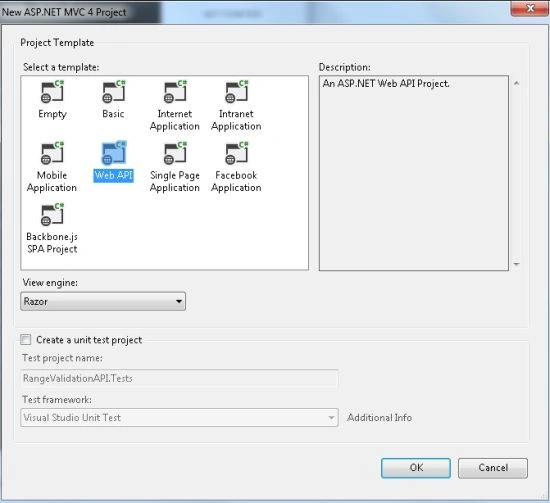
- Click on the "OK" button.
Step 2
Add a Model folder as in the following:
- In the "Solution Explorer".
- Right -click on the "Model folder".
- Select "Add" -> "Class".
- From the add item window select "Installed" -> "Visual C#".
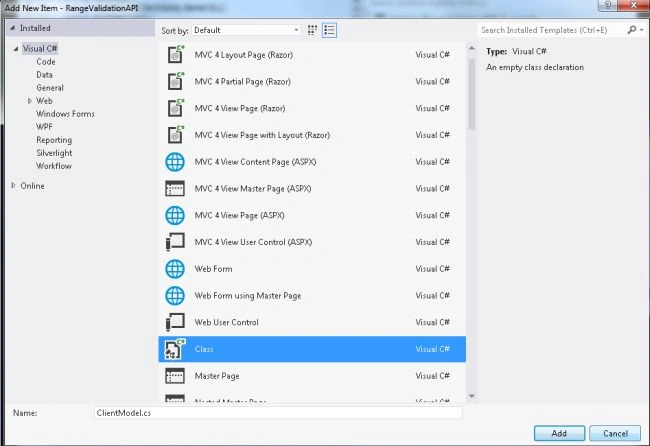
- Select "Class" and click on the "Add" button.
Add the following code:
- using System;
- using System.Collections.Generic;
- using System.ComponentModel.DataAnnotations;
- using System.Linq;
- using System.Web;
- namespace RangeValidationAPI.Models
- {
- public class ClientModel
- {
- [Required(ErrorMessage = "Pleasee enter you number")]
- [Range(0, 1000, ErrorMessage = "Enter number between 0 to 1000")]
- public int NumberofClient { get; set; }
- }
- }
Step 3
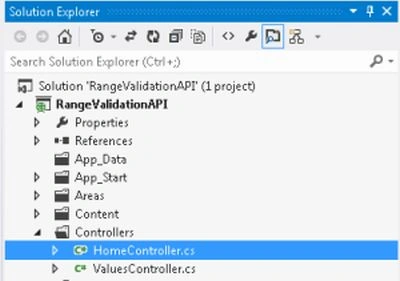
Now in the "Controller" we add the code that uses all the variables of the Model class. This file exists:
-
In the "Solution Explorer".
-
Expand the "Controller" folder.
-
Select the "HomeController".
Add the following code:
Join the conversation! Your thoughts help the community grow.