Introduction
Here, we will see how to implement a few more rare tags of HTML 5, like <kbd>, <legend>, <rel>, <meter>, and <wbr>.
<kbd>
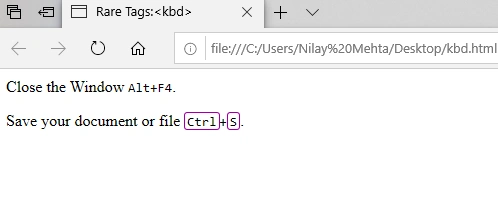
The <kbd> tag is represented as keyboard input. The content of this tag is displayed in same width size (monospaced font) in your browser.
<kbd> provides effective and attractive results, while we are using it, with CSS snippets.
Tag omission is allowed, opening tag is required, but closing tag is optional.
Example
- <html>
- <head>
- <title>Rare Tags:<kbd> </title>
- <style>
- kbd.key {
- padding: 1px 2px 0;
- border-radius: 3px;
- border: 1px solid #666;
- border-color: #990099;
- font-family: monospace;
- }
- </style>
- </head>
- <body>
- <p>Close the Window <kbd><kbd>Alt</kbd>+<kbd>F4</kbd></kbd>.</p>
- <p>Save your document or file <kbd><kbd class="key">Ctrl</kbd>+<kbd class="key">S</kbd></kbd>.
- </p>
- </body>
- </html>
<legend>
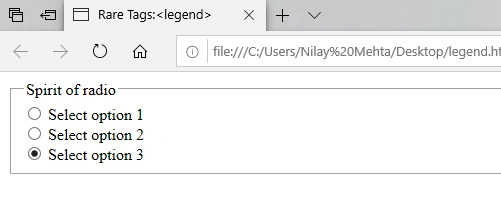
In our previous article, we already learned about <fieldset> element. Here, the <legend> tag provides a caption to <fieldset> which plays a parental role for its contents. In other words, we can say that a <fieldset> 's primary child is <legend> element.
Tag omission is not allowed, both opening and closing tags are required to avoid errors.
Example
- <html>
- <head><title>Rare Tags:<legend> </title></head>
- <body>
- <fieldet>
- <legend>Spirit of radio</legend>
- <input type="radio" id="radio" name="radio">
- <label for="radio">Select option 1</label><br/>
- <input type="radio" id="radio2" name="radio">
- <label for="radio2">Select option 2</label><br/>
- <input type="radio" id="radio3" name="radio">
- <label for="radio3">Select option 3</label>
- </fieldset>
- </body>
- </html>
<rel>
rel is not tag, but it is an attribute for <a> and <link> tags.
Syntax
<a rel= ”value”> or <link rel=”value”>
Here, attribute value should be any of the following, while we are using <a> tag,
alternate, author, bookmark, external, help, license, next, nofollow, noreffer, noopener, prev, search, tag
An attribute value should be any of the below list, while we are using <link> tag,
as, crossorigin, anonymous, use-credentials, disable, href, hreflang, importance, integrity, media, refferpolicy, rel, sizes, title, type, methods, prefetch, target, charset, rev
Example
- <html>
- <head>
- <title> Rare Tags: rel </title>
- </head>
- <body>
- <p>
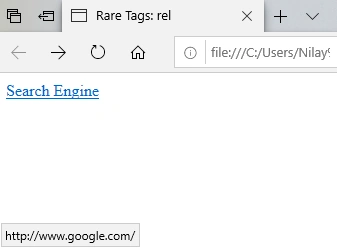
- <a rel="nofollow" href="http://www.google.com/">Search Engine</a>
- </p>
- </body>
- </html>
<meter>
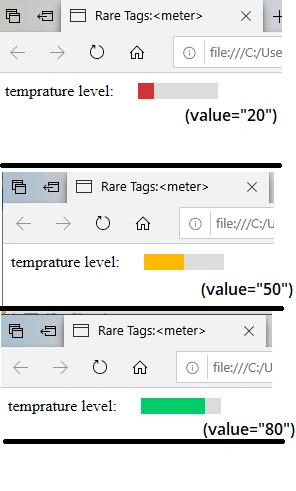
The <meter> tag is new in HTML 5, which is used to define a scalar measurement of a known range or graphical explanation of fractional value. Battery Level Charged, Temperature, Disk Usage, and Heat Level are the best examples of the <meter> element.
This element includes Global Attributes like: value, min, max, low, high, optimum, and form
Tag omission is not allowed, both opening and closing tags are required to avoid errors.
Note
The <meter> tag is not representing the progress like the <progress> tag. The <progress> element is used for progress bar.
Note
The <meter> tag is not supported in Internet Explorer, Edge 12, Safari 5 and previous versions.
Example
- <html>
- <head>
- <title>Rare Tags:<meter> </title>
- <style>
- label {
- padding-right: 20px;
- font-size: 1rem;
- }
- </style>
- </head>
- <body>
- <label for="temprature">temprature level:</label>
- <meter id="temprature"
- min="0" max="100"
- low="33" high="78" optimum="80"
- value="20">
- at 50/100
- </meter>
- </body>
- </html>
<wbr>
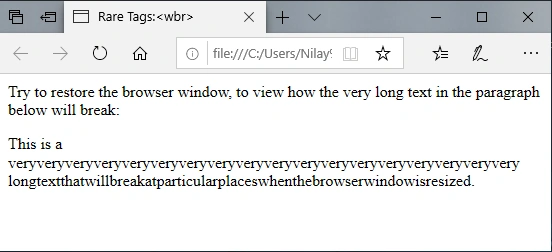
The <wbr> is also a new element of HTML 5. This element is represented as Word-Break Opportunity. It is used to optionally break text at a particular location. We used <wbr> very occasionally.
When do we use <wbr>?
When your text is too long, or if you have any doubt the browser will break your lines at the wrong place, at the time you can use the <wbr> to add word break opportunities.
Note
<wbr> is not supported in Internet Explorer 11 or earlier versions.
Example
- <html>
- <head>
- <title>Rare Tags:<wbr> </title>
- </head>
- <body>
- <p>Try to restore the browser window, to view how the very long text in
- the paragraph below will break:</p>
- <p>This is a veryveryveryveryveryveryveryveryveryveryveryveryveryveryveryveryveryvery<wbr>longtextthatwillbreakatparticular<wbr>placeswhenthebrowserwindowisresized.</p>
- </body>
- </html>
Summary
In this article, we learned about rarely used tags in HTML 5, like <kbd>, <legend>, <rel>, <meter>, <wbr>.
References
https://www.w3schools.com/tags
https://developer.mozilla.org/en-US/docs/Web/HTML/Element
https://www.w3docs.com/learn-html/html-elements.html


Onkar SharmaPosted Oct 12, 2019, 8:10 AM
Nice Article, Very Informative... ..