

All of us know what views are and what their purpose are in ASP.NET MVC 4. Views in an analogy are similar to web forms in ASP.NET that are used for displaying the data or the HTML content on the user's screen.
The User interacts with our application using views. In MVC 4, views can be rendered using the following two view engines:
- Razor View Engine: That was introduced in MVC 3 and enhanced in MVC 4.
- Aspx view engine/WebForms View Engine: That basically supports aspx expressions and earlier versions of MVC like MVC 2.
For our demo since we are using MVC 4, the view engine that we are using is Razor.
So let's start with an example. I'm creating a new VS2010 MVC 4 project named ViewsInDepth. Select the Project Template as “Basic”. I'm not doing any unit testing here so I'm not selecting the unit testing checkbox. Once the project/solution is ready, add a new controller with the name “Home” and select the scaffolding option as Empty.
Add a new Model class with the name “Employee”. Here is the code snippet for it.
- namespace ViewsInDepth.Models
- {
- public class Employee
- {
- public int EID { get; set; }
- public string EName { get; set; }
- public string EAdd { get; set; }
- public string EDesignation { get; set; }
- }
- }
- public class HomeController : Controller
- {
- List<Employee> lstEmployees = new List<Employee>()
- {
- new Employee(){EID=1,EName="Vishal Gilbile",EAdd="Andheri",EDesignation="Sr.Software Developer"},
- new Employee(){EID=2,EName="Rahul Bandekar",EAdd="Santacruz",EDesignation="Accountant"},
- new Employee(){EID=3,EName="Neetu Agarwal", EAdd="Dadar",EDesignation="Tech Lead"},
- new Employee(){EID=4,EName="Lincy Pullan",EAdd="Worli",EDesignation="DBA"},
- new Employee(){EID=5,EName="Suvarna Bhosle",EAdd="Andheri",EDesignation="Accountant"},
- new Employee(){EID=6,EName="Paresh Rahate",EAdd="Thane",EDesignation="Project Manager"},
- new Employee(){EID=7,EName="Ollin D'Souza",EAdd="Mumbra",EDesignation="Software Developer"}
- };
- public ActionResult Index()
- {
- return View(lstEmployees);
- }
- }
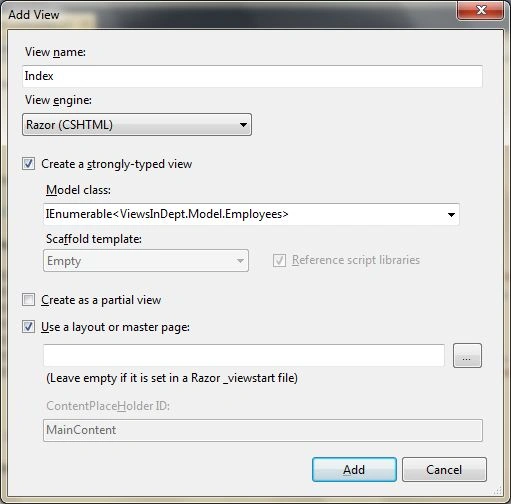
Here is the view code.
- @model IEnumerable<ViewsInDepth.Models.Employee>
- @{
- ViewBag.Title = "Index";
- }
- <h2>
- Index</h2>
- <div>
- <table>
- <thead>
- <tr>
- <td>
- EID
- </td>
- <td>
- Name
- </td>
- <td>
- Address
- </td>
- <td>
- Designation
- </td>
- </tr>
- </thead>
- <tbody>
- @foreach (var emp in Model)
- {
- <tr>
- <td>
- @emp.EID
- </td>
- <td>
- @emp.EName
- </td>
- <td>
- @emp.EAdd
- </td>
- <td>
- @emp.EDesignation
- </td>
- </tr>
- }
- </tbody>
- </table>
- </div>
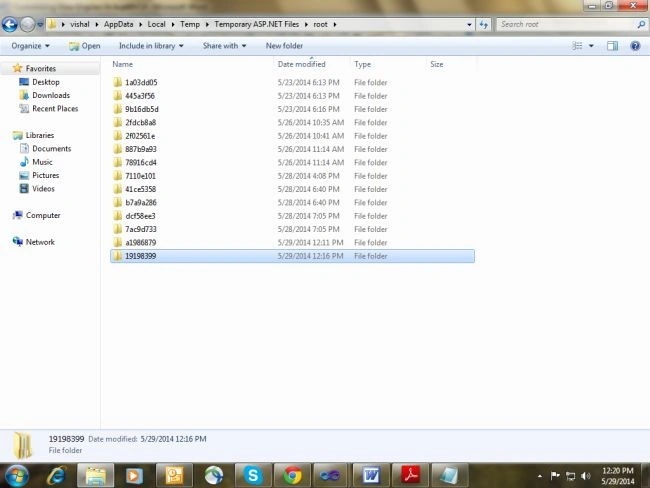
The one highlighted is my application folder that the razor engine created. Finding these files are a little difficult because they have encrypted names but you can find them using the strategy that we adopted that is by using system time. The advantage of compiling the view files into C# classes is that the access to the page/view is much faster because a compile file needs to be processed and the other benefit is that you are able to incorporate the C# code inside the View.
Here is the compiled file code. Again I'm saying you need to search a little to find the file because they have encrypted names. Here my file name is “App_Web_cp4ukq2j.0.cs”
- #pragma checksum "D:\Vishal\Mvc\ViewsInDepth\ViewsInDepth\Views\Home\Index.cshtml" "{ff1816ec-aa5e-4d10-87f7-6f4963833460}" "D0F32B1AF3DA597F11B766D5A7FB28D9C575671A"
- //------------------------------------------------------------------------------
- // <auto-generated>
- // This code was generated by a tool.
- // Runtime Version:4.0.30319.18408
- //
- // Changes to this file may cause incorrect behavior and will be lost if
- // the code is regenerated.
- // </auto-generated>
- //------------------------------------------------------------------------------
- namespace ASP
- {
- using System;
- using System.Collections.Generic;
- using System.IO;
- using System.Linq;
- using System.Net;
- using System.Web;
- using System.Web.Helpers;
- using System.Web.Security;
- using System.Web.UI;
- using System.Web.WebPages;
- using System.Web.Mvc;
- using System.Web.Mvc.Ajax;
- using System.Web.Mvc.Html;
- using System.Web.Optimization;
- using System.Web.Routing;
- public class _Page_Views_Home_Index_cshtml : System.Web.Mvc.WebViewPage<IEnumerable<ViewsInDepth.Models.Employee>>
- {
- #line hidden
- public _Page_Views_Home_Index_cshtml()
- {
- }
- protected ASP.global_asax ApplicationInstance
- {
- get
- {
- return ((ASP.global_asax)(Context.ApplicationInstance));
- }
- }
- public override void Execute()
- {
- #line 2 "D:\Vishal\Mvc\ViewsInDepth\ViewsInDepth\Views\Home\Index.cshtml"
- ViewBag.Title = "Index";
- #line default
- #line hidden
- WriteLiteral(@"
- <h2>Index</h2>
- <div>
- <table>
- <thead>
- <tr>
- <td>
- EID
- </td>
- <td>
- Name
- </td>
- <td>
- Designation
- </td>
- </tr>
- </thead>
- <tbody>");
- #line 23 "D:\Vishal\Mvc\ViewsInDepth\ViewsInDepth\Views\Home\Index.cshtml"
- #line default
- #line hidden
- #line 23 "D:\Vishal\Mvc\ViewsInDepth\ViewsInDepth\Views\Home\Index.cshtml"
- foreach (var emp in Model)
- {
- #line default
- #line hidden
- WriteLiteral(@" <tr>
- <td>
- emp.EID
- </td>
- <td>
- emp.Name
- </td>
- <td>
- emp.Designation
- </td>
- </tr>
- ");
- #line 36 "D:\Vishal\Mvc\ViewsInDepth\ViewsInDepth\Views\Home\Index.cshtml"
- }
- #line default
- #line hidden
- WriteLiteral(" </tbody>\r\n </table>\r\n</div>\r\n");
- }
- }
- }
- Our class is inherited from System.Web.Mvc.WebViewPage<IEnumerable<ViewsInDepth.Models.Employee>>. Here IEnumerable<ViewsInDepth.Models.Employee> is there because we created a strongly typed view of IEnumerable<ViewsInDepth.Models.Employee>. If your view is strongly typed with some other types like int or string or any other custom class then that class will appear over here. That means the WebViewPage class is generic in nature.
- From the Excecute method we can see that the “WriteLiteral” function is used for writing HTML contents and the “Write” function is used for writing C# code. Both of these functions write the content to the TextWriter Object that in turn is used by the IView that is an interface for creation of the view.
- Also check the name of the C# class. It provides a full description of the view path.
- Also your View @ code is just written as C# code.
Suyog BobaladePosted Jun 5, 2018, 3:02 PM
Great work sir.Thanks Sir!!!
Mahesh ChandPosted May 30, 2014, 2:54 PM
Nice Vishal. Nice code formatting. Cheers!
Praveen Raveendran PillaiPosted May 30, 2014, 12:50 AM
Good job,Vishal!!!