


In this article, you will learn the following points about Model in MVC 5.
- What is a View Engine in ASP.NET MVC?
- Why is View Engine required in ASP.NET MVC 5?
- What is Razor Engine in MVC 5?.
- What is Razor Syntax in MVC 5?
- Comments in razor syntax in MVC 5
- Escape sequence in Razor syntax
- Interview Question
Following are the previews to two articles on ASP.NET MVC 5.
What is a View Engine in ASP.NET MVC?
View Engine is responsible for rendering the view into Html form to the browser. ASP.NET MVC supports web form(.aspx) and Razor View (.cshtml).
View Engine is used to convert html+Programming language to pure HTML.
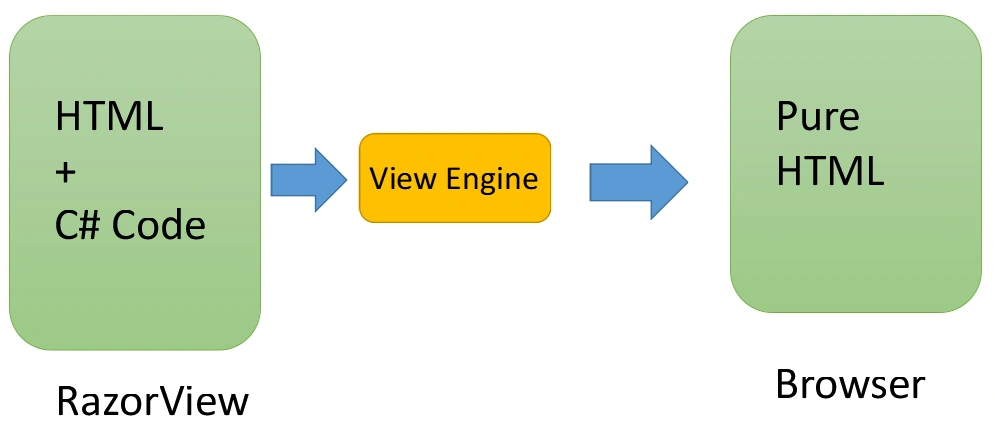
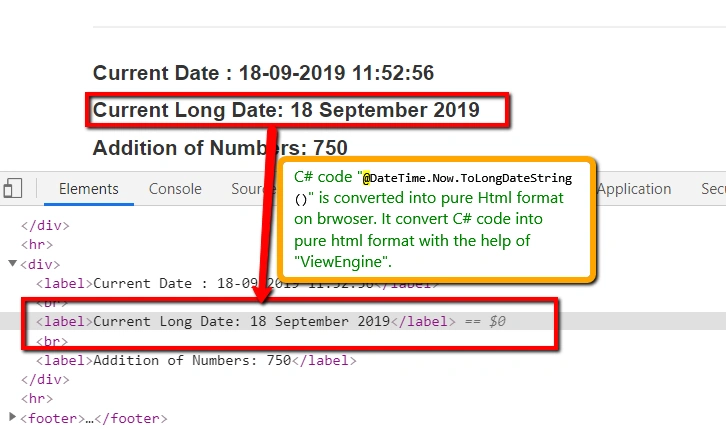
As per the above diagram, you can see that a view can contain C# and HTML code. Once the view renders on the browser, the C# code written on the view is converted into pure HTML format. To convert C# code into pure HTML is the job of ViewEngine. You can cross verify by inspecting the browser and verifying the C# data on the inspected browser; you can not find the C# code on the browser.
Why is View Engine required in ASP.NET MVC 5?
- View engine is responsible for creating HTML for View
- It converts html+Programming language to pure HTML
- It is used to find the corresponding view for the action method.
- It is used to find a View from the shared folder.
- We used to write C#/VB code on View
- View Engine is required to implement the strongly-typed View.
What is Razor Engine In MVC 5?
- Razor Engine is an advanced view engine.
- This is not a new language but it is a new markup syntax.
- The namespace for Razor Engine is System.Web.Razor.
- View file extension is .cshtml or .vbhtml (partial and layout view) based on language.
- Razor syntax is easy to learn and much cleaner than Web Form syntax.
- Razor Engine prevents XSS attacks(Cross-Site Scripting Attacks)
- Razor Engine does not support design mode in VS means you can not see your view page look and feel.
- Razor Engine supports TDD. It does not depend on System.Web.UI.Page class.
What is Razor Syntax in MVC 5?
Two types of Razor syntax,
- Single statement block: It starts with @.
- Multi statement block: It starts with @{..............}
It must be always enclosed in @{ ... }
The semicolon “;” must be used to end statements
Inline expressions (variables and functions) start with @
Example of Single block
A single statement block is used when a single line of code needs to write on View.
Example
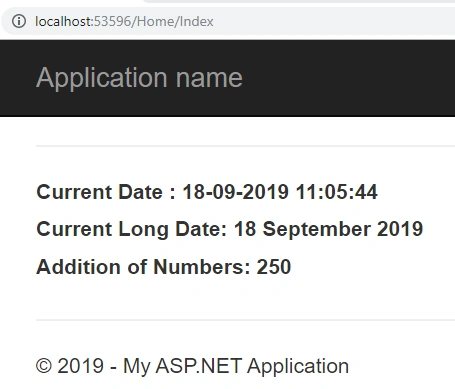
To display current DateTime.
Create Index.cshtml View and add following code. If you new with creating an application in ASP.NET MVC 5 then go with following links.
- @{
- ViewBag.Title = "Index";
- }
- <hr />
- <div>
- <label>Current Date : @DateTime.Now.ToString()</label><br />
- <label>Current Long Date: @DateTime.Now.ToLongDateString()</label><br />
- <label>Addition of Numbers: @(250 + 250)</label>
- </div>
Output
DeepanPosted Sep 30, 2019, 12:38 AM
Good article
Pankajkumar PatelPosted Sep 27, 2019, 12:21 AM
Nice article
Mahesh ChandPosted Sep 24, 2019, 4:37 AM
Good one, shrimant. Thank you.
Sourav Kumar DasPosted Sep 23, 2019, 11:25 PM
Superb Article Sir.