

This article explains RDLC reports in MVC razor or .aspx.
Step 1: Create new folder as Report or other.
Step 2: If you have used a .cshtml page (Razor) then you also need to add a .Aspx page inside the folder (Report) as in above.
Step 3: .cshtml is where you need to show the report; add the following code:
- <div id="autoUpdate" style="display: none; overflow-y: auto" class="SlideContainer">
- <table width="100%" height="100%">
- <tr>
- <td>
- <table>
- <tr>
- <td></td>
- <td></td>
- </tr>
- </table>
- </td>
- </tr>
- <tr><td><iframe id="myReport" width="100%" height="800px"></iframe></td></tr>
- </table>
- </div>
And add a JavaScript code to the page:
- $(window).load(function () {
- document.getElementById("myReport").src = "../../Report/CommonrdlcReport.aspx?ReportID=" + firstDropVal + "";
- $("#autoUpdate").show();
- });
In the JavaScript code above a parameter; if you don't want t then just remove this: + firstDropVal + ""; and a name ie.DEMO in the query string.
Step 4: Now add a DataSet from Add New item from Visual Studio and add it under the Report folder or root folder.
Step 5: Now create a procedure in SQL and in the Dataset UI right-click and select "Add TableAdopter" and use an existing procedure so you can access it in the RDLC further.
Step 6: Now create a RDLC folder in the root and add Report.rdlc from both. You can select whichever you want. Then to open the RDLC go to Dataset, add Datasets and select the Data source. If you are doing this the first time then click on "New" and access the procedure or table that you created. Then from the Available datasets select a record and click "OK".
Step 7: If you want to show a report then do that like this:
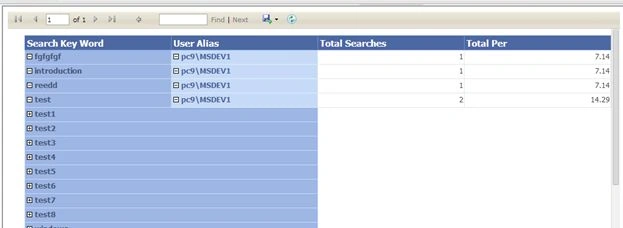
Add a table to the RDLC and create a parent group and right-click on the parent group field then insert a column add inside the group right-click and add another column field then right-click on the second field then select TextBox properties then select Visibility then select Hide and below select the Parent group field so you can see like above.
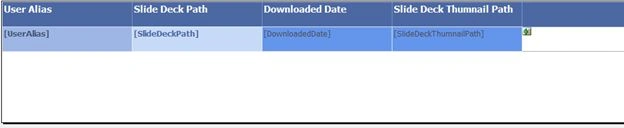
Step 8: Now go to the Report folder and select the .aspx page then go to the code behind or just double click. Now for the Page Load write the following code:
Guest UserPosted Mar 12, 2020, 5:17 AM
Hi Dinkar if you want to create a form that need an insert like this link https://www.jotform.com/form/200354107619550. How do you do it on RDLC ?
tyrone deePosted May 7, 2016, 12:14 PM
hi, please provide source code