This article shows how to read a Word file.
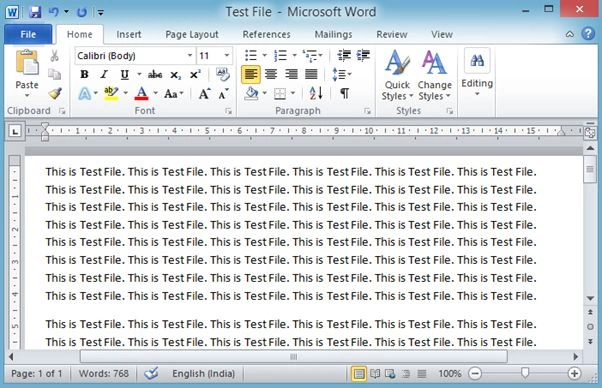
The following is my Word file, the contents of which I am showing in a text box.
Image 1.
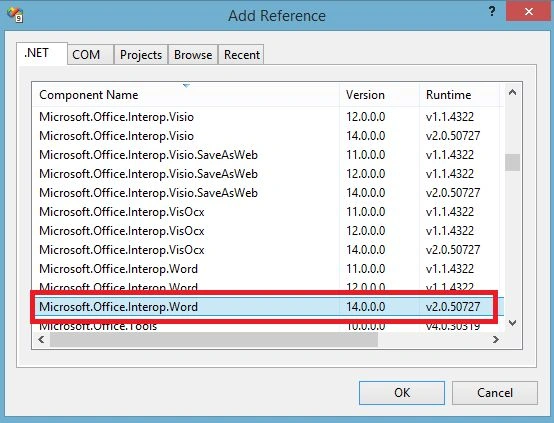
For this, I am using a Microsoft.Office.Interop.Word reference.
Image 2.
Now my aspx code:
- <%@ Page Language="C#" AutoEventWireup="true" CodeFile="Default.aspx.cs" Inherits="_Default" %>
-
- <!DOCTYPE html PUBLIC "-//W3C//DTD XHTML 1.0 Transitional//EN" "http://www.w3.org/TR/xhtml1/DTD/xhtml1-transitional.dtd">
- <html xmlns="http://www.w3.org/1999/xhtml">
- <head runat="server">
- <title>Read Word File</title>
- </head>
- <body>
- <form id="form1" runat="server">
- <div style="height: 700px;">
- <table cellpadding="10" cellspacing="10" width="85%" align="center" style="background: SkyBlue;">
- <tr>
- <td>
- Select Word File To Read #
- <asp:FileUpload ID="WordFileToRead" runat="server" Width="500px" />
- <asp:Button ID="btnUpload" runat="server" Text="Read File" OnClick="btnUpload_Click" />
- </td>
- </tr>
- <tr>
- <td>
- <asp:TextBox ID="WordFileText" runat="server" Height="400px" Width="100%" TextMode="MultiLine"></asp:TextBox>
- </td>
- </tr>
- </table>
- </div>
- </form>
- </body>
- </html>
My aspx.cs code:
- using System;
- using System.Collections.Generic;
- using System.Linq;
- using System.Web;
- using System.Web.UI;
- using System.Web.UI.WebControls;
- using System.IO;
- using Microsoft.Office;
-
- public partial class _Default : System.Web.UI.Page
- {
- protected void Page_Load(object sender, EventArgs e)
- {
-
- }
-
- protected void btnUpload_Click(object sender, EventArgs e)
- {
-
- WordFileToRead.SaveAs(Server.MapPath(WordFileToRead.FileName));
- object filename = Server.MapPath(WordFileToRead.FileName);
- Microsoft.Office.Interop.Word.ApplicationClass AC = new Microsoft.Office.Interop.Word.ApplicationClass();
- Microsoft.Office.Interop.Word.Document doc = new Microsoft.Office.Interop.Word.Document();
- object readOnly = false;
- object isVisible = true;
- object missing = System.Reflection.Missing.Value;
- try
- {
- doc = AC.Documents.Open(ref filename, ref missing, ref readOnly, ref missing, ref missing, ref missing, ref missing, ref missing, ref missing, ref missing, ref missing, ref isVisible, ref isVisible, ref missing, ref missing, ref missing);
- WordFileText.Text = doc.Content.Text;
- }
- catch (Exception ex)
- {
-
- }
-
- }
- }
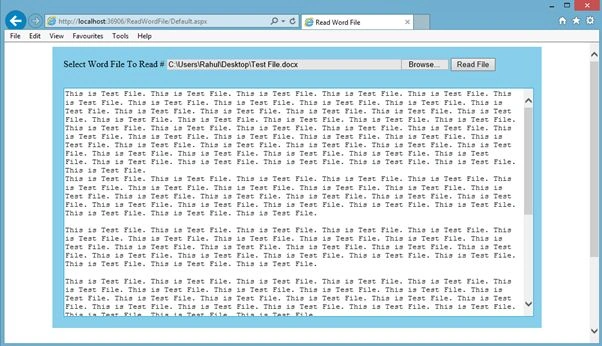
Now run the application and select your file to read:
Image 3.


Nagoor MeeranPosted Sep 26, 2018, 4:01 AM
Its showing error in application class what i have to do for this?
DeepanPosted Sep 13, 2018, 2:08 AM
Simple and great one
Rahul Kumar SaxenaPosted Oct 24, 2014, 1:37 AM
it depends sir... sometime due to security reason server don't have MS Office..... so in case of to perform operation with word/excel... etc (MS Office packages).... we need to use interop/ infragistics dll..... :)
Saineshwar BageriPosted Oct 24, 2014, 12:53 AM
nice one sir
Mahesh ChandPosted Oct 24, 2014, 12:35 AM
Great Rahul. I think once the ASP.NET Website is deployed on Web Server, server must have Office installed. Is this correct?