

The following is my Excel file:
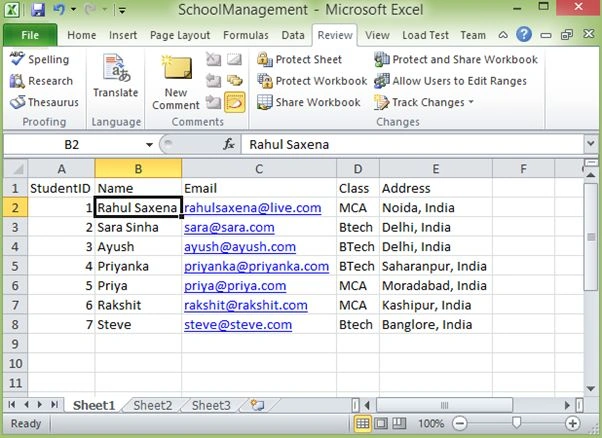
Image 1
It may be that user has already opened this Excel file during read/write operations, so to avoid the file is already in use problem do some of the following settings.
Go to Review then select Share WorkBook.
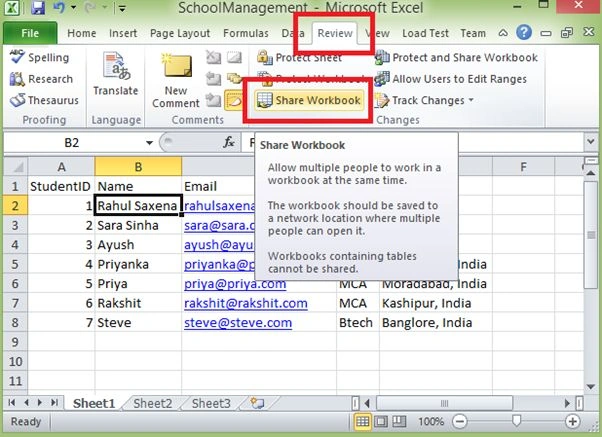
Image 2
Here the current user/window user should be added.
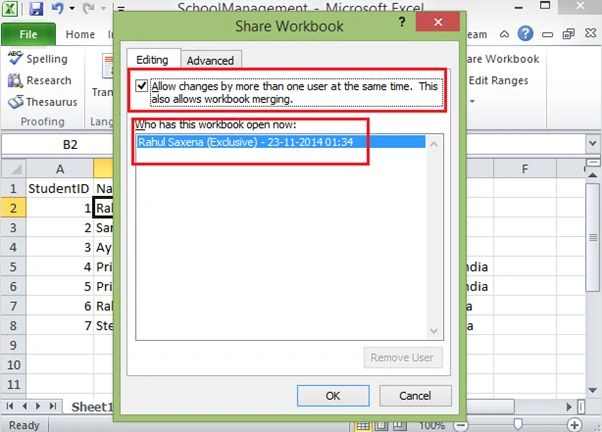
Image 3
Now close this Excel file.
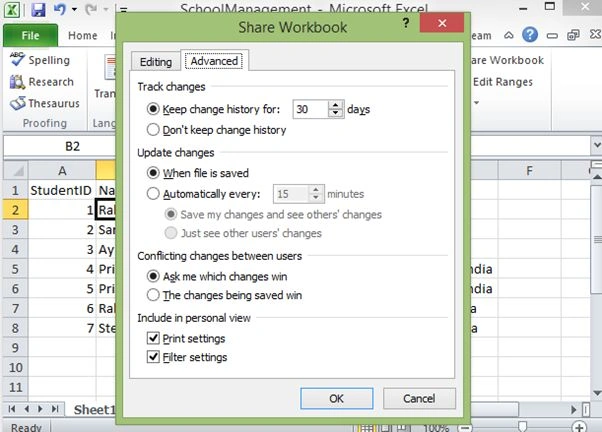
Image 4
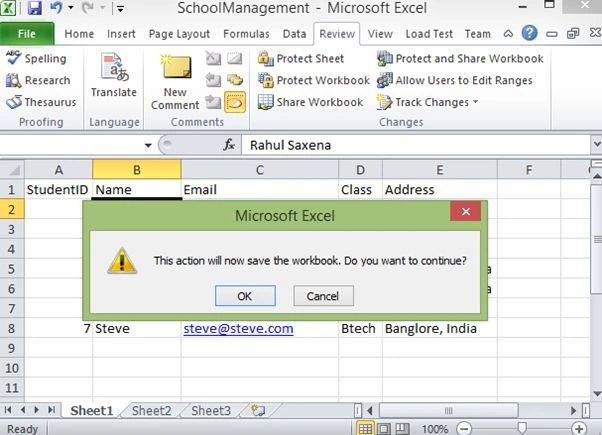
Image 5
To do the Create, Read and Update operations in a WPF .NET application, we need to use an OLEDB connection. So the Office System Driver for Data Connectivity must be installed in your machine.
Download the driver from the following location.
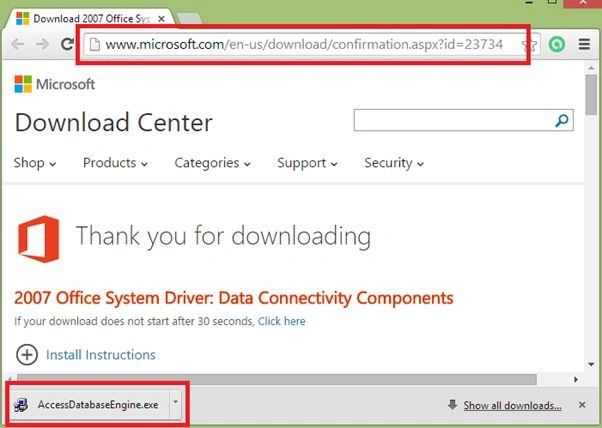
Image 6
If you try to use the OleDb provider "Microsoft.ACE.OLEDB.12.0" without installing this driver, the application will throw the following exception.
“The microsoft.ace.oledb.12.0' provider is not registered on the local machine”.
After installing this driver now create a new WPF application.
Open Visual Studio -> New Project.
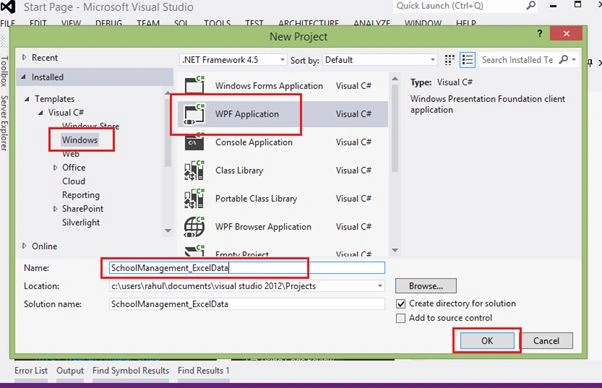
Image 7
Now add a new class to your WPF application.
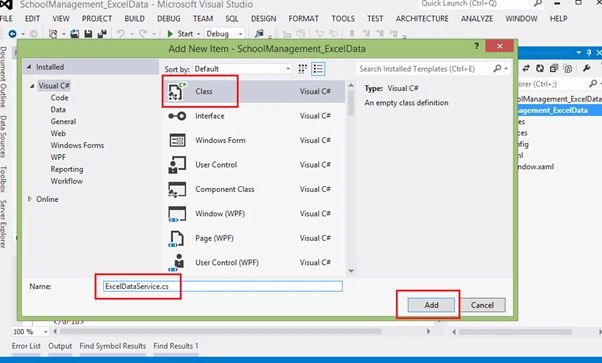
Image 8
The following shows my code in my ExcelDataService.cs. Here in this class I am also using a class Student.
- using System;
- using System.Collections.Generic;
- using System.Collections.ObjectModel;
- using System.Data.OleDb;
- using System.Linq;
- using System.Text;
- using System.Threading.Tasks;
- namespace SchoolManagement_ExcelData
- {
- public class Student
- {
- public int StudentID { get; set; }
- public string Name { get; set; }
- public string Email { get; set; }
- public string Class { get; set; }
- public string Address { get; set; }
- }
- public class ExcelDataService
- {
- OleDbConnection Conn;
- OleDbCommand Cmd;
- public ExcelDataService()
- {
- string ExcelFilePath = @"H:\\SchoolManagement.xlsx";
- string excelConnectionString = @"Provider=Microsoft.ACE.OLEDB.12.0;Data Source=" + ExcelFilePath + ";Extended Properties=Excel 12.0;Persist Security Info=True";
- Conn = new OleDbConnection(excelConnectionString);
- }
- /// <summary>
- /// Method to Get All the Records from Excel
- /// </summary>
- /// <returns></returns>
- public async Task<ObservableCollection<Student>> ReadRecordFromEXCELAsync()
- {
- ObservableCollection<Student> Students = new ObservableCollection<Student>();
- await Conn.OpenAsync();
- Cmd = new OleDbCommand();
- Cmd.Connection = Conn;
- Cmd.CommandText = "Select * from [Sheet1$]";
- var Reader = await Cmd.ExecuteReaderAsync();
- while (Reader.Read())
- {
- Students.Add(new Student()
- {
- StudentID = Convert.ToInt32(Reader["StudentID"]),
- Name = Reader["Name"].ToString(),
- Email = Reader["Email"].ToString(),
- Class = Reader["Class"].ToString(),
- Address = Reader["Address"].ToString()
- });
- }
- Reader.Close();
- Conn.Close();
- return Students;
- }
- /// <summary>
- /// Method to Insert Record in the Excel
- /// S1. If the EmpNo =0, then the Operation is Skipped.
- /// S2. If the Student is already exist, then it is taken for Update
- /// </summary>
- /// <param name="Emp"></param>
- public async Task<bool> ManageExcelRecordsAsync(Student stud)
- {
- bool IsSave = false;
- if (stud.StudentID != 0)
- {
- await Conn.OpenAsync();
- Cmd = new OleDbCommand();
- Cmd.Connection = Conn;
- Cmd.Parameters.AddWithValue("@StudentID", stud.StudentID);
- Cmd.Parameters.AddWithValue("@Name", stud.Name);
- Cmd.Parameters.AddWithValue("@Email", stud.Email);
- Cmd.Parameters.AddWithValue("@Class", stud.Class);
- Cmd.Parameters.AddWithValue("@Address", stud.Address);
- if (!IsStudentRecordExistAsync(stud).Result)
- {
- Cmd.CommandText = "Insert into [Sheet1$] values (@StudentID,@Name,@Email,@Class,@Address)";
- }
- else
- {
- Cmd.CommandText = "Update [Sheet1$] set StudentID=@StudentID,Name=@Name,Email=@Email,Class=@Class,Address=@Address where StudentID=@StudentID";
- }
- int result = await Cmd.ExecuteNonQueryAsync();
- if (result > 0)
- {
- IsSave = true;
- }
- Conn.Close();
- }
- return IsSave;
- }
- /// <summary>
- /// The method to check if the record is already available
- /// in the workgroup
- /// </summary>
- /// <param name="emp"></param>
- /// <returns></returns>
- private async Task<bool> IsStudentRecordExistAsync(Student stud)
- {
- bool IsRecordExist = false;
- Cmd.CommandText = "Select * from [Sheet1$] where StudentId=@StudentID";
- var Reader = await Cmd.ExecuteReaderAsync();
- if (Reader.HasRows)
- {
- IsRecordExist = true;
- }
- Reader.Close();
- return IsRecordExist;
- }
- }
- }
- <Window x:Class="SchoolManagement_ExcelData.MainWindow"
- xmlns="http://schemas.microsoft.com/winfx/2006/xaml/presentation"
- xmlns:x="http://schemas.microsoft.com/winfx/2006/xaml"
- Title="Manage Excel Data" Height="350" Width="575"
- Loaded="Window_Loaded" Background="SkyBlue">
- <Grid>
- <Grid.RowDefinitions>
- <RowDefinition Height="40*"/>
- <RowDefinition Height="202*"/>
- </Grid.RowDefinitions>
- <Button Content="Refresh Record"
- Name="btnRefreshRecord" Grid.Row="0"
- FontSize="16" Click="btnRefreshRecord_Click" Margin="342,1,26,5"/>
- <DataGrid Name="dataGridStudent" AutoGenerateColumns="False" ColumnWidth="*" RowBackground="WhiteSmoke"
- CellEditEnding="dataGridStudent_CellEditEnding" RowEditEnding="dataGridStudent_RowEditEnding"
- SelectionChanged="dataGridStudent_SelectionChanged" Grid.Row="2" Background="LightBlue">
- <DataGrid.Columns>
- <DataGridTextColumn Header="Student ID" Binding="{Binding StudentID}" Width="70"></DataGridTextColumn>
- <DataGridTextColumn Header="Name" Binding="{Binding Name}"></DataGridTextColumn>
- <DataGridTextColumn Header="Email" Binding="{Binding Email}" Width="140"></DataGridTextColumn>
- <DataGridTextColumn Header="Class" Binding="{Binding Class}" Width="80"></DataGridTextColumn>
- <DataGridTextColumn Header="Address" Binding="{Binding Address}" Width="170"></DataGridTextColumn>
- </DataGrid.Columns>
- </DataGrid>
- <Label HorizontalAlignment="Left" Margin="20,10,0,0" Grid.Row="0" VerticalAlignment="Top" FontWeight="Bold" FontSize="16" Foreg round="Green" Content="Showing All Student Information"/>
- </Grid>
- </Window>
- using System;
- using System.Collections.Generic;
- using System.Linq;
- using System.Text;
- using System.Threading.Tasks;
- using System.Windows;
- using System.Windows.Controls;
- using System.Windows.Data;
- using System.Windows.Documents;
- using System.Windows.Input;
- using System.Windows.Media;
- using System.Windows.Media.Imaging;
- using System.Windows.Navigation;
- using System.Windows.Shapes;
- namespace SchoolManagement_ExcelData
- {
- /// <summary>
- /// Interaction logic for MainWindow.xaml
- /// </summary>
- public partial class MainWindow : Window
- {
- ExcelDataService _objExcelSer;
- Student _stud = new Student();
- public MainWindow()
- {
- InitializeComponent();
- }
- /// <summary>
- /// Getting Data From Excel Sheet
- /// </summary>
- /// <param name="sender"></param>
- /// <param name="e"></param>
- private void Window_Loaded(object sender, RoutedEventArgs e)
- {
- GetStudentData();
- }
- private void GetStudentData()
- {
- _objExcelSer = new ExcelDataService();
- try
- {
- dataGridStudent.ItemsSource = _objExcelSer.ReadRecordFromEXCELAsync().Result;
- }
- catch (Exception ex)
- {
- MessageBox.Show(ex.Message);
- }
- }
- private void btnRefreshRecord_Click(object sender, RoutedEventArgs e)
- {
- GetStudentData();
- }
- /// <summary>
- /// Getting Data of each cell
- /// </summary>
- /// <param name="sender"></param>
- /// <param name="e"></param>
- private void dataGridStudent_CellEditEnding(object sender, DataGridCellEditEndingEventArgs e)
- {
- try
- {
- FrameworkElement stud_ID = dataGridStudent.Columns[0].GetCellContent(e.Row);
- if (stud_ID.GetType() == typeof(TextBox))
- {
- _stud.StudentID = Convert.ToInt32(((TextBox)stud_ID).Text);
- }
- FrameworkElement stud_Name = dataGridStudent.Columns[1].GetCellContent(e.Row);
- if (stud_Name.GetType() == typeof(TextBox))
- {
- _stud.Name = ((TextBox)stud_Name).Text;
- }
- FrameworkElement stud_Email = dataGridStudent.Columns[2].GetCellContent(e.Row);
- if (stud_Email.GetType() == typeof(TextBox))
- {
- _stud.Email = ((TextBox)stud_Email).Text;
- }
- FrameworkElement stud_Class = dataGridStudent.Columns[3].GetCellContent(e.Row);
- if (stud_Class.GetType() == typeof(TextBox))
- {
- _stud.Class = ((TextBox)stud_Class).Text;
- }
- FrameworkElement stud_Address = dataGridStudent.Columns[4].GetCellContent(e.Row);
- if (stud_Address.GetType() == typeof(TextBox))
- {
- _stud.Address = ((TextBox)stud_Address).Text;
- }
- }
- catch (Exception ex)
- {
- MessageBox.Show(ex.Message);
- }
- }
- /// <summary>
- /// Get entire Row
- /// </summary>
- /// <param name="sender"></param>
- /// <param name="e"></param>
- private void dataGridStudent_RowEditEnding(object sender, DataGridRowEditEndingEventArgs e)
- {
- try
- {
- bool IsSave = _objExcelSer.ManageExcelRecordsAsync(_stud).Result;
- if (IsSave)
- {
- MessageBox.Show("Student Record Saved Successfully.");
- }
- else
- {
- MessageBox.Show("Some Problem Occured.");
- }
- }
- catch (Exception ex)
- {
- MessageBox.Show(ex.Message);
- }
- }
- /// <summary>
- /// Get Record info to update
- /// </summary>
- /// <param name="sender"></param>
- /// <param name="e"></param>
- private void dataGridStudent_SelectionChanged(object sender, SelectionChangedEventArgs e)
- {
- _stud = dataGridStudent.SelectedItem as Student;
- }
- }
- }
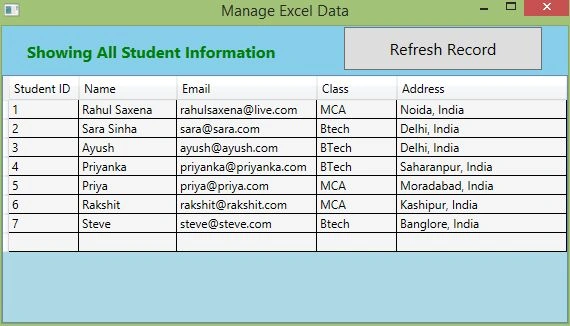
Image 9
Now add a new Row.
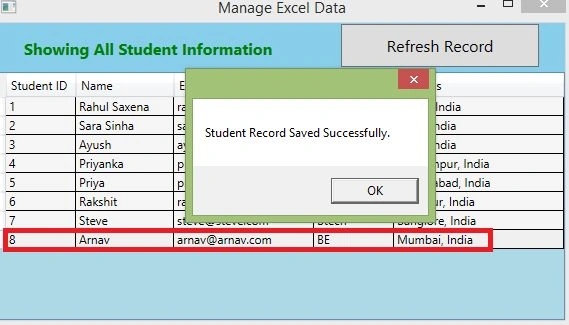
Image 10
Now check the Excel the file.
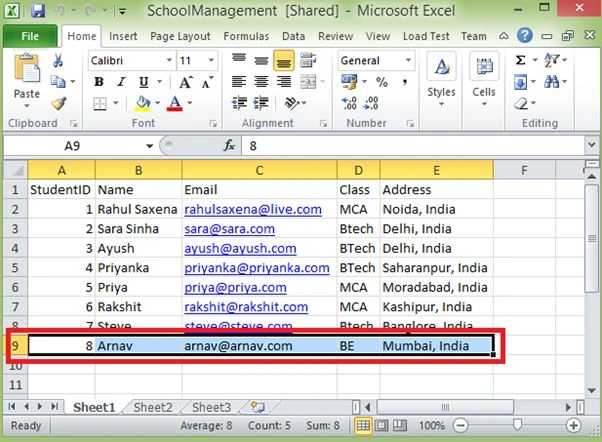
Image 11
Now edit any record.
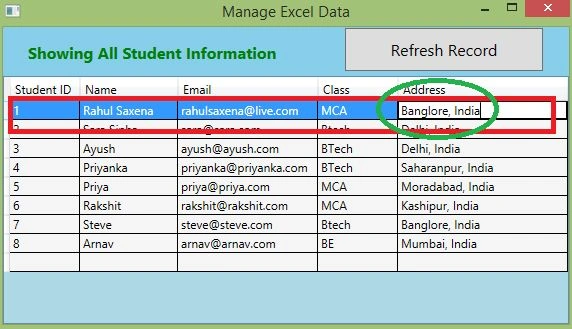
Image 12
Now check the Excel file.
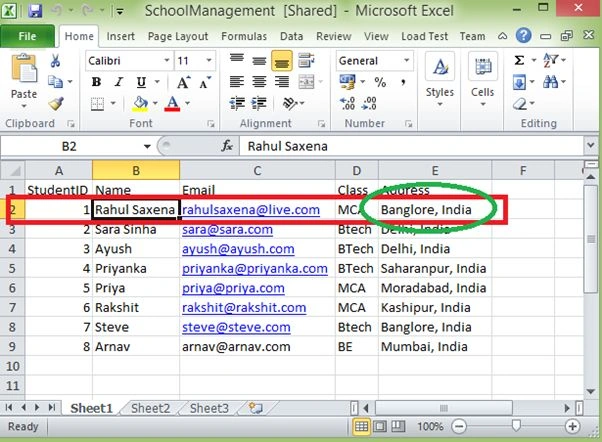
Image 13
Now see what event is firing on what action in my application:
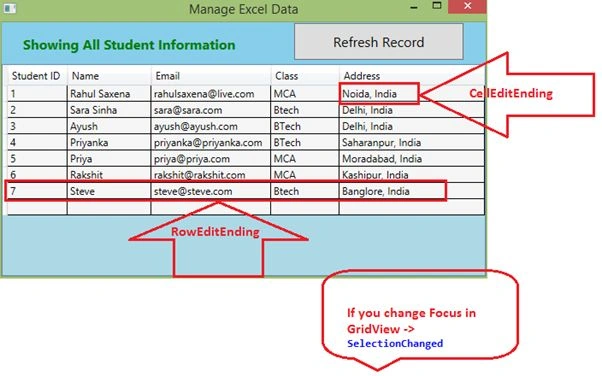
Image 14
I saved my Excel file inside the Application folder. To run the application with my Excel sheet you can save it your system and change the Excel File Path in ExcelDataService.cs.
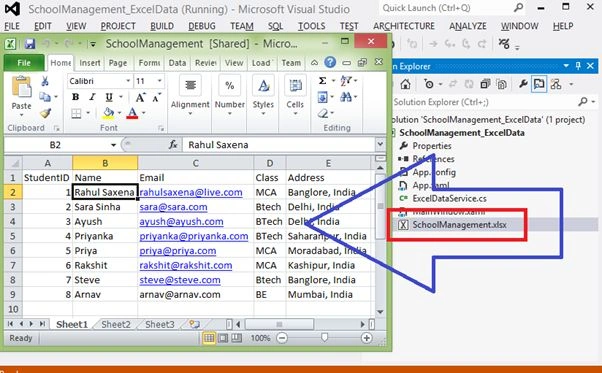
Image 15
Dirk BourgeoisPosted May 6, 2019, 2:16 PM
Does anyone know why the Async Call fails with an IndexOutOfRange ? ExcelDataView.ItemsSource = ExcelDataService.GetReplacementsAsync().Result;, the Async does not get to Reader.Close();, and just returns at the first iteration of the wile Reader.Read
Richard LovePosted Jul 5, 2018, 2:44 AM
What a great tutorial. Thank you for this. It really helped me learn more about WPF. I'm very new to C# and the .NET system.
Dario RodriguezPosted Jul 11, 2017, 4:22 PM
When i run the code just like you show us i got the Show Message in private void GetStudentData(), because await Conn.OpenAsync(); in the class ExcelDataService jump to the Exception, why is this happening?
Vinu P TomyPosted Dec 12, 2014, 3:01 AM
good example and work.