

If you are new to database programming and ADO.NET, you may want to look at the ADO.NET section of C# Corner. Plenty of source code samples and tutorials are available for free. You might want to check out my book for ADO.NET beginners: A Programmer's Guide to ADO.NET in C# (published by APress).
First we need to create a database. We start by creating a new Access database called AppliedAdoNet.mdb and adding a table to the database called "Users." The database table schema should look like Figure 15.7 Microsoft Access stores binary large objects (BLOBs) using the OLE object data type.
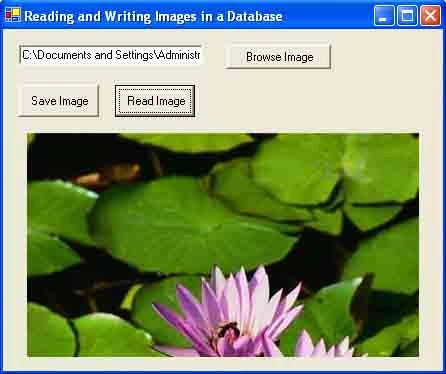
To make our application a little more interactive and user-friendly, let's create a Windows application and add a text box, three button controls, and a PictureBox control. The final form looks like Figure 15.8. As you can probably guess, the Browse Image button allows users to browse for bitmap files; the Save Image button saves the image to the database; and the Read Image button reads the first row of the database table, saves binary data as a bitmap, and displays the image in the picture box.
Before we write code on button clicks, we need to define the following variables:
//User-defined variable
private Image curImage = null;
private string curFileName = null;
private string connectionString =
"Provider=Microsoft.Jet.OLEDB.4.0; "+
"Data Source =F:\\AppliedAdoNet.mdb";
private string savedImageName =
"F:\\ImageFromDb.BMP";
Do not forget to add references to the System.IO and System.Data.OleDb namespaces:
using System.IO;
using System.Data.OleDb;
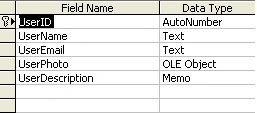
Figure 15.7: Users table schema
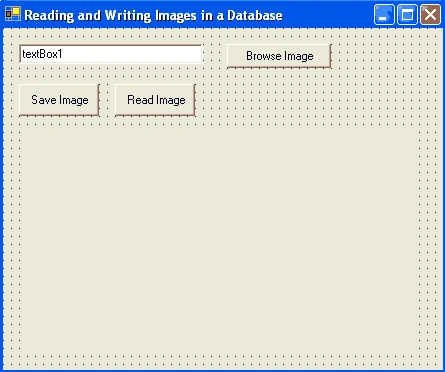
Figure 15.8: Reading and writing images in a database form
The stream-related classes are defined in the System.IO namespace. We will use the OLE DB data provider, which is defined in the System.Data.OleDb namespace, to work with our Access database.
The Browse Image button click code is given in Listing 15.9, which simply browses bitmap files and saves the file name in CurFileName. We can set filter to access the file formats we want.
Listing 15.9: the Browse button click event handler
private void BrowseBtn_Click (object sender, system.EventArgs e)
{
OpenFileDialog openDlg = new OpenFileDialog();
openDlg.Filter = "All Bitmap files | *.bmp";
string filter = openDlg.Filter;
openDlg.Title ="Open a Bitmap File";
if (openDlg.ShowDialog() == DialogResult.OK)
{
curFileName = openDlg.FileName;
textBox1.Text = curFileName;
}
}
The Save Image button code given in Listing 15.10 creates a FileStream object from the bitmap file, opens a connection with the database, adds a new data row, set its values, and saves the row back to the database.
Listing 15.10: The Save Image button click event handler
private void SaveImageBtn_Click (object sender, System.EventArgs e)
{
//Read a bitmap's contents in a stream
FileStream fs = new FileStream (curFileName,
FileMode.OpenOrCreate, FileAccess.Read);
byte[] rawData = new byte [fs.Length];
fs.Read (rawData, 0, System.Convert.ToInt32 (fs.Length));
fs.Close();
//Construct a SQL string and a connection object
string sql = "SELECT * FROM Users";
OleDbConnection conn = new OleDbConnection();
conn.ConnectionString = connectionString;
//Open the connection
if (conn.State != ConnvetionState.Open)
conn.Open();
//Create a data adapter and data set
OleDbDataAdapter adapter =
new PleDbDataAdapter (sql, conn);
OleDbCommandBuilder cmdBuilder =
new OleDbCommandBuilder (adapter);
DataSet ds = new DataSet ("Users");
adapter.MissingSchemaAction =
MissingSchemaAction.AddWithKey;
//Fill the data adapter
adapter.Fill (ds, "Users");
string userDes =
Addy yaddlyPosted Sep 12, 2012, 3:45 PM
To Resize the Image simply add the following line of code to your Constructor pictureBox.SizeMode = PictureBoxSizeMode.Zoom; then you done. Thanx for reading thru
azhar shaikeditedPosted Sep 6, 2012, 6:34 AMEdited Sep 6, 2012, 6:35 AM
good
Sunil SharmaPosted Aug 17, 2012, 11:05 AM
getting the error when viewing the image in Picture Box---A generic error occurred in GDI+. In line -- curImage = Image.FromFile(savedImageName);
Mustafa IqbalPosted Jun 21, 2012, 2:52 AM
Thanks Dear, and, If it is easy, please add the coding of setting image size on Reading image time,
Mustafa IqbalPosted Jun 21, 2012, 2:52 AM
Thanks Dear, and, If it is easy, please add the coding of setting image size on Reading image time,
hilda rPosted Feb 13, 2011, 6:40 AM
thank you for your code,but it can be usefull,if you write or create a database with sql server 2008. Thanks again
Vicky KanojiyaPosted Sep 9, 2010, 10:18 AM
thanks a lot mr. dinesh